
Your Browsing History


Steve W.
Joined on 01/28/03
0
0
product reviews
- 13
A take-anywhere Chrome OS computer
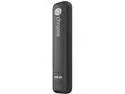
ASUS Chromebit B013C - RockChip 3288-C - 2 GB RAM - 16 GB Flash - Quad-Core ARM Mali-T764 - Chrome OS - Mini Stick PC
Pros: -A very inexpensive way to have a Chrome OS computer -Very small, easy-to-setup and hide behind a monitor -Very low power consumption; can be simply left on all the time -Good compatibility with reasonably-new peripherals -No DRM issues watching web-based streaming videos
Cons: -If not using a Bluetooth keyboard and mouse, then you'll need to plug a USB wireless keyboard/mouse dongle into the one and only USB port on the stick, and/or use an external USB hub to use any other peripherals -Noticeably slower, compared to Chrome OS products with more expensive processors (you get what you pay for) -Some users may miss a built-in MicroSD card slot for local storage expansion, but Chrome OS is meant to be used with cloud-based storage
Overall Review: This is my fourth Chrome OS device, including two Intel Core i3 Chromeboxes and a Core 15 Chromebook. I'm phasing out most of my home's Windows PCs, since the Chrome OS products are so much easier to maintain. I assume the reader understands the use case for Chrome OS, and isn't comparing it to a full-function Windows or Mac operating system. Web browsing and typical online tasks work fine, although there is some lag, caused by the inexpensive, Chinese-designed Rockchip SOC, compared to a substantially more expensive Intel chip. It's plenty fast enough, though, to display web-based streaming video in 1080 HD resolution. I consider this fast enough to use for casual web browsing, email, basic document or file work with Google Docs, and as a PC used with a family-room TV and wireless keyboard. Addressing some other reviewer's complaints: Bluetooth works fine. Some old keyboards may not pair successfully. HDMI/HDCP works fine now, after recent Chrome OS updates -- audio passes through HDMI as it should, as long as the connected devices support it. I recommend this as a great way to add computer capability to a spare monitor or TV, or as a small, easy-to-transport computer for travel (for giving presentations, or watching content on a hotel room TV, for example). It's also a great backup computer for travelers, if a laptop breaks, gets stolen, etc, as long as you bring, or can borrow, a wireless keyboard and mouse or trackpad.
2/19/2016See more detail
No Pi for you
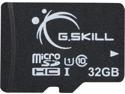
G.Skill 32GB microSDHC UHS-I/U1 Class 10 Memory Card with Adapter (FF-TSDG32GA-C10)
Pros: None.
Cons: To the G.Skill rep who keeps replying to these reviews, claiming that the cards should work, there are now dozens of users reporting that this product is failing when used with the Raspberry Pi 2 computers...not just me. I tried repeatedly to properly re-format and install the NOOBs and other distributions, and they all die with data corruption.
Overall Review: Buy some other brand; these are duds.
11/5/2015See more detail
Plenty of cooking power, and easy to clean
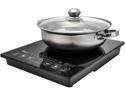
Rosewill 1800W Portal Induction Cooktop Burner | Large Digital Screen Display | 1800 Watt | 5 Pre-Programmed Cooktop Settings | Stainless Steel Pot Included | 10" 3.5 QT - RHAI-15001
Pros: --So far (after a week's use), the cooker works reliably well, which should be a given, but other brands or models of induction cookers have had significant reliability issues. --The hard ceramic surface is very easy to clean, and it doesn't scratch, even with a cast iron frying pan on it. Cleanup of greasy spatters is simple, using a blue Scotchbrite sponge and detergent. --The touch-panel controls add to long-term reliability and ease of cleaning, by eliminating any crevices or mechanical switches that would allow food residue to penetrate and damage the controls. --Precision control and fast response make it ideal for searing meats or other foods, then quickly reducing the temperature.
Cons: --As most others have mentioned, the included pot is flimsy, but, for the price of the cooker, I didn't expect a high-end pot. I actually left it in the box and used my own cookware.
Overall Review: --I wouldn't rely on the temperature settings, since the true temperature may depend on the type of cookware being used. For example using it with a Lodge cast iron skillet, the skillet gets incredibly hot, very fast, due to the pure iron content reacting so strongly to induction. A low-mass, steel alloy pot would be less efficient at the same setting. --It's critical to carefully watch the food cook, and immediately turn down the power if it starts to smoke or overheat; again, this is a very powerful induction coil, and it can heat the cooking utensil to smoking, burning temperature in seconds. --I already have a perfectly good gas cooktop, but I bought this as something I can also use to keep hot foods hot at the table, for parties, or outdoors for a BBQ. For the great price on sale, it's a no-brainer purchase.
7/3/2016See more detail
The best Chromebox available in 2015
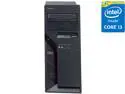
Lenovo ThinkCentre 10H30000US Chromebox - Intel Core i3 i3-5005U 2 GHz - Tiny - Business Black
Pros: This is the only Chromebox I've found so far, with a 5th-generation Intel Core i3 (Broadwell) processor, and it is considerably faster than previously-available Chromeboxes, with a Google Octane score of around 20,200. It's built like a tank, out of the same type of thick sheet steel as found in typical desktop tower cases. The case design is shared with Lenovo's "1L Tiny" form-factor Windows PCs, designed for commercial/office use. The case is easily opened by removing one screw. It comes with a decent Chrome OS membrane keyboard with 10-key numeric keypad, and with a basic scroll-wheel mouse. Both are USB hard-wired, not wireless. The full keyboard with numeric keypad is a rarity, and a welcome inclusion. The system board is populated with one 4GB SO-DIMM, and it has one free SO-DIMM slot, although 4GB is plenty for Chrome OS. The 16GB LiteON SSD is plugged into a M.2 slot and could be easily upgraded or replaced if desired. It includes WiFi and Bluetooth, thanks to another slot populated with an Intel combo card. There's one external WiFi antenna on the rear, and an internal antenna on the front, behind a thin, smoked plastic cover. WiFi performance is excellent. The chassis does have a fan, but it's probably unnecessary, due to the power-efficient Core i3 SOC and large heat sink. The fan barely runs, and can't be heard over typical office ambient noise.
Cons: There is a punch-out in the chassis rear for a SD-Card reader, but no reader is installed. This is likely a security precaution for its intended commercial customers. It would have been nice if the keyboard and mouse were wireless. It's larger than necessary for a Chromebox, due to sharing the same 1L (one liter volume) case with Lenovo's Windows products, designed as a family for commercial/educational use.
Overall Review: This review assumes that readers understand the benefits and intended use of Chrome OS devices. Since all Chromebooks and Chromeboxes run the same OS, with the same features, the only differences are in performance and build quality. In both measures, this product is outstanding. For home use, last year's Asus Chromebox i3 model would be cheaper, although slower. The Asus is also smaller and lighter, made mainly out of plastic. For office or kiosk use, this unit can be VESA mounted, or securely bolted to a table or desk, or slipped inside a specially-designed Lenovo monitor, all with anti-theft features. All mounting options are optional extra-cost items. Otherwise, the unit can sit on a desk either flat, with rubber feet, or vertically, with its included stand. Lenovo isn't really marketing this to retail consumers, hence it being hard to find for sale. Interestingly, it was assembled for Lenovo by Wistron in China, a large contract manufacturer.
11/25/2015See more detail
Compact, sturdy enclosure, with one shortcoming
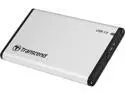
Transcend TS0GSJ25S3 2.5" Silver SATA III 6Gb/s USB 3.1 Gen 1 (backward compatible with USB 2.0) External Enclosure
Pros: The case is nicely-manufactured out of extruded and machined aluminum. Although inserting a drive is a tight fit, one reason is that the case has a built-in thermal transfer pad attached to the inside aluminum surface, to mate with the top of the drive.
Cons: As others have noted, there are no installation instructions -- see my "other thoughts". The hard drive I installed wouldn't run with the included USB 3.0 cable, when plugged into a USB 2.0 port; it needed more power. Transcend should have included a Y-cable, like this one, Newegg SKU N82E16812705029
Overall Review: Re. comments about installation: Simply remove the two screws on the connector end of the case, remove the plastic end-piece, plug the drive into the SATA/power connector, and push it back into the enclosure. It's tight, but safe, as it has rails designed to press against the bottom edge of the drive to prevent shorting against the case body.
10/18/2015See more detail
Works with Chrome OS
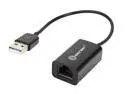
SYBA SY-ADA24027 Network Adapter 10/100Mbps USB 2.0 1 x RJ45
Pros: Compact size. Excellent performance. Works with an Acer Chromebook, "plug-n-play", with zero configuration needed. Mine is barely warm in use; it does not overheat as was reported.
Cons: Very cheap construction. As has been noted, the thin, short USB cable isn't firmly secured to the housing. A slight tug on the cable will pull it right out of the device. It can be shoved back in, but it really should have been better-secured. I'm going to use some silicone glue to keep this from happening again.
Overall Review: I guess this is what should be expected for ten bucks, but I've never seen such a flimsy USB cable before. There is a red LED inside the unit that is barely visible by peeking around the Ethernet jack, when powered up. It would have been nice to have an activity LED like most Ethernet jacks. It comes with a mini-CD containing the Windows drivers. I didn't use the CD, since I used the adapter with a Chromebook, but I suppose this would be useful if somebody needed to have the drivers to connect to the Internet, and therefore couldn't simply download the drivers.
6/14/2015See more detail