
Your Browsing History


Mark S.
Joined on 01/21/03
0
0
product reviews
- 36
Stable for new non-overclocking Skylake build, has Displayport, support for USB 3.1, latest storage tech.
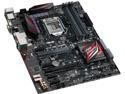
ASUS H170 PRO GAMING LGA 1151 Intel H170 HDMI USB 3.1 ATX Intel Motherboard
Pros: I've had the motherboard working for just a few days but so far it has been flawless. The board seems well built, the backplate is sturdy and everything worked as expected. I updated the BIOS within the BIOS from the most recent image on the ASUS website by pointing to a file on the hard drive and it worked with no quirks. This is a non-overclocking productivity machine so I really wanted stability over everything and so far so good. Paired with an i3-6100, a Sandisk Ultra II SSD and 2x4GB Crucial plain Jane sticks with no heatspreaders. The board has cool LED lighting effects including a red "breathing" mode that will please people with windowed cases and want to show off, but my board is tucked away inside a case so aside from a novelty when I first powered it on with the case cover off, a non-essential feature, really. LED diagnostic lights are a plus. The board also has very good quality audio with a digital output, which is a real bonus if you have decent audio gear to hook it up to. A plethora of ports including Displayport and HDMI and with Skylake, powering multiple 2K or 4K monitors is actually quite doable without a discrete graphics card. Included accessories are a few SATA cables, an M.2 mounting kit, a driver CD and not much else. For the price, this is a very solid board for someone who wants Skylake but has no desire to overclock and wants to be on the newest platform. A lot of future proofing potential with USB3.1, Displayport, M.2 SSD support, support for dual graphics cards, expansion slots and more. Total system performance is outstanding and blows the doors off the system it replaces and every other system I own. Love that I can throw in newer, faster CPUs in the future if need be.
Cons: Motherbard did not come with mounting screws or standoffs, which can be an issue if reusing an old case or going into system with a case that does not include mounting hardware. Intel drivers for this chipset have not had the benefit of time to become very very mature. Drivers included on CD were outdated and an update from Intel's own site fixed a bug that caused graphical corruption on resume from sleep. Only glitch encountered with the platform so far and it has been perfect since the driver update. BIOS on board was dated from July 2015 and updated to a new BIOS released by ASUS in December. It appears they've released numerous BIOS updates since the board's release, compelling me to continue checking for months. Platform is still new so there's bound to be more revisions down the road as with any platform in the first generation.
Overall Review: As long as this board doesn't fail, it's the best LGA 1151 board in terms of price and features on the market. I was able to get this board, 8GB memory, a 240GB SSD and a Core i3-6100 for under $400. If you just want a powerful machine for business or productivity on the latest platform with all the new standards, this is a great choice. Throw in a discrete graphics card and you can game with the best of them too. Keeping my fingers crossed for long-term reliability. UPDATE: Sept. 4, 2016 -- I've had the board for about 8 months and it has been a champ. No issues, constant reliable performance, a steady stream of BIOS updates from ASUS, no issues at all. The board has since been through some upgrades and now boasts an i7-6700 and is fitted with an EVGA GTX1070 SC and 24GB of ram with all four slots populated with Crucial's straightforward heatspreader-free DDR4-2133 in a 2x4 and 2x8 configuration. I am using a powered USB 3.0 hub connected to one USB 3.0 port on the back of the board with my keyboard and other devices plugged into that. I recommend you get a powered USB hub if you plan on using a lot of devices. I'm really fond of the fan controls after letting the QFan controls auto-detect optimal settings in the BIOS. With no software running, the machine is dead silent except while gaming and the fans speed up gracefully and only spin up as much needed. I forsee this board having a very long and happy life as my primary machine. To the reviewer who criticized the BIOS for limited control and installing a 6700K CPU: this is not an overclocking board. H170 does not support overclocking. You erred by not buying a Z170 board. It is not the fault of the BIOS. You should arrange for an exchange.
9/3/2016See more detail
Went out on a limb, got a DOA.

Foxconn 6150BK8MC-KRSH / C51PVM06N2-6KRSH 939 NVIDIA GeForce 6150B(PV) Micro ATX AMD Motherboard
Pros: Cheap. Small form factor. Seems to be laid out well.
Cons: DOA. The PCB looked like it never had a cleaning bath after assembly or the wash was filty or something because the board was covered with a slight milky haze. Unit powered up for about 10 minutes before dying.
Overall Review: When the board croaked, I originally thought the power switch to my case or the PSU was faulty. Swapping hardware in and out proved that not to be the case. Board refused to power on and just made a "ticking" noise with one of the green leds above the LAN port blinking in rhythm. RMA'd for a replacement. Hoping that the next one works properly. If so, I'll write a more positive review. Thank goodness for Newegg's smooth RMA process.
2/8/2008See more detail
Product works as advertised.
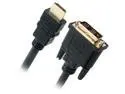
Omni Gear DVI-1-HDMI 3 ft. Black DVI to HDMI Cable Male to Male
Overall Review: Cable seems well made and functions perfectly. Currently being used with a USB-C dock to deliver HDMI out from the dock to a monitor with DVI input. The dock is connected to a 12" MacBook. Works perfectly, no glitches, no problems with display detection, color or anything else. Simple cable that did the job.
3/31/2020See more detail
Good value
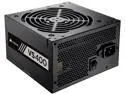
CORSAIR VS Series VS400 (CP-9020117-NA) 400W ATX12V / EPS12V 80 PLUS Certified Active PFC Power Supply
Pros: Well built, decent quality. Sleeved cables. Unit feels hefty and strong. Low price.
Cons: Really only in my head.
Overall Review: Bought this on sale with a rebate to get a decent PSU at a remarkable price. This was for a general purpose build with virtually no gaming or heavy tasks so I decided to save a few bucks with this model instead of the pricier units sold by Corsair, EVGA and Seasonic.
5/3/2017See more detail
Solid ITX board.
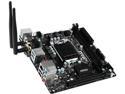
MSI B150I GAMING PRO AC LGA 1151 Intel B150 HDMI USB 3.1 Mini ITX Intel Motherboard
Pros: Built in wifi and bluetooth is a huge bonus. Decent BIOS. Overall quality is good.
Cons: Old BIOS shipped with the motherboard. Not a big deal -- was able to update easily with a flash drive in the BIOS.
Overall Review: Great board for Skylake setups. Recent BIOS include support for Kaby Lake. Note that if you want to install Windows 7, you have to turn on a setting in the BIOS to enable it AND install it via DVD drive. Installing with a bootable USB flash drive just doesn't work. If you're upgrading from 7 to 10, be sure to turn those compatibility features off as they will limit your performance in 10. I've had several MSI boards over the years and they all proved to be durable and long lasting. I expect the same from this one.
5/3/2017See more detail
Great quality for the price
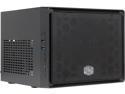
COOLER MASTER Elite 110 RC-110-KKN2 Midnight Black Steel / Plastic Mini-ITX Tower Computer Case
Pros: Fits ATX PSUs Not hard to build in Small Decent materials and fit and finish Super low price Decent ventilation Fits full height, average length video cards.
Cons: Included 120mm fan is a bit cheapish. Compact size is great for saving space but makes clean cable routing a challenge.
Overall Review: Great little cube case that can fit a decent number of drives. Perfect for a small mITX build that includes a basic graphics card. Go slow when building with this case and route your PSU cables and make your connections before inserting the PSU. A modular PSU might help matters but you can still make a decent job of it if you are patient and careful.
5/3/2017See more detail
seller reviews
- 1
Good products, nice small American business.
Very pleased with the quality of the kit I bought from Vilros. Sent an email to support with a question and they replied immediately with good, helpful information. Really great all around. I wouldn't hesitate to buy from them again. Great selection of stuff if you're into Raspberry Pi and maker projects.
On-time
Delivery
Product
Accuracy
Customer Service
Satisfactory
12/3/2020See more detail