
Your Browsing History


Brian M.
Joined on 08/10/04
0
0
product reviews
- 14
Wow.... Amazing
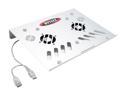
BYTECC Aluminum Notebook Cooler NC-500 (USB)
Pros: Extremely good at what it's made to do. My laptop gets so hot when it's on the table that if you touched the bottom you might burn your hand. (under full load of course). The top of it is very uncomfortable too. As soon as I put this under it.... it was bliss. Under full load the bottom of the laptop feels COLD!!! The top is a little warm. Absolutely amazing. I would recommend this to everyone, ESPCIALLY if you have a hot notebook.
Cons: Doesn't cure cancer.
Overall Review: The fans are placed perfectly where my notebook got the hottest, so now it runs very cold. I was surprised actually about the effectiveness of this product. It also has holes above the fans, one of which is placed conveniently where my laptop's fan is, so I'm not getting warm air (if there really is much) from below the laptop. The fans are small, but blow a lot of air. They're completely silent as well, in fact when I turned it on I had to put my hand on one to make sure it was working. It plugs into a USB port but it doesn't steal that space from you, it has a female that fixes that problem. Great product.
10/26/2006See more detail
Would not recommend
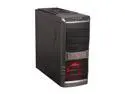
SilverStone SST-RL01B-USB 3.0 Black Steel / Plastic ATX Mid Tower Computer Case
Pros: It looks nice when completely assembled. Top fan grill could be covered in mesh but that's personal preference.
Cons: Where to begin? I knew this case wouldn't come with many standoffs, I read that and was prepared. What I was not prepared for was the cheap, flimsy materials that make up this case. I had to use a faint touch to prevent from permanently dinging this thing. This is absolutely the most frail case I have had the displeasure to work with, and I have bought cases WAY cheaper than this one. The motherboard tray is just as problematic. I had to keep my had behind it while plugging in the power cables/ video card else bend the tray out of shape forever. The HDD toolless design is either a sick joke or my worst nightmare. Once you get the chinsey plastic pieces off, getting them back on to hold your HDD is nearly impossible, especially since you are trying to hold the drive in place at the same time. I ended up getting frustrated and sticking a couple screws in the drive, throwing the plastic piece in the trash. Rear IO covers are the kind where you pop out and throw in the trash. I prefer replaceable IO covers. What if you pop out the wrong one and don't have a replacement? You'll have a gaping hole in the back of your case. Included fan was mounted in the front, making me have to work even harder whilst already frustrated at the case, to move it into the back to exhaust any heat generated. Feet aren't rubber. Case slides far too easy. USB 3.0 plug doesn't fit snugly in place, falls out fairly easy.
Overall Review: I was going to get a similarly priced case by a better brand, but it went out of stock. I'm kicking myself now for not waiting as just about ANY case would be better than this piece. Take my word for it. I've been building systems for over 10 years, 6 of which I was at a computer shop specializing in builds/repairs. This case isn't worth the materials it's made out of. Pass over it, buy from a manufacturer that's known for their cases... I think you know who.
4/26/2013See more detail
B850 Eagle Wifi68
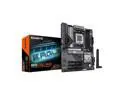
GIGABYTE B850 EAGLE WIFI6E AMD AM5 LGA 1718 Motherboard, ATX, DDR5, 3x M.2, PCIe 5.0, USB-C, WIFI6E, 1GbE LAN, EZ-Latch 5-Year Warranty
Pros: Lots of headers Easy front panel pin connectors
Overall Review: This is one of the nicest motherboards that I've owned. Super easy install, plenty of usb and the front panel pins have this cool connector that makes your life easier.
3/31/2025See more detail
Good PSU, minor gripe
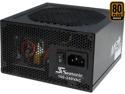
SeaSonic M12II 620 Bronze 620W ATX12V V2.3 / EPS 12V V2.91 SLI Ready 80 PLUS BRONZE Certified Full Modular Active PFC Power Supply
Pros: Good PSU, works flawlessly. Voltages are all normal. MODULAR!
Cons: The 4+4 pin power connector is not quite long enough. I buy cases with bottom mounted power supplies, and this will reach the top 4+4 power on the motherboard, but I would have liked a good 3-4 more inches minimum so I could have tucked the cable away out of eyesight. Fan was rattling when I first turned it on. Cable inside was hitting the fan, had to bend it out of the way)
Overall Review: So far so good, if it blows up I'll update my review, but I think this will be ticking away for a while.
4/26/2013See more detail
Great Drive
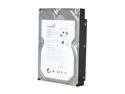
Seagate BarraCuda 7200.12 ST31000528AS 1TB 7200 RPM 32MB Cache SATA 3.0Gb/s 3.5" Internal Hard Drive Bare Drive
Pros: Great drive. Fast, installed W7 without hitch. Price was right.
Cons: None
Overall Review: I was upgrading from a 250GB Drive which booted sluggishly even after a fresh OS install. This drive is much quicker. A definite recommended buy.
2/14/2011See more detail
GCS1102
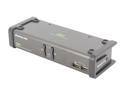
IOGEAR GCS1102 2-Port DVI KVMP Switch w/ Cables
Pros: Detected the display perfectly. No ghosting, no clipping, nothing. No noticeable video quality loss. Switches between systems in 1-2 seconds. I had to turn off mouse emulation so that my MX518 would utilize the extra buttons, which all work. Works with my Ubuntu desktop just as well as on my Windows 7 PC. It has two additional usb ports on the back for peripherals, which can be switched independently or with the KVM focus.
Cons: I had a really tough time getting this to play nice with my computers at first. I had everything plugged in correctly, however it kept telling me "driver failed to install" on my W7 PC, while my Ubuntu box refused to detect mouse/keyboard either. I fiddled with the USB cable for about 40 minutes and was about to quit for the night when it magically worked on one computer. Where the USB connector plugs in at the back of the KVM (the input from each PC is a USB-B) feels very loose. I had to move the cables around in the port to the perfect angle for this to work.
Overall Review: I am not sure if my experience was a fluke or not, but when I get the time I will try with another USB A to B cable to see if that makes a difference. So long as this unit continues to work, I am happy. I have no special media keys on my keyboard, so I cannot test their functionality. Read the manual! There is a TON of useful information about this KVM (and the 1104, which I actually wish I had gotten). It is possible to switch only the audio between PCs, only usb peripherals, only KVM, KVM + audio, etc. This is exactly the KVM I was looking for. I only wish there was a way to program your own hotkeys ie i want to always keep audio on PC1 using the [scroll lock] [scroll lock] enter command. On the rare occasion i need audio on PC 2, i would use another, longer command. I have four other Iogear KVMs (in my shop), and this is by far my favorite one thus far. I use it at home.
2/1/2011See more detail