
Your Browsing History


Hamilton C.
Joined on 05/14/01
0
0
product reviews
- 6
Smokes the old WD740GD in tests
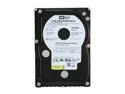
Western Digital Raptor WD740ADFD 74GB 10000 RPM 16MB Cache SATA 1.5Gb/s 3.5" Internal Hard Drive Bare Drive
Pros: On a P4C800-E Deluxe mobo, I compared this ADFD with the old WD740GD Raptor in the following benchmarks: AIDA32, HDTach 2.62 & 3.0, SANDRA Business Pro 2007, WinBench, PCmark04 & PCMark05, ATTO, IOmeter, HDTune, DriveTest, DiskBench, and H2bench. The differences were quite remarkable.
Cons: None...except maybe large differences in performance between drives.
Overall Review: I can't say how this would translate to ACTUAL PC USE, but it IS indeed much faster. I had a total of 4 of these, and the differences between them were worth noting. As much 8mb read/write differences between drives, and they all had the same firmware, 20.P702 (or 20.07P20 depending on how your controller reads it). I noticed no HD noise, and they did not run hot for me either.
1/29/2007See more detail
1 of 4 were DOA, 2nd died in a few weeks. Be sure and check these when you receive them
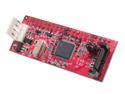
Rosewill RC-204 IDE to SATA Mini Vertical Bridge (for IDE device)
Pros: These work on certain drives....
Cons: ...but are not reliable.
Overall Review: I ordered four of these. The first one I tried worked, but died in a few weeks. I tried another one and it was DOA! I though something had gone wrong with the drive, until I checked the 3rd and 4th and those worked. Can't say for how long now though. This WILL NOT work with EVERY type of drive. I could not get them to work with a Samsung HD (ATA100/80g/2mb/7200rpm), but they worked with a Maxtor (ATA133/80g/8mb/7200rpm). They would not work with an Asus DVD-ROM drive (DVD-E616A2).
1/29/2007See more detail
WARNING!!
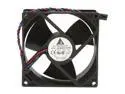
Delta EFB0912HHE 92mm Case Fan
Pros: Double ball bearing; small hub for more air flow and static pressure; and of course the CFM rating.
Cons: BEWARE OF THE CONNECTOR!! It is NOT STANDARD! I can't understand why no one mentioned this, unless I got some oddball fan. But the fan shown in the images here is the same one I got. This is NOT a standard 3-pin connector for PC's!! A standard connector has the RED WIRE in the CENTER. These have the BLUE wire (sensor) in the center!! Hooking this up as-is to a mobo's header* or fan controller could either fry the fan or ruin the mobo's header or fan controller!
Overall Review: *Another thing: A fan that draws more than .3A should never get its power from the mobo because most mobo fan header connectors are only rated at about .3A. You could end up eventually blowing the fan headers if you don't use an adapter where the sensor and ground are from the mobo but the power is from the PSU. 5 stars for fan performance and quality, 1 star for NewEgg not mentioning the connector. "kjell", my box wasn't like the one pictured here. But I assume yours is similar to mine, and that's a generic box retail packaged by rexususa.com. Mine had numerous brand names on it. Odd that according to Delta, there's no such thing as a Delta 92mm fan! But it is at the Rexus site rexususa.com/fans/20911.html, and note they erroneously claim it's a standard 3-pin connector! But below they say it's a "Dell connector" and they show the red wire as the center wire, but it is NOT the center wire as I stated.
2/28/2008See more detail
Didn't run hot for me, VERY cool on stock HSF unit!
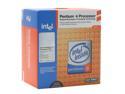
Intel Pentium 4 531 - Pentium 4 Prescott Single-Core 3.0 GHz LGA 775 Processor - BX80547PG3000EK
Pros: With the stock retail HSF unit, and Arctic Silver 5, this thing ran on the COOL side for me. Never got above 40°C even under burn-in load. In XP it stayed around 26-30°. Yes, I touched the *backside* of the mobo's CPU socket and it was indeed cool.
Cons: None.
Overall Review: It all depends on how well you clean the mating surfaces, and apply the TIM. The thermal pad should be removed with a soft plastic spatula, and it and the CPU's top should be cleaned with mineral spirits, then dried VERY well, then compressed air blown over them right before application. Apply Arctic Silver 5 about the size of a grain of rice and leave it like that, then put the HSF unit on the CPU. (Mobo was a Biostar P4M80-M7, VIA P4M800 chipset).
1/15/2007See more detail
Unknown timings, they only know the CAS spec, and not very fast
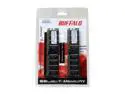
BUFFALO Select 1GB (2 x 512MB) DDR 400 (PC 3200) Dual Channel Kit Desktop Memory Model DD4002-KS1G/BR
Pros: NO ERRORS at ALL in MemTest nor Windows Memory Diag's. That's a GOOD thing. Stable too. Mine had Micron chips. Buffalo's site says they can have Micron, Samsung or Hynix.
Cons: Poor performance, apparently flaky SPD chip, and not even Buffalo know what the COMPLETE memory timings are!
Overall Review: Benchmark programs report it at running at only 166mhz instead of 200mhz (yes, it's set correctly in the BIOS). So its low performance in benchmarks is either due to it really running at only 166mhz, or, it's just "slow" memory. Most new mobos' BIOS' have many other settings other than CAS (CL). Buffalo doesn't even know what they are! So you have to set this area in a mobo's BIOS to Auto, and I fear that will not be correct since the "SPD" tab on programs like AIDA32, CPUz, etc., are grayed out! They can't even read the modules' SPD chip specs. (Mobo was a Biostar P4M80-M7, VIA P4M800 chipset).
1/15/2007See more detail
Cr@p, died less than a week, and not even bootable
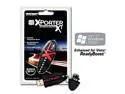
Patriot Extreme Performance 1GB Flash Drive (USB2.0 Portable) PEF1G200USB
Pros: It was INSANELY FAST...for the short time it lasted. Faster than a HARD DRIVE in a USB enclosure!
Cons: Cr@pped out in less than a week. Can't even right click it now without XP constantly asking to format it: "would you like to format this drive now?" Then it says the "drive cannot be formatted". I thought all USB flash/pen/thumb drives were bootable, why not? This one is not bootable. Patriot didn't even know if these were bootable! They told me to "try these utilities" and directed me to one at their site ("MakeBootable") and one at HP's site to make it bootable. Neither one worked. Then they said "Oh...these are not bootable". The cap WILL get lost, it should be attached in some way.
1/15/2007See more detail