
Your Browsing History


JAMES M.
Joined on 03/29/02
0
0
product reviews
- 2
Awesome case for the storage, um, "enthusiast."
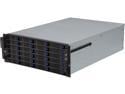
NORCO RPC-4224 4U Rackmount Server Case with 24 Hot-Swappable SATA/SAS Drive Bays
Pros: 24 hot-plug bays on the front make building your NAS a breeze. This is perhaps the best density/dollar value on the market for a proper, hot-plug, backplane equipped storage-centric server you will find. Being able to fit all this as well as a full ATX board (or any of its more Lilliputian brethren) into the case and still have room to work is wonderful. Airflow design is ideal for the purpose, and draws fully front to rear, with no obstacles. The addition of several status LEDs, 2 USB ports and power+reset buttons on the rack "ears" is an interesting placement, but not unheard of. The drive cages are not only fitted with 3.5" mounting holes, but also 2.5" mounting holes. No adapter is required to mount 2.5" drives in the bays.
Cons: There are only 2 real cons with this unit. 1. The separator/fan wall used. Instead of using the (ample) vertical space to house 120mm fans, Norco defaults to 4 80mm fans. Those are not the quietest in the world. Spend the extra money, and purchase Norco's 3x 120mm replacement divider. Your ears will thank you when you can hold a conversation directly over or in front of this monster while the cover is actually off the unit (yes, with 3 quality 120mm fans, even at full speed, you can have a conversation and the other party will not know you are calling them inches away from a running server). 2. This is a bit if a con for the, "a little at a time," builder. not everyone will fall into this category, but if you do, be aware: In my circumstance, I only populated 8 of the 24 bays (I placed the empty cages back in the front). This is not a terrible issue for the electronics behind the drives; the 16 cages that have no drives pass massive amounts of air into the chassis for the items behind the drives. This "path of least resistance" for the air does mean that airflow over the 8, populated, drives is reduced. My solution was to use travel-case foam cut to the hight and width of a hard drive, then to friction-fit into the empty cages, and re-insert. I believe Norco's intent with this case was for it to be fully populated, making this less of an issue, but is is still something to consider if you are running fewer than 24 drives and want to ensure adequate airflow over the populated bays.
Overall Review: 1. SFF-8087 - Don't forget - this thing has 6 backplanes. You cannot just plug standard SATA cables in and rock on. Not everyone sees this before buying, and this could cause a panic if it were to arrive without knowing. SFF-8087 (and recently SFF-8643) is commonplace in servers and higher-density systems, but the first time buyer venturing into home-built NAS may not know about it when they open the lid of this guy. Be sure to get SFF-8087 cables appropriate to your needs to attach to the backplanes. Also, new, 12Gb SAS cards are on the market (like the Areca 1883 series) that sport SFF-8643 connectors. These cards often have a number of SKUs that may include none, SFF-8643 to SFF-8087, SFF-8643 to SFF-8643 or SFF-8643 to SATA cables in their kits. Reasearch your card of choice to be sure it comes with the cables you need, or purchase separately. 2. The unique placement of the power and rest buttons on the rackmount ears can make for a bad day if you are not careful - Be sure to set the system to require a 4-second press to actually power off. I would avoid connecting the reset button entirely. That being said, they DO require a hefty amount of force to press, but be safe when walking by the rack. 3. The case can be very quiet - Track down the 120mm fan equipped divider wall and throw away the 80mm fan wall. Even with a Xeon 1230, an Areca 1883ix, an 850 watt PSU and a wall of 120 MM fans, the server is quiet. VERY quiet. 4. It's heavy. Either install this in your rack without the drives populated, or call a friend over to help. Your back and knees will thank you.
4/11/2015See more detail
Quiet. Solid. Efficient. Great feature/price ratio.
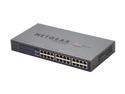
NETGEAR 24 Port Gigabit Unmanged Plus Business-Class Rackmount Switch - Lifetime Warranty (JGS524E)
Pros: NO FANS=NO NOISE! Super easy setup, delivers on the speeds promised, has been solid as a rock. Uses less power than previous 16-port 100 Mbit switches I have owned. VLAN Tagging is easy, and the GUI makes changes easy to apply. Been in place for over a year, and being beat to death for a lot of that time, never missing a beat.
Cons: No SFP ports.
Overall Review: Some people are complaining about the setup, and how it doesn't have a proper "web" GUI. There's some validity to that, but Netgear is blurring the lines between SMB and high-end consumer gear here. So, you have to install an application, and cannot just use Firefox/IE/Chrome... Big-Boy switches (Cisco Catalyst, for example) require telnet, ssh, or a licensed piece of software for initial configuration. When you move to an SMB switch like this, the fact it comes in at under $300 and brings MAJOR features like 24 TRUE Full-Duplex Gigabit ports, QoS, LAG VLANs, cable test and IGMP Snooping while making ZERO noise and drawing a minuscule amount of power makes this a fantastic switch and value, with or without the rebate.
4/23/2013See more detail