




 here!
here!
I’m your shopping assistant for PC builds, upgrades, and everything tech.
Got questions? Ask away!
Start a conversation
here!
I’m your shopping assistant for PC builds, upgrades, and everything tech.
Got questions? Ask away!
Start a conversation

Joined on 08/24/03
Extremely fast with Intel's reliability
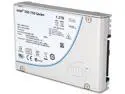
Pros: Fastest NVMe on the market right now. Verified over 2GB/s reads and over 1GB/s writes. Who needs raid-0? The number of IOPS this thing supports is so high that you'll never stress it in a desktop environment. Intel's SSDs have also been the most reliable in my experience and as shown online, and so I have no fears about this drive having any issues in the future. The 2.5" form factor means I don't have to install a PCIe card that would block airflow for one of my video cards in SLI.
Cons: Mega-expensive, and I would have bought the 800GB variant if Intel had offered it. The 15mm height means that the SSD mounts you have will not work if they assume the more common 7mm or 9mm heights. I had to install this drive in a 3.5" bay.
Overall Review: Have you heard of the 8639 connector before this drive? Neither had I. Will the connector last as a standard, or die off in a year? I'm not considering this a con since it's all speculative, but you have to wonder.
Cheap and Full of Gotchas
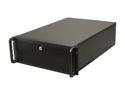
Pros: * Cheap 4U case for custom server builds. Nothing else like it at this price. * Plenty of room for a large motherboard. * Not too heavy.
Cons: * You aren't putting 15 drives in this without some serious high pressure, high RPM fans. They're packed extremely densely, and so with 7200 RPM drives, you will cook them. I recommend at most 3 drives per cage so that a decent amount of air can pass around the drives OR you only use SSDs with mounts that naturally leave space. * The case will cut you. The aluminum edges are not cleaned up. * Front USB 2.0 ports in 2020. * HD light arrived broken. Yes, I'm sure the + and - leads are connected correctly. * You get 7 2-pin fans that run at a constant RPM. These can't respond to temperature by definition, and so IMHO, are complete waste. * 4 screws to open up the panel compared to the single-screw solution that Dell has. * The recommended rails have extremely bad reviews.
Overall Review: I don't regret the purchase because of the price and 4U, but I seriously cannot recommend it to anyone.
Works on ASUS Pro WS X570-ACE @ 3200
Pros: * 4 sticks work on the ASUS Pro WS X570-ACE at its rated speed. No problems whatsoever.
Cons: * Looks. But you're not buying this because you want RGB.
Overall Review: 100% satisfied.
What a difference vs. a DIY NAS
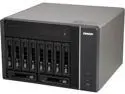
Pros: * 10 bays allows me to run two 5 drive raid-6 volumes in one unit. * mSATA SSD cache speeds up reads on a volume significantly. * Creating a virtual machine is as easy as pointing to an ISO and indicating how many resources to use. Installed Ubuntu Server 15.04 and then got rid of a physical machine as a result. * Can upgrade to 32GB of ram. Installed ECC ram, and it worked fine. 2x CT2KIT102472BD160B. * The Xeon in this unit has the highest TDP (sustained performance) out of any NAS available w/o purchasing specialty equipment. Plex transcoding is a non-issue.
Cons: * Case screws are small and easily lost. Be careful. * The drive caddies are somewhat cheap and not toolless. * Ram is behind a motherboard power cable that's really snug. I installed ram without pulling the power cable since I would have had to exert too much force to be comfortable with it. * Boot time is significant. For 24/7 operation it doesn't matter that much, but why? * Creates forced share points that you can't delete. Web and Public in particular. * No documented method for getting data off an encrypted backup without purchasing another QNAP.
Overall Review: * ~200W when full and mostly idle. I'm really wondering how good QNAP support is if the entire unit fails. Let's hope I don't have to find out the answer to this.
Works but awkward
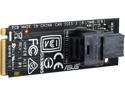
Pros: Allows you to connect an Intel 750 SSD 2.5" without installing an expansion card that would block airflow to a video card in a SLI setup.
Cons: It's somewhat bonkers that after its installed the receiving connector points towards the motherboard when the Hyper Kit is installed vertically as it is in a ASUS X99 Deluxe. I would have preferred the reverse orientation so that I could unplug the cable easily should I need to.
Overall Review: FYI, the Intel 750 2.5" SSD is extra tall (15mm), and would not fit into the behind the motherboard tray mounts on my Corsair 750D. I needed to adapt it to a 3.5" bay in the end to install it.
Best Internal CF Card Reader
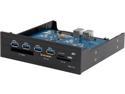
Pros: * USB 3.0 speeds reading flash. I no longer can take a break waiting for gigs of photos and video recordings to transfer. * 4 USB 3.0 ports on the front of the machine. * Comes with two USB port covers in case you already have 2 on your case, but would like to conceal them after installing this unit.
Cons: * Requires a SATA power connector to power the front USB ports, and the power connector isn't that tight. Install very carefully! * SATA power connector is recessed vs. something like a DVD drive. This makes it difficult to reach with your fingers in tight quarters. * USB 3.0 header cable is bulky and connector can also be easily bumped off the motherboard. This isn't Atech's fault, but just a standardized design problem you have to deal with.
Overall Review: Upgraded from their equally awesome PRO-55U. The power light only comes on when you're reading a CF card, so don't fret if it doesn't light up when the machine turns on.


