




 here!
here!
I’m your shopping assistant for PC builds, upgrades, and everything tech.
Got questions? Ask away!
Start a conversation
here!
I’m your shopping assistant for PC builds, upgrades, and everything tech.
Got questions? Ask away!
Start a conversation

Joined on 12/09/11
Visually Pleasing
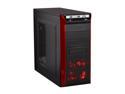
Pros: The red is actually alittle bit darker, more cherry red. Connections where very easy to line up very little has to be done to manage the wiring, interior is very well done. Also packing is very secure so it will not be rattled. There is a blank for the rear I/O for expansion cards.
Cons: I was short 3 spacers for an ATX board, I'm not sure if that's industry standard or if I'm supposed to have more than 7, I certainly had plenty more screws for everything else so I'm not going to knock an egg I am happy. The OCD in me can't quite let go of the small ding on the top of the tower in front, it isn't damaged, just dinged, only noticable in the light.
Overall Review: Instructions are good, doesn't list where the bottom fan is supposedly set, I'm not too worried it isn't too hard to look for. And fans on side/rear at least are not Rosewill branded. If you think steel case means heavy, your wrong, I'd bet you could haul the case up and down stairs without a PSU installed. Extra large air processor coolers like the Corsair A70 will be tight fits. Breaths well, waiting for more LED side fans to light it up, mesh on bottom, water cooling routing is good quality if your considering it.
Great Option for DDR3
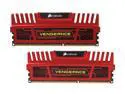
Pros: Heat spreaders are metallic like diecast metal cars, yeah you could break it and no it's not flimsy. Performs solidly with near careless abandon, pronounces itself on case inspection.
Cons: Does not have the most detected setup, my system "Believes" it's 1333, but software on the same hardware turned on my motherboard and tested says something between "Have nice day and I'll be back" rather slick it's not actually a problem but I'd like that acknowledgement considering I had to flip the switch. And yes even windows says that, neither is right according to testing.
Overall Review: Getting it out of the plastic and inserting it where moments I felt nervous, didn't want to come out easily in packaging which is great, then it didn't want to go in as easily as other ram I'd had, again diecast car comes to mind. Attention to detail is pretty high, OCD gripes where few, only a few none of them actually stopping this from being a win win.
Odd Color aside
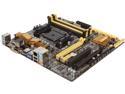
Pros: -Resolved PCI-e 3.0 x16 slot issue -Decently Heatsinked -Everything get's OC'protection -Seamless configuration for the M-ATX layout, lot's better than the A-55 board I had before this. -USB 3.0 are on the board, someone wrote a review there was not more than one for some reason, there is two at least, made use of it with Corsair Link. Outside USB 3.0 would make more sense there are few to be clear. I'm planning on swapping in quite a few different parts to refresh my box, and while I would go with an ATX board if I was going to crossfire and do four or more monitors I'm doing one, very large one. That afforded me the luxury to make things small, and the A-55 board is fine if that's all you want to be, the A88 is well, eager to please in comparison especially after Windows 10 laid 8 to rest. This board looks aggressive and is substantially more refined than my FX AM3+ board was. Some quality in the feel of the parts, not so frightening to install parts on as some boards good weight for it's size too.
Cons: -Box fan connectors, while all are 4pin makes no sense where they are in using them for fans on the case, don't plan on a short connection, this layout is still ideal for me having dedicated Memory Fan and other uses it works well for. -Memory Configuration is not always easy, this is one of those know what your buying it can require input all the way down the timings, latency, speed... For memory that doesn't load correctly, it loads which is notable IMO as a good thing and loads 1600, just not 2133 before adjustment. -Bios update or Windows 10 either resolves a few annoying things add it too pre-config or be prepared to handle it other reviews hit everything I've experienced. Bought this as an open box, came without the factory box, otherwise had everything I wanted. I still have to give it 5 because nothing is really bad. It is probably one of the easiest boards to setup I've come across. Just be aware it's not perfect.
Overall Review: My build Asus M32BF (Frankenbuilt with parts I've not installed or tested long enough to review at this time update in 6 months accordingly) I'll say this looks to be the best effort to provide something like the upper tier ATX FM2+ Asus boards, I really like it. Tinker types will like this for what it is, meticulously OCD types will cringe with some Air coolers it is a M-ATX. Without being unfairly critical of cosmetics like colors and Micro fan locations I appreciate how attention was given to make most the pieces useful. Most points are clearly marked if you take the guide it lays everything it offers out in a clear enough way to use it. Don't expect a lot of help from the book though, it's clear the board is more capable than an entry one. Really geared towards someone trying to push the settings up to a fail or near fail level for most the components, fairly robust tools to enable that both config and physical. Final thoughts, it's what my FX build couldn't be, but I'm not the average builder, easily budgeted top shelf parts for it's size. Happy with the end result beyond expectations I started out with. Also kudos to Newegg for delivery of a Open Box in exceptional form. If I'd not watched an unboxing I'd have thought the bland box was original. Know your processor before selecting a chipset, this one is probably not the best choice pinching pennies if a out of the box solution is your goal. Auto tune features are respectable, but leave room for refinement if you know what your doing or want to gamble alittle more.
Low Profile means LARGE AIR CPU Cooler
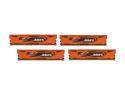
Pros: Very low profile, maintains the heat sink, solid, not overly glossy but still nice to look at, well packaged, easily the best ram I have had in quite some time, no issues recognizing the first shot. Ohh and this is on an all AMD box, fx-4100/biostar ta990fxe/his 6850. Best of all it makes, well no, no the pancakes didn't make it.
Cons: Not immediately seen for 1600, comes in 1333, but this was a driver issue on the mobo on boot I was expecting to have to handle, not an issue, just thought I'd mention it.
Overall Review: I have a Corsair A70 on my little four core, and it easily fits a decent mm or mm and half above the ram.
Slim and Runs out of the box
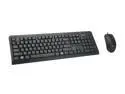
Pros: Slim and running out of the box no issues, nice finish, non glossy.
Cons: Bit small of a mouse, but it works well so I'm not complaining so much as notating it isn't a huge draw towards something I'd play alot of shooter's with.
Overall Review: For the price I can't say I'm dissapointed, I like them, I've been stuck with stuck keys on my other hardware due to accidental drink exposure, so this is nice, also makes the click, and type shudder noises, if your OCD about those things may be the wrong set for you.
VGA LCD
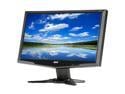
Pros: Attractive, Stable, adjustable side to side/tilt/up down Stationary, and plug n play. Recommended for 18in desirees, picked mine up for $70 on sale so I really like it, could see why it's worth it. Shipping was free and was quick.
Cons: Cannot elevate, not a big deficit pretty good neutral standing. VGA. Nothing noteworthy at this point to point out.
Overall Review: Know your video card output, vga is phasing out, I am using the Rosewill RCAD-11001 VGA to HDMI Adapter to get to my desktop's VC via HDMI. Works great directly to my older labtop VGA do not fear, it's bright.
Nice small kit
Kit arrived as pictured and with a brief bit of research to identify the MSI type from the last standoff I was able to get everything done I wanted. Nice baggy for each type nothing out of sorts.


