
Your Browsing History


Sam E.
Joined on 09/02/06
0
0

product reviews
- 14
This review is for the MSI Review Rebate Program
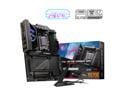
MSI MPG X870E CARBON WIFI Motherboard, ATX - Supports AMD Ryzen 9000 / 8000 / 7000 Processors, AM5 - 110A SPS VRM, DDR5 Memory Boost 8400+MT/s (OC), PCIe 5.0 x16 & 4.0 x16, M.2 Gen5, Wi-Fi 7, 5G LAN
Pros: - Plenty of the latest generation of USB slots. Toss away thos PCI-E expander cards and USB hubs, you won't need em. - Plenty of M2 slots. 2x Gen5 and 2x Gen4. Perfect for expanding into the years to come. - 2x Double network ports, 5gig and 2.5gig. - EZ release button on the PCI-E Primary slot helps when first building, and when installing new M2 drvies underneth. - EZ release of the M2s is almost standard with these higher end boards now, and all m2 slots have onboard heatsinks. Though it has yet to be seen if the thermal pads are thick enough to make contact with all m2 devices, and if the heatsinks are able to handle the heat from Gen5 devices. - EZ DEBUG LED, which can help troubleshoot any issues when you are testing out your build for the first time.
Cons: - My main concern is the Gen5 lane sharing between PCI_E1, PCI_E2, and M2_2. If either PCI_E2, or M2_2 slots have a device installed, lane sharing is set to 8x PCI_E1, 4x PCI_E2, and 4x M2_2. But I guess it can't be helped if you value the extra Gen5 M2 slot. This most likely will cause negligible bottleneck with the NVIDA 5000 series. But if you have a Gen3 video card, plan to upgrade soon because it would be a waste of lanes running at Gen3 8x speeds. - Would have been more happy to see a single 10g network port. I had to port over my 10g card and placed it into the single Gen4 PCIE slot. - For this price point, a MSI m2 xpander card coming included would have also been nice to have for the PCI_E2 slot that would have been ran at Gen5 4x, and an option in the BIOS to bifurcate to Gen5 2x/2x if it was a dual m2 card. - Only 4 SATA ports. But if it was 6 most likely would not have an extra PCIE M2 slot, or as many USB ports. Though 4 SATA ports is fine with me given I need to start utilizing m2 slots. - WiFi7 REQUIRES WINDOWS 11. Did not know this when I bought, but my mistake as there is a disclaimer in the marketing on the MSI product page. This is not MSI's fault, it is the WiFi chip requiring it. Good thing I do not need this feature, just would have been a nice to have. Maybe in the future when Windows 10 updates/support is gone, I will upgrade to Windows 11.
Overall Review: Personally, I am a sad that there is no ACE variant in this generation, as that was the perfect higher end board under the GODLIKE variant for me. There is nice to have features and quality that the ACE series brought. I was torn between getting this, or the MSI x670 ACE, as there really is not much differences between these generations. Not sure why MSI axed the ACE for this generation. My assumption is that they just wanted to close the gap between the CARBON and the GODLIKE series, but I don't think they did that enough for the MSRP price.
10/20/2024See more detail
Decent for a ten$ unit
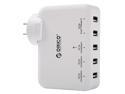
ORICO DCAP-5U 5-Port USB Wall Charger Adapter for iPhone 7/7Plus/6S/6S P/5SE/iPad/LG/Samsung/HTC/Nexus and More - White
Pros: - 5 ports - LED to tell you it's working - Hard plastic build - The universal plug does not block other plugs on the wall.
Cons: - As others have stated, the locking tab for the plug is made with cheap plastic. AND WILL BREAK. Mine came unlocked and because I read reviews that it would break with ease, I carefully twisted it into the lock placement. Then a few weeks later a friend ask me what it does and if I could unlock it and take a look at the plug by itself. I attempted to unlock it and then it broke off. Luckily it is still in the locking position, but now unable to unlock the plug (which is ok with me). - SUPER CHARGE ports will disappoint you. These are not real fast charge or super charge ports. I have ran tests with multiple devices and cords (cords provided with my iphone and my S7), and I am only able to get about 1.1 to 1.2 Amps out of them MAX. They have more power than the 'Universal' ports which only clock in about 0.8-0.9 amps MAX.... BUT definitely not certified fast charging specs, as they can not even reach 1.5 or 2 amps required for fast charging.
Overall Review: 2 stars because it overall does it's job of charging, but not as advertised. PS, ORICO Customer Care team, Please do not reply to my review with a canned response to contact you for issues... Unless you can offer me a free upgrade to your ORICO DCAP-5S 40W model, which seems to have better build quality. Thanks.
4/10/2016See more detail
Did it's job
![ORICO 2.5" Transparent USB 3.0 to SATA 3.0 External Hard Drive Disk Enclosure Box, USB 3.0 High-Speed Case for 2.5" HDD / SSD, Case Support UASP Protocol SATA III Tool Free [Upgrade Version]](https://c1.neweggimages.com/ProductImageCompressAll125/0VN-0003-000Z5-01.jpg)
ORICO 2.5" Transparent USB 3.0 to SATA 3.0 External Hard Drive Disk Enclosure Box, USB 3.0 High-Speed Case for 2.5" HDD / SSD, Case Support UASP Protocol SATA III Tool Free [Upgrade Version]
Pros: Clear so you can see the beauty of the drive. Seems to work universally with no problems in recent windows.
Cons: Lid removal is a bit tricky, just because there is a lip on one end. Always gets me to try to remember how I removed it previously; and then I remember it slides out on a rail type system using a certain amount of force at a certain spot. Not really a bad thing, because i'd rather have a secure case than a loosey goosey case. But having some sort of small indicator on the case such as an arrow and small boarder lines around the actual removable piece would be helpful.
Overall Review: Got this to help a friend upgrade her laptop from a spindle drive to an SSD. Slapped an SSD into it and it recognized fine on a windows system, clone when swimmingly as expected. Once the clone was completed, swapped the SSD that was enclosed into the laptop and the spindle drive went into this enclosure to be preserved as a "Just in case" failure of the SSD in the future. In my use, this was really just a one off product. Will update again if I ever use it again for something in the future.
12/22/2019See more detail
Does what it needs weekly
Philips Norelco Nose Trimmer 3000 for Nose, Ears, Eyebrows, NT3355/49
Pros: Multiple little extensions, 3mm and 5mm I believe. I have only used the 3mm for mustache trimming, and no extension for nose trimming.
Cons: No travel case.
Overall Review: Does what it does; can be cleaned easily.
12/22/2019See more detail
Still working stong
SAMSUNG 32GB BAR Plus (Metal) USB 3.1 Flash Drive, Speed Up to 200MB/s (MUF-32BE3/AM)
Pros: Works as intended. Gets a bit hot when active transferring but metal body is good to dissipate that heat.
Cons: None so far!
Overall Review: I <3 Samsung
12/22/2019See more detail
Works and is pretty
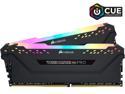
CORSAIR Vengeance RGB Pro 32GB (2 x 16GB) DDR4 3200 (PC4 25600) Desktop Memory Model CMW32GX4M2C3200C16
Pros: Works as intended. LEDs are bright and customized via corsair iCue.
Cons: No cons thus far.
Overall Review: Can also be controlled via MSI mobo software I got too, but seems like having both like to interfere with each other. Even though there is a setting to allow another program to take control it doesn't always work upon restart, with the one program starting up first taking priority/control. I am sticking with iCue mostly, as I am fine with the hardware defaults for the MSI mobo LEDs. Remember you will need to set BIOS to the specified memory speed on the sticks, otherwise it will be under-clocked by default.
12/22/2019See more detail