
Your Browsing History


Hans B.
Joined on 10/15/04
0
0
product reviews
- 17
Very Handy, Great Quality
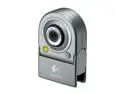
Logitech QuickCam for Notebooks Deluxe 0.35MP Effective Pixels USB 2.0 WebCam
Pros: We have a webcam on a regular PC and wanted the flexibility of a small webcam to use on a laptop, at times. This Logitech cam exceeds our expectations. Our family keeps telling us how good the picture quality is, so that's terrific. Plus, it is easy to have laying around and plug in when needed. THe short cord (~1 ft) makes for few entanglements. Highly recommended. Works great with Skype video.
Cons: None that I have noticed.
Overall Review: We clip this to a Dell d610 laptop, which has a little ridge at the edge of the top panel. Very easy to put on and take off.
7/17/2006See more detail
Not worth the risk
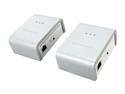
NETGEAR XAVB101-100NAS Powerline AV Ethernet Adapter Kit Up to 200Mbps
Pros: I really wanted to like these and use these Powerline adapters but have very mixed feelings in the end. I have my cable modem on the 2nd floor and various PCs and devices around the house that until now are connected to a wireless G access point. I had hoped to EITHER add an access point closer to the "middle" of my home OR connect my basement office via the powerline adapters to the router upstairs.
Cons: Well, neither scenario works in a 2005 home with clearly new wiring. I can not get above 105 Mbs in the best case scenario, even from the 2nd floor to an outlet one floor below and in the same part of the house. In the basement, I get an even lower performance that is not any better than wireless is. So I have them laying around now, doing nothing, and hope one day to have a need for connectivity that is just a "few outlets" over, like maybe in the same room or next room. I also have the distinct impression that even if the connection rate is 100 Mbs+ that there is a "lag" or latency that is noticably worse than on a direct wireless G connection. Webpages just do not appear with the same snappyness. It may be that the electronics in the adpaters is just a whole bunch less powerful than in a normal 10/100 5 port switch or wireless router. So even if the transmission rate can theoretically be high, that does not mean in daily use that you will actually have snappy performance.
Overall Review: I had been highly sceptical based on the other reviews and experiences people had written about for powerline adapters and should have listened. These may be usable if you really do not care about the performance part and just need some easy way to provide internet / network connectivity. Maybe if you turn the LEDs off so you do not see the RED light reminding you of the bad performance, it may be more acceptable to some. Otherwise, look elsewhere for better networking options. For the same amount of money, I could have bought two wireless N routers like the Asus RT-12N, loaded 3rd party firmware and used one as an AP and the other as a client bridge. It would at least have worked whereas I now have no use for the powerline units. Good luck.
6/6/2010See more detail
Great drive
Western Digital Blue WD6400AAKS 7200 RPM 16MB Cache SATA 3.0Gb/s 3.5" Internal Hard Drive
Pros: Lots of space, quiet, fast
Cons: None.
1/14/2009See more detail
Fine, quick way to have 4GB
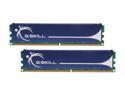
G.SKILL 4GB (2 x 2GB) DDR2 800 (PC2 6400) Dual Channel Kit Desktop Memory Model F2-6400CL5D-4GBPQ
Pros: Easy to add 4GB. Seems flexible, running 5-5-5-15, no booting issues on an AMD MB.
Cons: None
Overall Review: For the price, you can;t go wrong.
1/14/2009See more detail
Solid and awesome price/performance
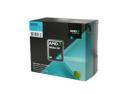
AMD Athlon 64 X2 5000 - Athlon 64 X2 Brisbane Dual-Core 2.6 GHz Socket AM2 65W Processor - ADO5000DOBOX
Pros: Using it in simple desktop. Have another box with Windsor X2 at 2.2GHz. Overclocked this one to 2.8 but using integrated graphics of the MB. Nice to know the horsepower is there to get some video work done now and then. Stays cool, low noise, totally usable stock fan. All in all I wanted a low cost but solid performing CPU. Would love to have an Intel Q6600 or E8400, etc, but can't see spending three+ times more on the CPU itself. I'm trying to keep each of the major PC components between $40 - 70, ie MB, CPU, mem, HD, case. Add a DVD and you are done with a strong but affordable box.
Cons: None. Thought I could overclock in a few minutes to 3.0, but settled on 2.8 with a FSB of 217. That puts mem clock at 403, which uses your DDR2 memory properly versus stock 2.6 speed which yields 371 mem clock. CPU multi is 13 and mem divider is 7, hence these #. Still, 2.821 is just fine performance for everyday use and fine for video encoding every now and then. Passmark composite of 1100 versus 877 for the previous X2. The Intels would have 2000+ performance, but I just can't justify it for the purpose here.
Overall Review: Easy to put in. Came with some from of thermal past bu used Actic Silver anyway. Not sure that was really needed or that big a deal anymore with these 65w chips.
1/14/2009See more detail
Great board, for desktop or HTPC
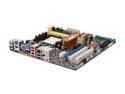
ASUS M3A78-EM AM2+/AM2 AMD 780G HDMI Micro ATX AMD Motherboard
Pros: Took one hour to get the whole system running. Upgraded to a newer BIOS but then downgraded back to the version (0701 I think) that was on there to begin with. Need stability first and foremost. Overclocked a X2 Brisbane to 2.8 from 2.6 in a few seconds. Ran at 3.0 for a bit but did not stick, even with higher voltage on CPU and memory. Not sure why but not worth the hassle to spend 20 hours figuring that out. If you just want a great MB, with integrated graphics for a simple desktop or terrific HTPC box, you can;t go wrong.
Cons: None
Overall Review: Nice to know you can go all the way up to a Phenom quad core if you wanted to upgrade 2 years from now for another 50 bucks.
1/14/2009See more detail