
Your Browsing History


John C.
Joined on 10/28/04
0
0
product reviews
- 17
Excellent Video Card
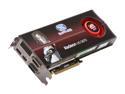
SAPPHIRE 100281SR Radeon HD 5870 (Cypress XT) 1GB 256-bit GDDR5 PCI Express 2.0 x16 HDCP Ready CrossFire Supported Video Card w/ATI Eyefinity
Pros: I got my 5870 today and installed it in my system. Before I did that, I ran 3DMark 06, and Vantage while my 4870 X2 was installed. Here are the numbers I got when I tested the 5870, and then compared the results to my earlier 4870 X2 results. In 3DMark 06 the 4870 X2 scored 23,379 Points and the 5870 scored 23,127 Points. The separation between the two cards was 1%. In Vantage, my 4870 X2 scored 17,190 points, while my 5870 scored 17,161 points. The difference here is 0.1%. All in all, the cards pretty much ran Identical. Thats great considering the 5870 has a single GPU. I also noted temperature and fan speed differences at idle. The 4870 X2 at idle was 68 degrees Celsius with a fan speed of 27%. The 5870 was 43 degrees Celsius with a fan speed of 21%. The 5870 is significantly cooler, and quieter. All cards were tested at there default clock speeds.
Cons: None... Great card
Overall Review: My system... Asus P6T6 Revolution mainboard, Intel i7 940 overclocked to 3.65Ghz, Corsair 1600 Mhz DDR3 Dominator Ram, Corsair 750 Watt Power supply, and of course the Radeon HD 5870. Since these cards ran so close in speed, could I be Processor Limited?? Not sure. I do know the higher I overclock the processor, the better the frame rates in these tests.
9/24/2009See more detail
Doesn't Deliver for the Price
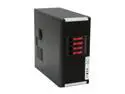
iStarUSA S-8-H34-RED Black Aluminum / Steel ATX Mid Tower Computer Case
Pros: It has very clean looks in a time when cases tend to look like Alien space craft. It has a 4 drive "Hot Swappable" hard drive closure that can be removed and used in another case down the road.
Cons: It is a metal case, but torch it side to side, and it doesn't seem very solid. It's put together with rivets that look barely adequate for the job. The front cover is plastic, and connects to the chassis VIA 6 plastic squeeze inserts. It has the ability to install 2 120mm fans, but they are not included. No type of wiring management integrated into the design. Hot Swap drive bays are not lockable. Walk away from this case, and your child decides to remove one of your drives... I don't have to say what might happen.
Overall Review: This case is so expensive because of the Hot swappable drive bay chassis. You can buy these separate here on NewEgg for a little over one hundred dollars, and install them in any case. I've bought 2 of them in the past for other computers, although, they had lockable bays. The rest of the case is not worth the rest of the cost. This case should maybe cost 140 dollars. I would probably endorse this cases "Sister Cases", they sell for about 119 dollars. They are very similar to this case, only I don't think you can remove the Hot Swappable Drive Closure. Unfortunately I didn't see the cheaper cases because they didn't show up in the "Advanced Search" feature of NewEggs website.
12/2/2008See more detail
Worked well in my Mac Mini
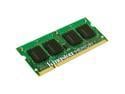
Kingston 4GB (2 x 2GB) DDR2 667 (PC2 5300) Dual Channel Kit Memory for Apple Notebook Model KTA-MB667K2/4GR
Pros: Pretty good price and it worked in my 2009 Mac Mini.
Cons: none
Overall Review: I have a 1.83Ghz Intel Core 2 Duo Mac Mini. It only had 1 Gig of memory installed. That's not enough to run the latest installment of OS X. I bought this because I seen one user review that had upgraded his Mini with this RAM. The install is kinda hairy but with the help of Youtube videos I got it done and it works fine! My Mini now reports 4 Gig of RAM and I can upgrade to lion.
11/18/2011See more detail
Very nice!
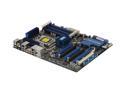
ASUS P6T6 WS Revolution with NF200 3xPCIe true x16 LGA 1366 Intel X58 ATX Intel Motherboard
Pros: 6 PCI Express slots! No other motherboard has this many. I like that the floppy controller is gone. I haven't used it at all on my last 4 builds. I'm also glad the IDE drive controller is gone. This board is marketed as a "Work Station" board, but I'm using it as a gaming machine. I like Express gate! I can definitely see me using it in the morning when I'm in a rush, and want to check my bank account, or the weather. The little Error Check module that comes with the motherboard has already paid off for me. I had a memory failure that caused the system not to boot. The code my Diagnostic Module returned was "d4". The book listed that as a memory failure. I was then able to focus on the Memory, and I found the bad Module pretty quickly.
Cons: No 1394"Firewire" ports. I know the idea behind this board is to eliminate all the legacy connections. But Firewire is not legacy. It's on most external hard drives, and just about every video camera made. I knew this when I bought my motherboard. I knew my machine would be a gaming machine, and I wouldn't need firewire. I think the elimination of Firewire has more to do with the fact that it's not "Intel technology". I believe it's developed by several companies... Apple, Sony, and IBM to name a few. Intel would love to see it go away.
Overall Review: I gave this board 4 stars because of the lack of firewire, a current technology that should be on here. Other then that! Great motherboard! If someone asks me to build a computer for them, and they are not going to record there son playing baseball... I'll suggest this board.
2/7/2009See more detail
Best I've ever tested
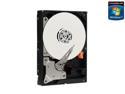
Western Digital Black WD1001FALS 1TB 7200 RPM 32MB Cache SATA 3.0Gb/s 3.5" Internal Hard Drive Bare Drive
Pros: The price and amount of storage were the main reasons for purchase. I also wanted a drive with 32meg of cache, because I've found that more cache means better performance. This drive is also, in my opinion, very quiet. My Hardware: Asus Maximus Extreme, 4870 X2 Crossfired with a single 4870, Intel E8400 processor, Patriot DDR3 1333, Areca 1220 Raid Controller, 8 250 Gig Seagate Drives. This drive will be for another computer, but I tested it in this machine
Cons: None
Overall Review: I bench marked this drive with HD Tune 2.55. Maximum Transfer rate was 103.8 MB/sec, minimuim transfer rate 52.2MB/sec, for an average of 84.8MB/sec. Burst Rate 134.3MB/sec. Pretty good, actually the best I've seen. About 24% better then the last drive I bought (Which only had 16Meg of Cache). Probably results would vary with a different rig, but my computer is pretty new, and running the best stuff you could buy a year ago.
1/23/2009See more detail
works for me
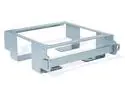
SoNNeT MacCuff mini VESA LCD Mounting Bracket for Mac mini Model CUFF-MINI
Pros: Secures a Mac Mini to the back of my work desk. The boss is none the wiser of it. I use an IO gear KVM switch (Part #GCS632U) to switch between the work computer, and and the Mac. Just a couple of clicks of the scroll lock key, and I'm on my Mac, the whole thing works great. Mac Mini connects to internet wirelessly.
Cons: Probably a bit expensive
10/5/2008See more detail