
Your Browsing History


Jeffrey T.
Joined on 12/17/10
0
0
product reviews
- 15
AE-9 vs ZxR
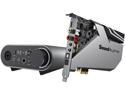
Creative Sound Blaster AE-9 Sound Card (Metallic Gray)
Pros: With the AE-9 you have full control of your sound. -Swappable op-amps -A wonderfully designed EQ -Well though out software controls The sound is much more responsive that that of anything I have heard on-board. -Impressive tightness in bass response -Accurate highs when the EQ is properly tweaked
Cons: The amount of control you have over the sound profile can be daunting if you're really particular about how you listen to your music. For instance, it feels like you need to have a different EQ for every genre instead of something general. This isn't necessarily a hit against the AE-9; it means you are getting such a wide sound profile that you can better notice what needs to be changed to perfect your listening experience. I also found the EQ sort of difficult to perfect with Sennheiser HD598 headphones; you really need to be prepared to change it up with differently mastered albums if you want the perfect sound. Not everybody will feel the same about music though. So, again this isn't exactly a hit against it. EDIT: after 1 month of ownership, I had it cut out and disconnect from the system. I had to plug it into another PCI-E slot and now it works again.
Overall Review: As for the comparison between the ZxR and this, I really like the AE-9 more for its bass response specifically. The bass on my sub channel is noticeably more punchy, giving an accuracy that the ZxR cannot attain. The AE-9 also has a smoother tone with the highs (it feels less artificial in a way). This sounds good on paper, but its accuracy also means that poorly mastered music or lower quality mixes sound much worse than they normally would if not corrected in the EQ. The ZxR's EQ is not nearly as responsive or well thought out as with the AE-9 -- here the software really makes the difference. I can't 100% say that anybody would agree that the difference is worth the difference in price, but for me this difference matters enough.
9/28/2020See more detail
Great while it lasted
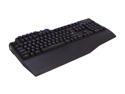
Gigabyte Aivia Osmium Cherry Red Mechanical Gaming Keyboard Blue Back-lit (GK-OSMIUM)
Pros: -Backlit -Great Macros -Typing felt good -Nice and sturdy design
Cons: -Failed on me in just over a year
Overall Review: The keyboard decided to stop working just over a year after purchase. Bought on 8/12/13 if I remember correctly. First the lights started to flicker on and off, then it just quit on me. It was such a great keyboard while it worked. You would expect that a $100 keyboard would last several years. Very disappointed. If you want a keyboard that'll last, stay away from this one.
8/28/2014See more detail
420mm Radiator Support Note
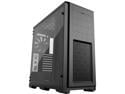
Phanteks Enthoo Pro TG PH-ES614PTG_BK Integrated RGB Lighting Control Tempered Glass Side Panel ATX Full Tower Computer Case - Black
Pros: The case is great in almost every way, but see cons and overall for some additional information which may help if you have a 420mm radiator.
Cons: -To install a 420mm radiator up top, you will need to take out the 5.25in drives -The two main panels to remove are structural and may introduce case flex when removed.
Overall Review: I thought based upon the reviews and pictures that I would be able to install a 420mm radiator up top with little issue, however you must remove structural pieces. Thankfully they do include a small cross piece that keeps the case somewhat rigid after how bad it was when I had initially removed the structural pieces.
3/10/2021See more detail
Great, even years after release

Intel Core i7-5960X - Core i7 4th Gen Haswell-E 8-Core 3.0 GHz LGA 2011-v3 140W Desktop Processor - BX80648I75960X
Pros: -Very overclockable -Quick with heavy workloads -Able to sustain overclocks requiring 230W form the socket
Cons: -Absolutely none as of 2018; it has not yet become irrelevant for many intensive modern applications
Overall Review: Was able to overclock it to 4.7Ghz at 1.315v
5/14/2018See more detail
Solid Board With A Few Hitches
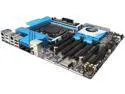
ASRock X99 WS-E LGA 2011-v3 Intel X99 USB 3.0 Extended ATX Intel Motherboard
Pros: -Great ram support -Solid quality design -Multiple RAID arrays on one controller -Fast POST -Expandability & Futureproofing -Nifty dual BIOS -Reliable Overclocking results
Cons: -Louder than necessary south-bridge fan -Difficult to get 3000mhz ram above 2666mhz
Overall Review: I bought this motherboard in conjunction with a i7 5960X and 32gb of 3000MHz DDR4 ram for futureproofing. I intended on overclocking it to 4Ghz, as most can, but any manual overclock above 3.75Ghz won't apply and reverts the system overclock to default (auto settings will apply, but are broken when modified the slightest). I expect to find away around this in the upcoming months, but it's still an inconvenience. Regarding the southbridge fan... It is clearly audible above even my graphics card fans, which are admittedly quiet. I have gone into the BIOS and manually set the fan to maintain a minimum constant rpm (in which the lowest possible setting is 65%). Despite this, it still occasionally ramps up. I expected this was because the southbridge sets the fan to go full speed when overheating, but I found that was not the cause of this. The southbridge is always below 55C, as it should be. While the southbridge fan is an annoyance, it alone doesn't merit a 4 egg review. It's the combination of both cons that really does it. In conclusion, the motherboard works great with only a few caveats. I would recommend it. EDIT: After a few years with this board, I can say that I am fairly impressed with what they have done. There was a BIOS update recently (years after initial release!). I was able to get my processor up to 4.7GHz while playing with a few settings here and there.
5/14/2018See more detail
Stable At Rated Speed With Some Modifications

G.SKILL Ripjaws 4 Series 32GB (8 x 4GB) DDR4 3000 (PC4 24000) Memory Kit Model F4-3000C15Q2-32GRBB
Pros: +Very fast compared to DDR3 +Spacious
Cons: -May require voltage modification depending on system
Overall Review: I had to increase my system agent voltage by an offset of 0.2v (1.2v effective), which allowed the 5960X's imc to achieve the kit's rated speed.
1/4/2016See more detail