




 here!
here!
I’m your shopping assistant for PC builds, upgrades, and everything tech.
Got questions? Ask away!
Start a conversation
here!
I’m your shopping assistant for PC builds, upgrades, and everything tech.
Got questions? Ask away!
Start a conversation

Joined on 09/28/05
Highest rated Samsung B-die available, but don't expect your system to run it @ 4800
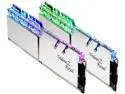
Pros: This is some of the highest speed available RAM that uses Samsung's legendary B-die, and is green-lit from the manufacturer to run 4800MT/s*. Even if you cannot run these at XMP (which is a very likely outcome), it's expected that you have some knowledge to manually tune these to get the most out of them. You can expect some very good characteristics from tuning timings and subtimings manually out of this kit.
Cons: There are many caveats in order to get this running at 4800MT/s. You absolutely need a capable motherboard that is optimized for high frequency. An ASUS APEX board, MSI GODLIKE, or similar top end board that has been built with overclocking in mind. You also need a CPU that has been pre-qualified to run RAM at these speeds. The chances of getting any off the shelf CPU to run these RAM speeds are very slim. On top of that, even if you do get the "silicon lottery" on your mainboard and CPU to run these at their rated speeds, you may need to run uncomfortably high supporting voltages (such as 1.5 volts or higher for Intel's System Agent). It's not currently known how detrimental these voltages are in the long run, so tread cautiously.
Overall Review: Don't get me wrong, this is a fantastic RAM kit. However, you need the hardware to run these at the specced speeds. A random off the shelf set of parts will not run these at 4800. You can expect closer to 4400MT/s to 4666MT/s at the top end for a random off-the-shelf 9900K or 10700K/10900K. A CPU that has been binned specifically for RAM speed will have a higher chance of running this ram at 4800MT/s without errors. If you do not have a ram-binned CPU, then I cannot recommend getting this RAM kit, and you would be better off purchasing a kit rated between 4400MT/s and 4666MT/s if you want a high performance set of RAM. Do NOT purchase this if you think you can just enable XMP and be running at XMP speeds. There are many other factors that could prevent success. Another note: Since this uses Samsung B-die chips, I cannot recommend using this on AMD Ryzen platforms. There is minimal performance benefit, if any, to running RAM past the limit of the CPU's Infinity Fabric speed, which typically caps out at 1900MHz (or 3800MT/s in terms of RAM speed). Even if you were to decouple RAM and IF speeds and run your RAM faster than your IF, the Samsung B-Die found in this kit is not a good pairing for AMD Ryzen. For that, I would recommend kits that use Micron RAM chips. If you want the most out of your Ryzen CPU with a high performance kit, instead look at G.Skill's TridentZ Neo RAM kits, or other similar kits with a rated speed of 3800MT/s or lower.
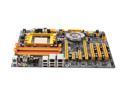
Pros: Supposedly the best A64 board around with SLI. 8 SATA ports is nice, though I'll find the RAID5 on the extra raid contrlller to be good for future plans.
Cons: This board simply will NOT run with any more than 1 stick of ram, put in slot #2 (Orange). I think the board is defective as I have tried countless different settings (Drive strength included) and I cannot get my memory to work. I have OCZ platinum DDR600 512MB ram that worked perfectly in my NF7-S v2.0 before. I don't see why DFI didn't include a universal setting or something so the memory will work right off the bat. This is really upsetting me and I may RMA the board.
Meets or beats the competition @ great price
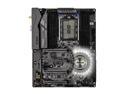
Pros: Was a great price at the time of purchase Great tweaking options in UEFI, lots of exposed options No post-setup issues. It just works. Better stability beyond stock compared to previous X399 board I used
Cons: VRM temperatures could be improved at very high loads beyond stock configuration, but remain acceptable throughout all the punishment I put it through. A-Tuning software currently not working
Overall Review: I wasn't happy with the MSI X399 board I was using and saw a very good deal Newegg was running on this board for a few days, and another person was using this same board on a well-respected overclocking forums, so I pulled the trigger. Shoprunner had it delivered in 2 days, and setup was straightforward. Don't expect a lot of accessories aside from the basics (I/O shield, wireless antennas, SATA cables, setup guide, multi-GPU bridges, a few others). The board does have some RGB integrated and some RGB headers, but I'm not an RGB kind of guy, more into functionality. UEFI had a very small thing that I greatly appreciated: a customizable delay between end of UEFI loading and start of OS loading, so I don't miss an opportunity to get into the UEFI options. Also had the VDDP voltage exposed too, both of which missing on the MSI options. UEFI also has full access to any AGESA related options, so you can really get into the nitty-gritty. Also, avid threadripper overclockers understand the performance of increase RAM speed with Ryzen. I was able to operate 3333MHz without any adjustments other than setting "XMP", and even use some 3466 and 3600 speeds with some minor adjsutments. My previous MSI board did not reliably work beyond 2933 without random BSOD's or powering off on its own (Starting to see a pattern here?) On the topic of VRM temperatures, I don't think VRM will become a limiting factor with the included cooling heatsinks, as long as there is -some- airflow if you intend to fully load your threadripper CPU beyond stock configuration. I'm talking 350 watts on the CPU, you will likely be fine with just passive cooling. Beyond that, get some airflow. Also, you can completely turn off all RGB and motherboard lights inside the UEFI if RGB isn't your thing. That was a pleasant surprise too. The only minor con was the A-Tuning software, which is Asrock's board/CPU tuning software for windows, currently does not work (Crashes on start), which other users have reported too. But there isn't anything there you can't already do in the UEFI, so not a big loss. Threadripper sometimes has some POST issues, but I have had -none- on this board. Great job on that Asrock. All in all, I am very satisfied with this board. I'll definitely recommend this to others, and will probably stay with Asrock in the future. This review for ASRock review rebate program.
It's a network cable.
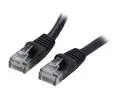
Pros: Sturdy feeling, works out of the box no problems, inexpensive. Minimal waste packaging.
Cons: ....Short? But if you're interested in this, you need a short cable anyways, like I did.
Overall Review: Used this to connect my cable modem to a gigabit router which were right near each other to reduce on wire clutter. Works great,
You get what you pay for
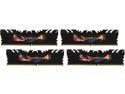
Pros: Better binned chips, about 40% faster than Intel's officially supported speed of 2133MHz.
Cons: Requires a CPU with a strong memory controller. This means winning the silicon lottery with your CPU.
Overall Review: I pre-ordered this kit around the day that the X99 platform was released for sale. Unfortunately, my i7-5960x wasn't up for the job. It was a poor overclocker, doing, at most, 4.3GHz core. Also the few times I was able to boot with the RAM @ DDR4-3000, it eventually flat out froze. The same behavior persisted in memtest86, even though no actual errors were detected. I was only able to stably run the RAM @ 2666MHz 13-13-13-30 1T. Recently I purchased a 'new' i7-5960x that was tested / binned with a higher clock speed. It can now run DDR4-3000MHz 15-15-15-35 1T just fine. So the people that are complaining about this kit only running at 2666 stable and not 3000, the problem may lay with your CPU. Intel only guarantees 2133MHz RAM to work. Anything higher is an overclock and not guaranteed. As far as this RAM kit goes, I couldn't be happier with it.
Great stuff.
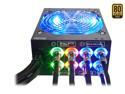
Pros: Ability to turn off the lights on the fan. Solid, stable power. Can be fully loaded without issue. I use two of these now for two separate computers that do number crunching on graphics cards. Each computer draws about 1000 watts at the wall with 8 GPU's in each computer, though I loaded it up once with extra parts a couple days to draw about 1350 watts at the wall, and the power supply still chugged along. It works just fine with either 125 volts AC or 250 volts AC; Electrical efficiency is about 2% higher with 250v, bringing it closer to 80PLUS PLATINUM levels. Granted the air coming out the exhausted started to get warm/hot, this is expected for the massive amount of electricity you're converting to DC. I can't comment on noise since the graphics cards' fans drowned out any noise from the power supply. The modular connections into the power supply are very solid too, but will increase the clearance needed in your case by about 2 inches. Also lights of various colors (Red, green, blue) around the modular plugs will light up when you have a cable solidly plugged into them if you like seeing pretty lights. 8 PCI-E power plugs and 2 EPS12v cables will sufficiently power any gaming computer you want to build.
Cons: Not 100% modular, but if you aren't already using this in multiple GPU setup with a high end CPU that requires 2 EPS12v power plugs, you are likely selecting a too high capacity power supply for your build. Lights on the modular barrel plugs cannot be turned off when a cable is plugged in.
Overall Review: Make sure you select the right capacity power supply for your equipment. 20% capacity is the lowest amount measured by 80Plus, and power supply efficiency quickly drops off below this. 80Plus Gold states a minimum of 87% efficiency at 20% capacity, or 260 watts DC. When your computer is idling, it may only be drawing 130 watts, or 10% capacity, which brings power supply efficiency down around 82-85%.


