

Your Browsing History


Brandon R.
Joined on 03/19/17
0
0

product reviews
- 1
This Motherboard is Outragerous
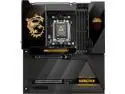
MSI MEG X870E GODLIKE, E-ATX - Supports AMD Ryzen 9000 / 8000 / 7000 Processors, AM5 - Dynamic Dashboard III, EZ Slide M.2, 110A SPS, DDR5 Memory (9200+ MT/s OC), M.2 & PCIe 5.0, USB4, Wi-Fi 7, 10G LAN
Pros: I/O is exceptional VRMs don't break a sweat DIY features are intuitive and a joy to work with It is a beautiful center piece for a build.
Cons: The software leaves some room for improvement The LCD display only (currently as of 12-01-2024) can only show CPU/system temps, no GPU settings.
Overall Review: Let's start off by saying this motherboard is NOT for everyone. It is a premium product with a premium feel that is completely over the top in every sense. With that out of the way, lets dive into this monster X870 board. Kicking off with the unboxing experience, MSI has gone to great lengths to deliver a white-glove worthy experience that will make you feel like you're unboxing a chest of gold. The sleek black chassis with all its metal accents will peer right back at you as it is removed from its home. Underneath, organized into individual LABELED boxes, the accessories are clearly marked and it keeps everything where it belongs until its in use. The solid metal backplate adds a TON of rigidity and weight to the board, which makes it feel substantial when handling. Mounting is was somewhat of a challenge, as you need to remove several of the DIY M.2 covers to access the hidden slots for the motherboard mounting screw holes. (More on the DIY covers later). Once it is mounted on your chassis, the first major pro of this board will become evident. All the connections are set at a right angle where you'd normally expect them to be... but they are also joined by a new connector that allows you to send the fan connections and ARGB headers to another location hidden wherever you'd like them to be. This ELIMINATES that pesky task of fishing cables under the board and trying to bend cables to sit properly in a tight cramped space. This feature alone makes the board stand out in a class of its own. It also features additional PCI-E connections (Also right angle) for additional power to both the PCI-E lanes and the USB bus for 60w fast charging. My PC is watercooled, and I appreciate the inclusion of 2 system pump headers for ease of connection and control. I would have liked to see these headers moved to the bridge, but I'm not going to split hairs. The board has a low number of traditional SATA ports, but lets be honest here... with all the M.2 slots, (2 5th gen and 3 4th gen) It's hard to imagine not going entirely M.2 for storage. Speaking of M.2 storage, each of the bays for the drives are hidden under some aesthetic covers...which is nothing new, especially for higher end boards...but MSI has engineered a tool-less system that actually makes working with these pieces easier. using magnets and latches, the covers can be removed and replaced in record time. It took me 13 seconds to remove the cover, take of the plastic shield on the thermal pads (WHICH HAVE A TAB FOR EASY REMOVAL THANK YOU!) install the M.2 drive, and replace the cover. I mentioned earlier that taking these covers off was required to access the screw holes, and honestly... it hides the screws and it's SUPER easy to do, so this doesn't bother me at all. So once the PC is assembled with this at the core (lol) the BIOS is typically the first stop to set up fan curves, RAM settings/overclocking. The Click Bios X is... okay. I am coming from an ASUS board, so I am still in a learning phase...but the bios feels a lot simpler. there are some settings that I havn't had the chance to dive into, like the Memory Test It! option, but I set up everything I needed without any issue whatsoever, and it booted first try. All of the core/critical items most people would be looking for are front & center. Since I've installed the MSI X870E Godlike, I have had 0 issues with stability, which is unusual to me, as my ASUS board was somewhat difficult to deal with sometimes. Issues with Thunderbolt 4 have disappeared, and I am currently running with ALL my USB devices for flight sim & content creation running without a hitch. The only major complaint I have about the board is the MSI Dragon Center. It has some interesting options, but the hardware monitoring suite seems to only poll the CPU and general system temperatures... The LCD screen is SO handy and I was extremely excited to move my CPU/GPU temps/usage...but sadly it seems it can only report CPU details at this time. A minor gripe, but hopefully MSI can add a full sensor suite to the potential display options for those of us who don't want to run a hardware monitor overlay to track those values. A word to potential buyers, be sure to get all the drivers and have them handy, as my LAN drivers were not compatible, and required some creative file transfers to get the 5G and 10G LAN ports to work correctly. A minor thing that I've seen happen before with other manufacturers too. Final thoughts, to quote the great Ferris Bueller. "It is so choice. If you have the means, I highly recommend picking one up". It will serve not only as a rock solid (literally) foundation for your system, but a centerpiece to marvel at every time you power it on. OH. MSI, THANK YOU FOR MAKING YOUR RGB SETTINGS RESTORE ON POWER ON. I can't tell you how long I tried to get away from the rainbow puke on every other board during POST.
12/1/2024See more detail