

Your Browsing History


Edward C.
Joined on 05/06/04
0
0


product reviews
- 8
Nice M.2 280 2TB SSD
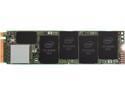
Intel 660p Series M.2 2280 2TB PCIe NVMe 3.0 x4 3D2, QLC Internal Solid State Drive (SSD) SSDPEKNW020T8X1
Pros: Fast, good price, easy set up using Windows 10 Control Panel\All Control Panel Items\Administrative Tools/Computer Management/Disk Management to format and setup a storage drive. I am running three different M.2 SSD in a Gigabyte X5570 AORUS Master Motherboard. 250 GB for the C dive and OS only, 500 GB for Software and utility's, and now the 2TB SSD for storage of my Game Library.
Cons: None so far, as I just put this drive in two days ago for my Steam library.
Overall Review: For me, its about reliability, good speed, price, and what the drive is used for. For my setup it fits all of the above. However, reliability to be determined. I also prefer the clean look of the M.2 SSD in a gamming pc.
1/20/2020See more detail
Left Click fell off after 60 days

New Razer RZ01-01610100 Gaming Mouse Naga Chroma Ergonomic MMO
Pros: All was functional but started missing a few clicks when pressing the left mouse key after about 3 weeks of use while playing ESO MMO. I bought this as my Naga Epic is going on 3 years old, but still working. I wanted a replacement should it fail, but started using the Naga Chroma as I really liked the extra left and right buttons on the center wheel. 1
Cons: Left Click plate fell off after 60 days and will not stay on the mouse.
1/30/2018See more detail
This RX 9070 XT fits my play style and games.
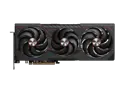
SAPPHIRE PULSE Radeon RX 9070 XT 16GB GDDR6 PCI Express 5.0 x16 ATX Graphics Card 11348-03-20G
Pros: SAPPHIRE build quality 16GB VRAM for future AAA titles Cool, quiet thermals ideal for warm climates Excellent performance in RDNA 4optimized games Great value, especially with tradein programs Backplate airflow design Includes GPU brace Perfect pairing for OLED ultrawide gaming
Cons: Power connector placement could be better Not aimed at competitive esports players Ray tracing is good, but not the absolute best in the industry
Overall Review: I chose the SAPPHIRE RX 9070 XT for practical, realworld gaming rather than chasing benchmark numbers, and it has exceeded expectations. The 16GB of VRAM was the deciding factor with future titles like The Witcher 4 on the horizon, and this card is clearly built for longterm AAA performance. Paired with an OLED display with a .03ms response time, the image quality, frame pacing, and overall smoothness are outstanding. One of the biggest advantages is how cool and quiet this GPU runs. In a Florida office where heat matters, this card avoids the highwatt, highnoise behavior of some competing GPUs. It delivers excellent frame rates in modern AAA games without burning unnecessary power or turning the room into an oven. SAPPHIREs cooling design is solid, consistent, and noticeably quieter than many cards Ive owned. Performance in RDNA 4optimized games is excellent, and the card handles openworld and storydriven titles beautifully. For players who value immersion, stability, and clean visuals over extreme FPS numbers, this GPU hits the perfect balance. Its also a great value when factoring in tradein programs and the overall build quality SAPPHIRE is known for. If youre a competitive esports player chasing the absolute lowest latency and the highest possible FPS, there are other GPUs better suited for that niche. But for real gaming RPGs, openworld titles, cinematic experiences, and OLED setups this card is a smart, efficient, and futureready choice. I would absolutely recommend it and would purchase it again.
6/20/2026See more detail
Show up, installed, and working.
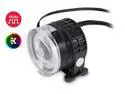
EKWB EK-XTOP Revo D5 RGB PWM Pump, Plexi (Acrylic)
Pros: Quite, powerful. RBG works with my Gigabyte AORUS Master Motherboard D-LED header and RGB Fusion 2.0 software.
Cons: Not really a Con, but it is a big pump, so make sure you have a space to mount it.
Overall Review: I bought an EVGA RTX 3080 black GPU and decided to cool it with the EK-Quantum Vector RTX 3080/3090 water block and their Backplate. This was my first attempt at water cooling. Watched a lot of Jaystwocents for help as he does a lot of PC water cooling. The fitting are crazy expensive, so I was not able make my set up look as nice as Jays water-loops. I went with soft tubing with no extra fitting to manage the hoses better. Its a work in progress. Bottom-line, I am 6 degrees cooler at idle 35C with out fans running full out to get 41C at idle. I think I will get the water-loop even cooler once I bleed all the air out of the loop. I did order the EK-AMD CPU water block and will remove the Prism Wraith fan and some more cable management is need as well. I am happy with this pump!
1/13/2021See more detail
No Setup Issues (Whew)
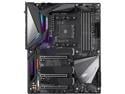
GIGABYTE X570 AORUS MASTER (rev. 1.2) AMD Ryzen 3000 PCIe 4.0 SATA 6Gb/s USB 3.2 AMD X570 ATX Motherboard
Pros: Bios came with version F3 was able to use Bios Q-Flash to update to F6 with no issues or problems. Love the easy mode Bios screen. Used USB to load Windows 10 Home 64 bit on an M.2 SSD with no issue. Everything was detected and the first time boot was flawless. I am still in the process of completing this build but wanted to get it up and running and some burn in time on the Ryzen 9 3900X CPU and the OLOy 3200MHz CL 16-18-18-36 32GB Memory, and the this Gigabyte X570 Aorus Master motherboard for any possible warranty issues. But Happy to have none. Last comment: This is the heaviest I have ever held, its built like a tank.
Cons: I missed a price drop of $259.00 after my purchase of $359.00. If that price is still available buy it, you won't be sorry.
Overall Review: First AMD Build in 15 years! Welcome Back AMD and Thank you Gigabyte for this quality AMD Board.
12/21/2019See more detail
Worked out of the box and no issue as of 60 days
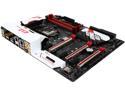
GIGABYTE G1 Gaming GA-Z170X-Gaming 7 (rev. 1.0) LGA 1151 Intel Z170 HDMI USB 3.1 USB 3.0 ATX Intel Motherboard
Pros: Showed up on time with the latest BIOS F6 loaded. However, I Think they're up to F9 with fix for a i7 skylake prime issue, improvements for M2 SSD and Raid. I am using the M2 SSD without issue using BIOS F6. I just uses this build for gaming so at this point BIOS F6 is still fine for me.
Cons: None really. I built this PC using the Corsair Vengeance Series C70 mid tower PC case and the Corsair Hydro Series™ H100i V2 Extreme Performance Water / Liquid CPU Cooler. 240mm and mounted it on the top of the case. I was not able to use a push pull fan configuration as the fan on the bottom side of the radiator would hit the MB. I need the front of the case to mount the 980 Ti Hybrid radiators. Not sure if the Con is for Motherboard as all three manufactures could have done things slightly different to make it work. Bottom-line the i7 6700K runs so cool I did not need the extra fans anyway.
Overall Review: I built this PC in preparation for the HTC Vive VR Steam kit. Sadly after much frustration I found out that the USB controller drives are not compatible. I think this is also true for the Oculus Rift. I looked on the Gigabyte website for a Updated USB controller drive but they did not have any available. At this point I had to buy the Inateck PCI-E to USB 3.0 5-Port PCI Express Card to get the HTC Vive VR to connect with VR Steam software. All is working now and VR is a lot of fun.
5/3/2016See more detail
seller reviews
- 4
Wonderful PSU single stranded black cables
Wonderful PSU single stranded black cables I bought these to use with my 5-year-old Corsair AX1200I PSU. (Yep still delivering perfect power) I am upgrading my Gaming PC with an Aorus Master X570 Paired with the Ryzen 9 3900X and want to upgrade the PSU cable set for a cleaner looking build. I am very satisfied with the quality and look of this cable set. I was nervous to make this purchase because of some of the negative reviews about RM power supplies being damaged. Even though I had an AXI it was still worrisome. However, all the cables I used had no issue, and I did see there were two kinds of 24 volt cables in the kit, with one marked vary clearly had RMX on it, I am not sure if that cable is a new addition to the kit or if using the wrong 24 volt cable was even the issue for the other reviewers. Bottom-Line over the decades buying from Newegg I have developed a trust for Newegg and their sellers, so I pulled the trigger. I also want to point out that I value and weigh all the reviewer’s comments, it is a big part of way I buy or skip a product. My two cents: I would recommend this cable kit to a friend, but keep in mind this is my first custom cable purchase. Recommendation: Seller (Bitfenix) you may want to monitor these reviews and chime in with support numbers or links to support for the customers having issue and maybe a follow up of why these issues happed.
On-time
Delivery
Product
Accuracy
Customer Service
Satisfactory
12/26/2019See more detail
Nest Hello
Nest Hello showed up working and I had the whole thing setup and working in about 3 hours. Using the Nest Hello compatibility web site I found out I needed a different transformer than what I had in my home had prior to this purchase. I ordered this transformer. "Honeywell RCA900N1008/N 16V Low Voltage Transformer" It worked perfectly without any issues. The Nest Hello App takes you through step by step and is easy to follow. I am very satisfied with this purchase.
On-time
Delivery
Product
Accuracy
Customer Service
Satisfactory
11/13/2018See more detail
Razer MMO Mouse
I have been using the Razer Naga Chroma to play ESO for about 3 weeks now and has help me a lot using skill or casting a spell cast quickly. I do have a hard time finding the correct button to push within the 12-button array, so I tend to only use the 1-2-3 & 10-11-12 buttons as they are at the edge of the array and easer to find. But 6 extra thumb buttons are still a huge help. Bottom-line: The Razer Naga Chroma is working perfectly and showed up on time for a very fair price. I did not have to go through an RMA process so can’t give you any information about how this would affect my opinion of this seller. However, I am very satisfied with this purchase form this Newegg's Seller.
On-time
Delivery
Product
Accuracy
Customer Service
Satisfactory
11/17/2017See more detail