
Your Browsing History


Aaron K.
Joined on 10/13/05
0
0
product reviews
- 2
****Several Issues Solved****
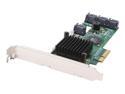
HighPoint RocketRAID 2320 PCI-Express x4 SATA II (3.0Gb/s) RAID Controller Card
Pros: Those of you who are having issues.....
Cons: First of all the Mac guy should not be messing with multi HDD arrays if he doesn't understand how static partitions work (IE Linux/Unix/Mac). When you create the RAID 5 like any other controller it is a logical array that the OS sees as a physical disk. If you already have the Array created, then format and partition the disk a resize of the disk will not be automatically used or dynamically expanded by any OS that I am aware of. You have to manually expand the partition. For example you have to do this in cmd for windows, "diskpart" then select the disk, then partition, then type "extend". Depending on the filesystem used for your Mac you would have to do something similar. I'm not a Mac user but I'm sure there is a built in partition manager.
Overall Review: Now for having both onboard and HighPoint RAID enabled on some motherboards. I had the same issue with an Asus PrQ Pro. You have to use the High Point tool that comes with the BIOS download from the HPT website. Its called hptflash.exe. It allows you to enable or disable options on the rom of the card. You are going to want to backup the BIOS and then open it in the config tool. Then choose the config button and disable INT 13 Support. This will disable the card as being bootable. I also change the Time waiting to 1 so the server boots faster. It would be nice if there was documentation for this as I consulted HPT about this issue and they didn't even know about it. Hope this helps some people out as I looked long and hard and couldn't find any info on this.
12/15/2009See more detail
Doesn't work w/ Keyboard
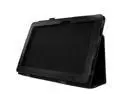
Case Cover Holder Magnetic For Asus Transformer Book T100 T100TA 10.1" PC574
Pros: It was cheap?
Cons: Fits without the keyboard. All the access cutouts seem to align well with the ports on the tablet perfectly. Could not attach the keyboard with the case installed.
4/22/2014See more detail