
Your Browsing History


Vladyslav H.
Joined on 02/07/02
0
0
product reviews
- 44
Great in RAID-0 on Windows 7
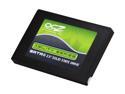
OCZ Agility Series 2.5" 60GB SATA II MLC Internal Solid State Drive (SSD) OCZSSD2-1AGT60G
Pros: - Indilinx controller allows RAID. - Two of these drives together cost close to a single 120GB SSD, while having performance (in RAID-0) that beats by large margin just about any 120GB SSD drive on the market. - RAID-0 so darn fast, it takes longer for the motherboard to POST than Windows 7 to boot.
Cons: None.
Overall Review: When I got the drive, its price was noticeably less than Vertex's. However, if current price is close to Vertex, get Vertex - it's just like Agility but, with *slightly* faster Samsung flash memory chips. (OCZ, you have to sell this one for less than Vertex!!) RAID-0 functionality of Indilinx-based drives may soon be improved by two changes in the software: - Upcoming firmware updates that will have background garbage collection, preventing degradation of MLC drives' performance. - Intel Matrix Raid driver needs to pass through ATA Trim command from OS to SSD drives in RAID. Currently it seems to pass Trim only to non-raid SSD drives.
8/24/2009See more detail
One of two is freezing, OCZ support is not listening
OCZ Agility 3 2.5" 240GB SATA III MLC Internal Solid State Drive (SSD) AGT3-25SAT3-240G
Pros: Fast, lots of space
Cons: One of two is freezing Windows
Overall Review: I have been buying SSDs since 2009 and by now bought about a dozen of SSDs, most of which are OCZ. Three of them died, all in the span of last three months. I own two of Agility 3 240 GB drives: one is perfect and another one is freezing up Windows 7 about every 30 minutes. As frustrating as that is, when I requested RMA from OCZ, they sent me instructions on how to try to make it work, going through which cost me an evening of labor, all the while it was pretty clear that drive is faulty, because it replaced Vertex 2 that worked fine in the same system. Sure enough, I wasted time for nothing - drive as unusable as before firmware version 2.22, latest Intel RST driver and latest BIOS. I suggest OCZ should simply replace faulty sandforce-based SSDs as soon as they get an RMA request, because I feel like OCZ support was just trying to stall instead of helping me.
6/8/2012See more detail
Good for the price, great 16GB RAM, very basic otherwise
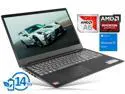
Lenovo IdeaPad S145 Notebook, 15.6" HD Display, AMD A6-9225 Upto 3.0GHz, 16GB RAM, 256GB SSD, HDMI, Card Reader, Wi-Fi, Bluetooth, Windows 10 Home
Pros: - Price - 16GB of RAM - 256 GB SATA SSD - Plenty of ports - Easy to access and use Power button on the keyboard - Bluetooth - Windows 10 Home
Cons: - Very mediocre screen - viewing angle is very limited. - Weak 2-thread CPU. - Display colors skewed heavily towards cold/magenta cast, needed color calibration to get OK colors. - Cheap materials. - No Fn lock on the keyboard, changing default function key behavior required BIOS access.
Overall Review: For the price, this is a very good deal. 16GB RAM basically makes it so, with 256GB SSD also sweetening the deal. Underpowered CPU is the first negative thing one may notice, followed by the very basic display with quite restricting viewing angle range.
12/10/2019See more detail
Failed right away and had to be repaired under warranty - a long and user-unfriendly process
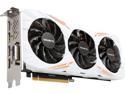
GIGABYTE GeForce GTX 1080 Ti 11GB GDDR5X PCI Express 3.0 x16 ATX Graphics Card GV-N108TGAMING OC-11GD
Pros: - Works well for DaVinci Resolve effects rendering purposes. - Quiet.
Cons: - Worked for only 2 hours after installation, before breaking. Had to RMA and have it repaired under warranty.
Overall Review: Gigabyte RMA process is long, confusing and user-unfriendly. Since I need this card for work rather than for playing games, the delay had negative impact. Such an expensive piece of hardware deserves to have much better support and warranty process than a $20 USB hub. If you are buying such a card for business purposes or for serious hobby, you may want to look for a more reliable brand.
12/19/2017See more detail
Takes up to 32GB of RAM

TOSHIBA Satellite 17.3" Intel Core i7-3630QM 8GB Memory Windows 8 64-Bit P875-S7310
Pros: - 4 RAM slots taking up to 32GB or RAM. 2 slots are easily accessible. - Powerful Core i7 CPU. - Easy to upgrade with 3rd party SSD drive. - Great value for $600 shipped. - Not too heavy for 17.3". - USB 3.0 ports.
Cons: - Output layout bad right-handed mouse users.
Overall Review: I am a hardcore software engineer and I got the laptop to be my workstation when I'm on the road. After I added memory and replaced stock spindle hard drive with SSD, this laptop fits the bill quite nicely. The only peeve I have with it is that most frequently used connectors on this laptop, like power, HDMI and VGA, are on the right side, sticking out right in the way of mouse. It's not terrible, but somewhat inconvenient. This laptop pictures on the web are sort of misleading, as they show connectors on both the back and the right side of the laptop, but in reality this model has them only on the sides - back has no connectors at all. But overall this is a great system for the price. Given its powerful CPU and ability to extend memory a lot, this laptop may stay relevant for quite some time.
6/3/2013See more detail
Great - 22 Watt, fast Win8 boot
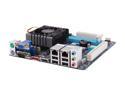
GIGABYTE GA-C847N-D Intel Celeron 847 1.1GHz Intel NM70 Mini ITX Motherboard / CPU / VGA Combo
Pros: - Inexpensive. - Powerful enough. - UEFI BIOS. - Auto-power-on after power outage. - Draws only 22 Watt idle, measured at the electric socket, with 2 SSDs connected. - Bare Windows 8 gets loaded in about 15-20 seconds from an SSD.
Cons: - No RAID.
Overall Review: I got this combo to serve as an AD domain controller, and SQL Server mirroring arbiter, both of which don't need much of a processing power, but for now I put Windows 8, and it's flying.
5/7/2013See more detail