


Your Browsing History


Philip B.
Joined on 03/13/24
0
0

product reviews
- 11
Wow this thing is awesome
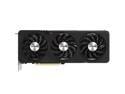
GIGABYTE Radeon RX 7600 XT GAMING OC 16G Graphics Card, 3x WINDFORCE Fans 16GB 128-bit GDDR6, GV-R76XTGAMING OC-16GD Video Card
Pros: It's big, heavy, and beefy yet is is so quiet. It is a very long card, and it has a very large cooling solution but even with 3 fans it is whisper quiet. It maxes out Alan Wake 2 with every setting turned on the highest at 1080p. It never gets loud or hot, and there is no stutter. It's simply amazing for the price and with 16gb of RAM is future proof. I knew it would be fast because it takes 2 8-pin power connectors. That is insane. It is the fastest video card that I have ever had.
Cons: There is nothing that I do not like about this graphics card
Overall Review: Buy it for the price it is a great video card. If you are looking at a 7600 XT, I recommend that you buy this one simply because it is overclocked for you, and it comes with a substantial, yet whisper quiet cooling solution that helps cut down on overall system temps and noise. It is the only 7600 XT I looked at that had alternate spinning fans, which is a thoughtful design.
3/26/2024See more detail
Liquified Awesome

Corsair iCUE H115i Elite CAPELLIX XT Liquid CPU Cooler - Two AF140 RGB Elite Fans - 280mm Radiator - Intel LGA 1851, 1700, 1200, 115X, 2066 / AMD AM5, AM4 - Included iCUE Commander CORE - Black
Pros: - Very quiet - Dropped temps of AMD Ryzen 5 7600X under load by 30 degrees - Easy installation - Allows using AMD Precision Boost Overdrive w/o crashing - Lights are cool - Consistent temperature - 5 year warranty - It's Corsair
Cons: - You have to plug this into a USB header on your mobo and install software - Doing so stops the PC from going to sleep on it's own, you have to manually put it to sleep
Overall Review: Do you know how enabling Precision Boost Overdrive causes the game to crash? This fixes that problem. I wasn't expecting a 30 degree drop in temps under load, so that's pretty crazy. I was using a dual radiator/dual fan cooler and my CPU would run at 73 degrees while gaming, and that's not a bad temperature according to AMD. Forum posts indicate using a less beefy cooler my Ryzen 5 7600X would operate at 92 degrees in games which seems insane to me. This cooler keeps the CPU much cooler at 43-44 degrees while gaming or idle, allowing me to max out the ultra settings of every game I throw at it, getting 100-150+ FPS with a Radeon 7600XT at 1080P. The only exception is Alan Wake II. I have to toggle some of the settings off of high to maintain smooth game play and I attribute that to the video card, not the processor but I couldn't/can't justify spending so much money on a better video card and monitors just for a couple of games. The CPU temp stays at a consistent 43-44 degrees under load or idle, so I know it could handle a much hotter CPU than 105 watts. Before, my PC would actually heat up the room and get pretty loud from all the fans spinning so fast. Adding this to my system lowered the noise generated by my computer and therefore keeps the room much cooler too. It should be mentioned that I used Arctic Silver MX-4 thermal grease, not what was included. The only problem I have is that because the RGB controller plugs into a USB header, it for some reason stops the PC from going to sleep on it's own on an MSI 670E motherboard, so you have to manually put it to sleep when you are finished. I also wish that everyone would standardize ARGB and RGB connectors because my case , motherboard, and this liquid cooler all use different controllers/connectors and the fans can't be synced together for uniformity. I know everyone wants to lock you in and force you to buy their controller/fans, but the reality is everyone is like me and just uses multiple controllers because of cost, so you might as well throw your paying customers a bone. I mean nobody builds a new PC and chooses everything all the same brand. You upgrade parts as needed overtime to cut cost so you end up with 3 or 4 light controllers...A minor inconvenience as you can match colors well enough. Overall it's an awesome cooler with a 5 year warranty. Final thoughts are people complain about the install and that's a case issue. Corsair couldn't have made it any easier making it easy to swap CPU mounting brackets by hand without tools, then it's a matter of just adding a few mounting screws. No instructions are included to cut cost/save trees so go to Corsair's website. Most people buy cheap $60 cases and the problem with those is the space is tight and the manufacturing alignment is usually off for holes and stuff so that's the problem. I got a giant, well built case that was well thought out and an ATX motherboard so this went right in with no problems. In hindsight, I would have mounted the radiator at the top first, then installed the fans to the radiator instead of putting them on then mounting it all together. But doing that may block some fan headers depending on your motherboard layout so that is something to consider prior to installation.
11/15/2024See more detail
Great monitor for the price

ASUS 24" (23.8" Viewable) VZ249QG1R Full HD, IPS, 75Hz, 1ms, Extreme Low Motion Blur, Speakers, FreeSync, Eye Care, VESA Mountable, Ultra-slim, DisplayPort, HDMI, Tilt Monitor
Pros: Light weight. Thin. Bright. HDMI and display port included.
Cons: No HDR support.
Overall Review: For the price you can't go wrong. This is my second monitor so it didn't have to be super fancy. Are there better monitors? Yes, but they cost a lot more. This looks good enough for my needs. Overall the low price makes up for it even though I may be missing some awe factor out of my video card. Looks good, HD 1080p.
4/4/2024See more detail
Great monitor
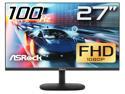
ASRock 27" 100Hz (Max.) IPS Full HD FreeSync (AMD Adaptive Sync) 1920 x 1080 sRGB 99% Challenger CL27FF Monitor
Pros: Looks good, HD 1080p. Light weight. Thin. Bright.
Cons: No HDR support. No display port. Why is there a VGA port? It's a dead serial bus that hasn't been common since Windows XP. There is not a modern system that supports VGA so it's weird to include it.
Overall Review: For the price you can't go wrong. Are there better monitors? Yes, but they cost a lot more. This looks good enough, although I wish it had HDR. Overall the low price makes up for it even though I may be missing some awe factor out of my video card. Looks good, HD 1080p. Light weight. Thin. Bright.
4/4/2024See more detail
Great fans cheap
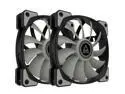
Montech Air Fan P120, 120mm Fan 2 in 1, 4Pin PWM, Durable Low Noise FDB System, High Cooling Performance, High Performance Fan Blades, Proprietary Enhanced Fan Frame
Pros: I'm not too cool to get excited about case fans. They are good quality, quiet, and move plenty of air. I like that they have rubber on them to act as a sound dampener. You get 2 fans in the box, screws, and adapters. The plastic is good quality, not cheap. There is some heft to the weight of these fans. I have had some fans where the plastic is so brittle that they make cracking noises when you screw them in. It has to do with the gasoline used when making the plastic. Companies will try to save money by using less gasoline, which makes more brittle plastic. I don't know why fans are so expensive now. Even the non RGB ones cost way too much.
Cons: Not really a con, but the 2 in 1 wording is misleading. I wasn't sure if there were going to be two fans in the pack and had to read the reviews. I would say 2 pack, or 2 in 1 pack. Not 2 in 1. 2 in 1 is a marketing terms used when a single item has 2 purposes.
Overall Review: Great fans. Good quality. Quiet. Great airflow. Hefty. Rubber sound dampener. Screws included.
4/4/2024See more detail
Great power supply
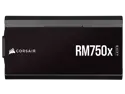
CORSAIR RMx SHIFT Series™ RM750x 80 PLUS Gold Fully Modular ATX Power Supply - Modular Side Interface - ATX 3.0 & PCIe 5.0 Compliant - Zero RPM Fan Mode - 105°C-Rated Capacitors - 80 PLU Power Supply
Pros: It's very heavy and beefy indicating that it is well built. It is very quiet and doesn't get hot. It has 8 sets of mounting holes drilled so it should fit any case, which is very thoughtful. The fan doesn't spin under light load and there is no coil/cap whine which is good. I really like the modular design and that the modular plugs are on the side facing you instead of on the back which makes it easier to work inside your case. I also really love the flat cables because they are easy to hide and run along edges and between cards and other small things allowing you to make art inside of your case. The flat cables are also able to be stacked on top of each other and zip tied together which is very nice. Overall if you take your time and use your head you shouldn't be able to see any cables inside of your case this way which is not only aesthetically pleasing, but allows for maximum, unobstructed air flow. I don't understand why people say the cables are too stiff to work with I thought they were very easy to hide. They're very small gauged wires mind you, how stiff can they be? If very thin copper wires get the better of you strength-wise, maybe don't tell anybody.
Cons: No cons this is a great PSU
Overall Review: Yes I recommend this PSU for it's quality, low cost, well thought out modular design, low noise, and ease to work with.
3/27/2024See more detail