




 here!
here!
I’m your shopping assistant for PC builds, upgrades, and everything tech.
Got questions? Ask away!
Start a conversation
here!
I’m your shopping assistant for PC builds, upgrades, and everything tech.
Got questions? Ask away!
Start a conversation

Joined on 07/20/06
G4 12" powerbook fit
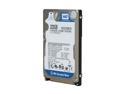
Pros: 1. Easy part for part replacement for dying 80gb drive 2. quieter than original drive 3. lower heat than original drive 4. larger capacity than original drive
Cons: No real cons for the drive. It was just painful taking the mac apart and putting it back together.
Overall Review: I recommend having a can of compressed air handy. If you are replacing the drive on on your powerbook and trying to squeeze out some life, your computer has at least 4 years of dust inside of it. Blow out the dust from the fans. Also, you should be able to find installation instructions on the web for taking the system apart/installing the drive. For the most part, the 12" powerbooks were extremely similar, so you should be able to take it apart based on online instructions. You will also need torx screw drivers to do it, in addition to the minis you may already have. GOOD LUCK!
dd-wrt compatible
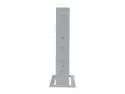
Pros: 1. Great replacement to my airport extreme wall brick 2. My airport extreme wall bricks can still function as itunes extenders 3. dd-wrt compatible 4. expanded my network so no my samsung tv (which supports dlna) can grab and read movies from my macbook running vuze 5. Can easily use more than one to create access points
Cons: 1. PIA to initially install dd-wrt. You must pay especial attention to the dd-wrt install instructions that tell you to install that other file first. I bricked one, but at $20, I was alright with that. Apparently, so was newegg, because they replaced it. 2. Will not run well if you do a full dd-wrt install; while it has the memory to barely support this, it will hang and suddenly stop running if you do this. Install the mini version. You will be much happier for it. 3. No external antennas. I have read about some hacks to open it up and install them yourself. I didn't bother; it's more worth while to just buy another one of the routers and extend your network using wds or some such thing. Yes, WDS will slow down your transfers inside the network, but I have noticed any internet download speed problems. 4. 10/100 i.e. no gigabit. I am migrating to a wired/wireless system for media serving and would have been a little happier with a gigabit router.
Overall Review: If you get one of the refurbs, while it is on sale, go for it. Otherwise, wait it out a little until it is one sale.


