
Your Browsing History


Andrew T.
Joined on 11/27/19
0
0
product reviews
- 5
Quirky, but Good
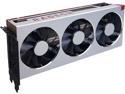
XFX Radeon VII 16GB HBM2 PCI Express 3.0 CrossFireX Support Graphics Card RX-VEGMA3FD6
Pros: - 7nm - 16GB HBM2 - 1 TB/s
Cons: - 10-bit H.265 AMD hardware decoding does not work in Davinci Resolve - Adrenalin 2020 Edition is not as stable as Radeon Pro Software for Enterprise - Using hardware acceleration with default settings in Firefox mayl crash your system
Overall Review: I purchased the Radeon VII to use with Davinci Resolve 16. As another reviewer encountered, with 10-bit HEVC footage, when hardware h.264/h.265 decoding is enabled in preferences AND the AMD box is checked, the red channel disappears completely (meaning only the blue and green channels display correctly). This is a known issue Blackmagic Design has also been able to reproduce with a RX 580 graphics card. AMD/BMD, please work together to get this problem resolved. The workaround is to uncheck the AMD box, but then the inference is it may not be fully taking advantage of AMD hardware decoding capabilities. If you're a professional, ie. not a gamer, don't bother with Adrenalin, it's not as stable as Radeon Pro Software for Enterprise (BTW, the aforementioned H.265 hardware decoding issue occurs with both Adrenalin 2020 Edition and PSE). Additionally, enabling Use Hardware Acceleration When Available with the default settings in Firefox will likely crash your system, repeatedly albeit randomly, while browsing. Throttle back the content process limit from the default 8 to 4 and you should be okay (disable it altogether and scrolling becomes choppy). I've always gone with Intel/NVIDIA QUADRO in the past, this is the first time I've gone with all AMD on the CPU (3950X) and GPU. There's a lot of tweaking and tuning that needs to be done with AMD to achieve optimum performance and stability. Intel/NVIDIA is definitely more plug and play. That said, now that my system has been tweaked and tuned, I have no regrets going with AMD. I was running out of GPU memory frequently with a 4GB NVIDIA Quadro card, and that's no longer a problem with RADEON VII. I needed to upgrade the graphics card primarily because I went from shooting/editing HD footage to 4K. The quad XEON/QUADRO system I had was barely crawling with 4K footage. That's not to say that the RYZEN/RADEON combo always blazes through 4K footage @ 24 fps, or better. Apply some color grading, masking, resizing/reframing, GPU effects, etc., and you're still hard-pressed to maintain 24 fps at 4K resolution, especially with h.264 or h.265 footage. Generally, ProRes and DNx tend to playback more smoothly, even at 4K. Some recommend dropping timeline resolution from UHD to HD, but that's not feasible for me since graphics don't scale the same at lower resolutions. However, a good workaround is to drop down to half or quarter resolution in proxy mode, if need be, to playback certain sections. Not a big fan of creating actual proxies, as they eat up additional disk space and require more in the way of storage lifecycle management. In general, not withstanding some of the above quirks, RADEON VII is a vast improvement over my previous NVIDIA QUADRO graphics cards, and has been a stable, reliable workhorse with Resolve for the past few months. Now I can throw as much as I want at RADEON VII, and worst case scenario it slows down under the load, but it doesn't buckle under the pressure. That's better than throwing errors and stopping, as was happening previously with my NVIDIA QUADRO card. It may not seem like it from some of my gripes, but I would still strongly recommend this graphics card. Just beware it may take a bit of tweaking and tuning to get it to perform the way you want.
4/19/2020See more detail
Small size, big performance
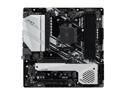
ASRock X570M PRO4 AM4 AMD X570 Micro ATX AMD Motherboard
Pros: - Small form-factor - AM4 compatible - PCIe Gen 4 - NVME M.2 slot for SSD - Supports up to 128GB RAM - USB 3.2 Gen 2 Ports - ASRock makes a compatible Thunderbolt PCIe card with a single cable connection to the motherboard
Cons: - Smaller form-factor means compromises have to be made - When Thunderbolt enabled in BIOS (for the AIC R2.0 card), M.2 NVME gets DISABLED
Overall Review: Blazing fast PCIe Gen 4 speed. USB 3.2 Gen 2 ports (Type A and C), and an adequate amount of ports/slots given the smaller size. Works great with 3rd Gen Ryzen, and the small size translates into a more portable build. Previously gave this 5 stars, but taking two off because cannot boot from M.2 NVME when Thunderbolt is enabled in BIOS. This motherboard is touted as Thunderbolt-ready with compatible PCIe expansion card, but in reality booting from M.2 NVME is disabled when the Thunderbolt 3 AIC R2.0 card is installed and Thunderbolt is enabled in the BIOS. Will add two-stars back to the rating if Asrock fixes this defect.
9/2/2020See more detail
Not as advertised
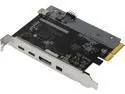
ASRock Thunderbolt 3 AIC R2.0
Pros: Could be a coaster for your drink glass.
Cons: Newegg specifications indicate the X570M Pro4 motherboard is compatible with Thunderbolt 3 with the Asrock card. Only X570M Pro4 won't boot from M.2 NVME when Thunderbolt is enabled in BIOS.
Overall Review: - Check the Asrock forum, not the only one to have encountered this problem. Major disappointment. C'mon, Asrock, get your act together.
9/2/2020See more detail
Decent speed, good value
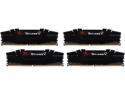
G.SKILL Ripjaws V Series 64GB (4 x 16GB) 288-Pin PC RAM DDR4 3200 (PC4 25600) Desktop Memory Model F4-3200C16Q-64GVK
Pros: - 3200 MHz - Works w/ 3rd Gen Ryzen - Good value
Cons: - None
Overall Review: Works like a charm with 3rd Gen Ryzen CPU, X570 motherboard. The 32GB cards were too pricey, so went with these 16GB instead.
12/15/2019See more detail
Gets the job done
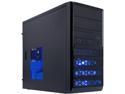
Rosewill RANGER-M Dual-Fan Micro ATX Mini Tower Gaming Computer Case with Blue LED Lighting
Pros: - Portable, small form-factor mini tower - Left Side Panel vent - Removable right side panel aids PSU modular cable installation - Front vents/mesh improve airflow - Long and wide enough to accommodate a massive graphics card - Included 120mm & 80mm fans - Relatively solid metal frame - Accommodates a MicroATX motherboard
Cons: - Very thin, flimsy external metal panels flex with the slightest touch - Cheap plastic front grill - The rear fan is only 80mm, but there are drilled holes to accommodate a larger (92mm?) fan
Overall Review: Let's face it, there aren't too many mini tower cases left on the market anymore. This case does the trick if you need this form-factor, but it won't win any manufacturing awards. The design is adequate, but the build is flimsy. Too bad the manufacturer opted for the cheapest possible materials, rather than constructing a more sturdy case. I would have been willing to pay double the price for a more solid build quality. As is, the case gets the job done, and will probably hold up if not abused. The reason I bought this smaller case is for easy transportation to/from gigs. Laptop components have come a long way, but they still can't pack as much punch as you can jam into this tiny box. On the bright side, your precious internal components are less likely to be swiped when would-be thieves get a load of the cheap exterior.
12/15/2019See more detail