
Your Browsing History


J C.
Joined on 06/19/03
0
0
product reviews
- 9
Nice Fan
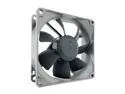
Noctua NF-R8 redux-1800 PWM, High Performance Cooling Fan, 4-Pin, 1800 RPM (80mm, Grey)
Pros: Used this fan as the main exhaust in my cube case. On high, doubles the volume of the Lian Li stock fan it replaced. PWM makes it silent during mundane tasks and cranks it up during gaming. Internal case temp never exceeds 33ºC gaming which is pretty good for a cramped cube case. Gray/Charcoal in color - not brown like its cousin. I believe it is exactly like the brown version mechanically, just a different color, is cheaper and comes with no frills. While gaming, makes an audible noise on high, but so do all my other fans so not really a problem.
Cons: None.
Overall Review: 53.3 m3/hr = 31.4 cfm. Not a con but.....My first Noctua - the box was so nice I didn't want to throw it away. Maybe Noctua could go less on the packaging and drop the price a few dollars....
3/15/2015See more detail
Very nice!
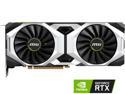
MSI GeForce RTX 2080 8GB GDDR6 PCI Express 3.0 x16 SLI Support Graphics Card RTX 2080 VENTUS 8G
Pros: 3 weeks old and no problems so far. Getting 65 FPS in the Assassin's Creed Odyssey benchmark.
Cons: None.
Overall Review: I have a windowless cube case so no lights, no problem. Hottest I've seen it get was 76ºC in an all-air, cramped cube case - a little warm but that is acceptable to me.
2/26/2019See more detail
Nice board, old BIOS
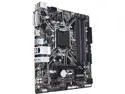
GIGABYTE Z370M DS3H Rev. 1.0 LGA 1151 (300 Series) Intel Z370 HDMI USB 3.1 Micro ATX Intel Motherboard
Pros: Owned about a month. Seems to work well. I use both the SPDIF header and the serial/com header and this board has them. Getting harder to find boards with both headers. My case is Micro-ATX only so that narrows it even more.
Cons: Just one SYS fan header. Two would have been fine, three outstanding. They make 4-pin splitter cables and I had to get one of those. Shipped with an old BIOS.
Overall Review: I was a Windows 7 holdout but new hardware is only supporting Windows 10. Couldn't get Windows 7 to recognize new m.2 NVME SSD so I had to (kicking and screaming) upgrade. Couldn't get this board to start initially. I was trying to boot it with a i9-9900K. I suspected it needed a BIOS update and bought a $64 Celeron G4920 just to get it to boot - it worked. It had the F3 BIOS in it, a 10 month old BIOS that does not recognize Gen 9. Flashed it to BIOS F11b and all is well. The i9-9900K is recognized and working fine. I initially bought the Gigabyte Z390M but sent it back because of no Win 7 support. I ended up upgrading anyway so I should have stuck with it.... Oh well. Anyone want to buy a low mileage Celeron G4920?
2/26/2019See more detail
i9-9900K air cooled
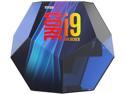
Intel Core i9 9th Gen - Core i9-9900K Coffee Lake 8-Core, 16-Thread, 3.6 GHz (5.0 GHz Turbo) LGA 1151 (300 Series) 95W BX80684I99900K Desktop Processor Intel UHD Graphics 630
Pros: It's a very nice step up if you haven't upgraded in a while.
Cons: Runs hot. More about that below. The plastic "penta-cube" thingy box it comes in was cracked in two places when I received it and had a loose piece of plastic rattling around inside. Odd because it was the only thing in the shipping box that was bubble wrapped. Makes me think it left the shipping center damaged. The CPU was fine but it kinda hurts the resell value, no? Disappointing. Minus one egg on Newegg for that.
Overall Review: You can air cool this but you have to nerf it. I know, I know, not ideal but some of us have limited options. I was getting runaway voltage and temp spikes running stock. This worked for me (YMMV): First, get a good diagnostic like CPUID HWmonitor so you can find what's best for you. I'm dealing with a cramped cube case with little CPU head room thus I'm using a low profile SilverStone SST-NT06-Pro. In the BIOS, disable Turbo Boost and set the Base Clock (use +/-) to a number between 36 and 43. Obviously, the lower the number, the cooler it runs. Save and Exit. That's it. No need to mess with the voltage. (Guys with the big tower air coolers that have fans that run at 100mph can try higher but at some point, you may need to add voltage.) The consolation prize here is that, paired with a good video card, you can game on ultra settings without the CPU alarm squawking at you and the temp exceeding 80C+. I have a MSI RTX2080 and am getting 65 FPS in the Assassin's Creed Odyssey Benchmark and that is acceptable to me. Also, some games may need to have the FPS capped at, say, 60 so as not to introduce the extra heat.
2/12/2019See more detail
Windows 10 only
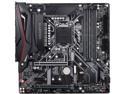
GIGABYTE Z390 M GAMING LGA 1151 (300 Series) Intel Z390 HDMI USB 3.1 Micro ATX Intel Motherboard
Pros: n/a
Cons: Not going to ding this board because I never started it up. No Windows 7 driver support at Gigabyte's website.
Overall Review: Ordered this and sent it right back once I find out it has no driver support for Win 7. Perhaps that should be put in the title somewhere? I considered "upgrading" to Windows 10 but have you read the reviews on that?
1/18/2019See more detail
Good mouse!
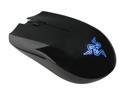
Razer Abyssus Mirror PC Gaming Mouse
Pros: Nice, decent mouse. I wanted the blue LED model to match my setup. The logo "breathes" with stock drivers/no software. No side buttons which is a plus for me - I never use them and am always accidentally hitting them on other mice. Been using it about 3 weeks so don't know about longetivity, yet, but at this price point, I think anything over a year would be gravy...
Cons: None really.
Overall Review: The top half is matte black, looks velvety when it is new. You'll create wear spots after a bit - this doesn't bother me. The bottom half is shiny black. I use the low polling rate (125hz) and the middle dpi (1800) and I'm fine with those settings.
3/23/2018See more detail
seller reviews
- 1
No problems
Korean seller makes for a couple of extra days for delivery. No problem if you're not in a hurry.
On-time
Delivery
Product
Accuracy
Customer Service
Satisfactory
3/23/2018See more detail