
Your Browsing History


Michael M.
Joined on 08/18/04
0
0
product reviews
- 36
Excellent budget performance card!
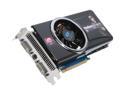
SAPPHIRE Radeon HD 4870 1GB GDDR5 PCI Express 2.0 x16 CrossFireX Support Graphics Card 100279-1GL
Pros: Performance unmatched for this price level. Popped it right into my Windows 7 64-bit system and worked perfectly on first boot. Probably the easiest gpu installation I've dealt with since I began building PC's about a decade ago. A steal compared to the X2 gpu's out there that are, in my opinion, way overpriced for what they can do. This card, oddly enough, actually weighed less than the old 2900 Pro I replaced. The cooling system on this one seems to be far more ellaborate and bulky than the 2900's was, but this card seems to weigh about half the 2900 did. A nice surprise as I'm always wary about stress on a mainboard. My Zalman 9700 already puts enough weight on it.
Cons: Not much of a con, but it does get a bit warm. 55C idle, 76C on load. I did notice someone else mentioning the power ports on the end of the card being a con for them, though I'm the opposite. I rather prefer them on the end rather than jutting out the side as did on my 2900 so as they don't run the risk of getting caught up in my 250mm door fan.
Overall Review: Using this gpu in a Thermaltake Armor full-tower, on a Gigabyte EP45-UD3P, Intel Q9550 @ 3.0GHz, 8GB DDR2 1066 and two Samsung lcd's, 22" and 19", on Windows 7 Ultimate x64 v6.0.1.7100. It's ridiculous how much of an improvement I saw in performance, not only in games but with the media editing I do for work. Game-wise, I tested the card on Empire: Total War, max settings w/ x8 AA and x8 AF. Getting a smooth average of 50fps on both campaign and battles. Very nice. For comparison, I was only able to run Empire on roughly 40% settings with no AA and Trilinear to achieve the same framerate. Very pleased with this product. Have always bought Sapphire through Newegg, who, as always, got it here earlier than expected. A++
9/10/2009See more detail
Good while it worked...
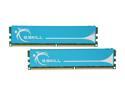
G.SKILL 4GB (2 x 2GB) DDR2 1066 (PC2 8500) Dual Channel Kit Desktop Memory Model F2-8500CL5D-4GBPK
Pros: Decent ram. Good while it was working.
Cons: Bought 6 of these sticks not a year ago and, within the course of one week, 3 of them died. Two in my PC and one in my wife's.
Overall Review: I've bought G.Skill for the last 5 years and they haven't failed me until now. That's why I marked 2 eggs instead of one. The stick in my wife's PC failed and caused it not to boot. The two in mine would go out when they warmed up, while in Windows, causing random, repeated BSOD's. Ran memtest86, identified the culprits, removed the two defective sticks and all's well. I think I'll shop around for ram the next time. Shame.
1/20/2010See more detail
Great deal and value
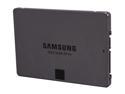
SAMSUNG 840 EVO MZ-7TE250KW 2.5" TLC Internal Solid State Drive (SSD) With Desktop Bundle Kit
Pros: Super fast, extremely easy to set up. Instructions were a bit sparse, as others have mentioned, but it was still pretty clear in how to clone my boot drive to this new SSD and swap them out. Cloning took about 4 hours coming from a 250GB 7200rpm Barracuda to this. Windows 7 Home Premium 64-bit used, boots now to fully up and running in less than 20 seconds, compared to roughly 5 minutes using the 7200rpm traditional HDD. No errors, no problems. After you've swapped your old drive out for this new one, be sure to go into your BIOS the first time you boot up to set this new SSD as your primary boot source. This was my first SSD, and I couldn't be happier with the result. Definitely recommended for those wanting to enter the SSD realm, but not wanting to drop big money on the larger drives. A nice compromise for first time SSD users.
Cons: Not really a "con", but it should be mentioned that you will need about 20% of free space on the drive you intend to clone before you can clone to the SSD. Had to temporarily move a lot of files from my old drive to an external to free up enough space to do the clone.
Overall Review: Great product, very fast, and shipping was fast from Newegg. It's nice living an hour and a half from one of their main distribution hubs :)
9/11/2014See more detail
Works as advertised
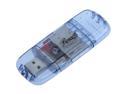
Rosewill RSD-CR106 Blue USB 2.0 External Single slot SD / MMC Card Reader
Pros: Does what it says it does. It's a USB card reader. What else is there?
Cons: None
2/25/2011See more detail
Best Windows yet.
Microsoft Windows 7 Home Premium 64-bit 1-Pack for System Builders
Pros: Quick to install, easy to use, love the new taskbar. One thing I'm incredibly pleased about is how easy networking is now, especially relative to what Vista and XP offered. Options are much more simplified and not scattered to the wind like Vista was. Search function seems faster now, and that Snipping Tool application was a nice touch. That has become very valuable to me as a designer.
Cons: UAC's still there. Easy to turn off, though. Other than that, I haven't come across anything for a con.
Overall Review: Had a little trouble getting this installed on a WD Caviar Black WD5001AALS. See my review on that product for more info on that issue. My system: Thermaltake Armor Series VA8003BWS Q9550 @ 2.83GHz w/ Zalman CNPS9700 Gigabyte GA-EP45-UD3P rev1.1 w/ F6 BIOS 4GB G.Skill DDR2 1066 SAPPHIRE 100279-1GL Radeon HD 4870 1GB 256-bit GDDR5 Mushkin Enhanced 550200 550W ATX12V SLI Ready Modular PSU Windows Rating: CPU: 7.3 RAM: 7.3 Graphics: 7.5 Gaming Graphics: 7.5 Primary Hard Disk: 5.9 WD Caviar Black WD5001AALS 500GB HDD Now I just need to wait for SSD's to come down in price and I'll be set.
1/26/2010See more detail
Samsung quality, unrivaled.
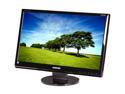
SAMSUNG 24" TN LCD Monitor 5 ms D-Sub, DVI-D 2494SW
Pros: Though not really much bigger than my Samsung 226BW, this monitor's clarity, color and contrast vastly outperforms it. That and I finally have a true HD 16:9 ratio screen. No dead/stuck pixels upon arrival. Didn't even have to adjust the settings. Crystal clear and vibrant colors. Works beautifully for my design work. CODMW2, Empire Total War and FSX are gorgeous on this display. BR looks phenomenal. Much better (and without bars) than on my 226BW. The 50000:1 DC makes my work much easier on my eyes as well.
Cons: I did notice some very slight, and I stress *slight*, light bleeding at the very bottom, in the middle. Only noticeable on the blackest of blacks, though. Not worth an egg. Seen far, far worse on other products over the years.
Overall Review: I'm using this monitor in a dual setup with my 226BW and an ATi Radeon 4870 1GB gpu, running Windows 7 Home Premium 64-bit. I'm a graphic designer by trade, so my monitors are the backbone of my work. Extremely happy with the quality of this product. Will buy another one soon and put my 226BW away for a backup and run these dual.
1/26/2010See more detail