
Your Browsing History


Douglas B.
Joined on 01/29/02
0
0
product reviews
- 17
Worked for me
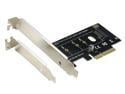
RIITOP NVMe PCIe Adapter NVMe to PCIe 3.0/4.0 x4 Converter Card Support 2230, 2242, 2260 2280 mm M.2 NVMe SSD
Pros: I combined this with a WD Black M.2 to use in the empty X16 slot of my MSI Z68 motherboard, only to find out that the board was too old to natively support an M.2 drive. But I found a post on Anandtech that outlines a way to use a USB drive with a bootloader called Clover to allow you to use M.2 drives in motherboards that don't natively support them (even legacy non UEFI boards). It looks as though I'll be able to patch the motherboard's BIOS to include support for an M.2 drive, and dispense with the USB drive. But for now it is working fine that way. Measured with Crystaldisk, I'm getting 808/682 - this compared to a few month old Lite On SSD that gets 526/506.
Cons: For the price, there is no con if it works.
3/27/2018See more detail
Died too young (if you buy one, save the package)
PNY 64GB Turbo USB 3.0 Flash Drive (P-FD64GTBOP-GE)
Pros: Good price to size ratio.
Cons: Died after less than a dozen uses.
Overall Review: I'd only used it six or seven times when it stopped working. It didn't work when I tried to use it to load some drivers on a computer I was building, so I tried it in my main box, where it had worked perfectly before. But in every computer I try it in now (I've tried it in four different ones), it begins to load a driver, then say the driver failed to load (alternatively, it shows in Device Manager with "This device cannot start. Code 10). It never shows up in My Computer, so there is nothing I can do with it. I began to fill out an RMA at PNY, but the bar code from the packaging is a required field - I threw the packaging out right after I received it. So the one year warranty is useless. I received this in the beginning of March of 2014, and it's now useless to me.
4/17/2014See more detail
If you can find a better deal, buy it.
HP EliteBook 8460p Intel i5 Dual Core 2500MHz 250Gig Serial ATA 4GB DVD-RW 14.0" WideScreen LCD Windows 10 Professional 64 Bit Laptop Notebook
Pros: I wanted a basic laptop, and this fills the bill. I bought two of these, one for myself, and one for my cousin. Mine had no discernible scratches or dents, the one for my cousin had a minor scratch on the top cover. Interestingly, mine had a 250 GB WD Blue drive, and my cousin's had a 750 GB Seagate. No matter, in both cases I removed them and replaced them with SSD drives (though in both cases the speed wasn't too bad with the original drive). You can use the Windows 7 key to install Win 10 on the replacement hard drive. With an SSD and an additional four gigabyte memory stick (just under $12.00 used) these are very fast running Windows 10. An unexpected bonus in both cases is that the battery life is surprisingly good - something I've learned to not expect when buying a used laptop. I just took my cousin's off the charger, and it says six hours remaining.
Cons: On my cousin's, one of the three hold down screws for the hard drive caddy was stripped. The other two are enough to hold it securely, so a very minor issue.
6/22/2019See more detail
It was okay while it worked
Ampulla Pluto dash cam 2K Super HD 1296P 170° Wide Angle 3" LCD Car Dashboard Camera with Parking Mode, Super Night Vision, Motion Detection, G-Sensor, Loop Recording, HDR
Pros: Reasonable price
Cons: Mount wobbles, design gets too hot in anything but an arctic climate
Overall Review: Read the reviews and bought one in the spring of 2018. I lived in the Sacramento Valley, which has a very hot climate in the summertime, and I think that contributed to the premature failure. As others have said, this camera gets hot, and I think that, combined with the heat of summer, caused the battery to die when the unit was only a few months old. It took me a while to realize this, as the unit would power on when I started the car, but was no longer keeping the date/time, or saving any recorded video. I researched and bought a replacement battery from (another vendor), and soldered it in, and it began working again. But in February I realized something else was wrong, as it would simply shut down randomly while I was driving. Not even a year old at that point.
5/18/2019See more detail
Good value case
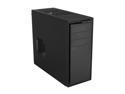
NZXT Source 210 S210-001 Black “Aluminum Brush / Plastic” ATX Mid Tower Computer Case
Pros: This case is big enough for a full ATX board, and full size video card(s). It has a good design for air flow and cable management, and places for multiple good sized case fans should you need to add them. The metal is thicker than you would expect for a lower end case, and the side panels slide into place with precision. The box and the packaging are very protective, so its unlikely to have shipping damage when you receive it.
Cons: It does not come with a POST speaker (luckily I have some spares), it only comes with one fan, and it's only USB 2.0. Another review mentioned that they were having a hard time when removing the motherboard for a swap because the screws were not coming out of the standoffs; I found that the included screws are a bit short, and maybe a little smaller than spec. I was having a hard time avoiding cross threading them, and I finally gave up and used some other screws I had with much more success. I'd recommend that you do the same if you have screws to spare; otherwise be extra careful to be sure and not cross thread the motherboard screws when installing them.
Overall Review: This case is a solid foundation for a quality build.
4/17/2016See more detail
My experience with an SY-PEX40039
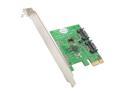
SYBA SY-PEX40039 2 Port SATA III PCI-e 2.0 x1 Card
Pros: My trusty old Asus P5Q Pro is now my HTPC motherboard, and I wanted to see if I could get some more speed out of the Crucial CT128M4SSD2 that I use as the OS drive. Using Crystal Disk Mark, the sequential speeds with the standard SATA port were 267/185. I installed the Syba controller in a PCI-E X1 slot at first, Windows 10 installed a driver, and I then shut it down and moved the SATA cable to the card; as expected, when installed in an X1 slot, it had significantly slower speeds than the board's own SATA port - 194/158. I then installed it in the open X16 PCI-E slot, and repeated the test, which resulted in 380/197. I was hoping for a little more speed than that, but that isn't too bad, and it is a significant improvement over the board's own SATA port.
Cons: I went to Syba's site and downloaded the latest driver and installed it, but it actually reduced the read/write speeds compared to the default Windows 10 driver, so I rolled back to that.
Overall Review: I would only recommend it for use with a primary drive if you have a free PCI-E slot that is greater than a 1X.
2/21/2016See more detail