




 here!
here!
I’m your shopping assistant for PC builds, upgrades, and everything tech.
Got questions? Ask away!
Start a conversation
here!
I’m your shopping assistant for PC builds, upgrades, and everything tech.
Got questions? Ask away!
Start a conversation

Joined on 08/09/06
Sturdy and pleasent
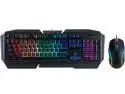
Pros: The keyboard rests in a metal frame that provides a sturdy backing. The keys are quiet, with just the right firmness. This is my first backlit keyboard; I wish I had gone to this much sooner. Rosewill provides clear instructions and the light patterns and color are easily adjusted. The USB port I am using has power all the time, so the keyboard remains lighted even when the computer is shutdown. Though I am not using this feature, setting the BIOS to allow start on any key would be super convenient with the back-lighting always on. The supplied mouse has a nice feel in my hand. The size is similar to the original Microsoft mouse and should work well in most hands. It may be slightly large for petite hands. Laser tracker works on most surfaces. I tried white paper and a mostly black-and-dark-blue mouse pad. Each works equally well.
Cons: None
Overall Review: I would recommend this combination. It is a good value (though out of stock on 13MAY2020).
Rugged and Reliable

Pros: This is good cable. Great value for plenum rated, Cat6 cable. I pulled this thru an attic space to connect PoE security cameras. It has a nice, thick outer jacket and held up well to the cable pull. There have not been any kicks as it is pulled from the box. The RJ-45's crimped on easily. The seller delivered the cable described on-time. Thank you.
Cons: None.
Overall Review: Recommended if you are pulling cable through an attic or crawl space, especially for those situations where it crosses from occupied to other spaces. Be sure to cut back at least 1 inch of outer jacket and trim the inner separater when preparing for crimping.
Beautifully Built and Gorgeous OLED display
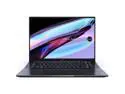
Pros: The OLED display is extraordinarily crisp and just drips with color saturation. Keyboard automatically tilts up when the display is opened; comfortable typing angle. Without a numeric pad, keys are larger and feel more like a full-size keyboard. Fast processor and plenty of memory. Large touch pad has an imbedded, virtual calculator pad. Fully charged battery lasts all day when not running heavy graphics. Asus provided a USB3 to Ethernet adaptor. NO bloatware installed! Windows 11 Home
Cons: No dedicated number pad, and: Virtual calculator pad does not function as a numeric pad. Video works well, although I have not tried any action or graphics-intensive games. More to follow. Video and large battery add noticeable weight. Windows 11; will not run my licensed copy of Office 2007.
Overall Review: Asus produced a beautifully finished, well packaged laptop. Even the box it comes in is artistic and attractive. While this does not effect electrical performance, it produces a very positive initial impression. The battery was charged enough to turn on the laptop. WOW! The display immediately grabs your attention. I was able to use my Guest Wifi to do the initial Windows setup; it was nice to know I had a wired option since I use MAC filtering on my primary Wifi. There are two Asus apps pre-installed; I am still exploring those. Blessedly, there was NONE of the usual bloatware cluttering the home screen and taking up disk space. Thank you, Asus! Windows setup is both brainlessly easy and a total pain in the rear. To do much, you have to log into your Microsoft account. Then, Microsoft sets up OneDrive by default, with Documents and Pictures stored to the cloud. I host my own NAS and do NOT want my files moved to a cloud! I finally got it set the way I want, but those are Microsoft issues, not Asus issues. (Most help on the Web is showing Win 10 or early version Win 11 menus). Microsoft includes a trial of all the Xbox games. I am going to give that a try. I will post an update to help gamers decide if this the value for them.
Reliable; Familiar Asus UI
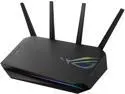
Pros: I have had this in operation just over 5 months and it is stable and solid. No dropped connections. Fast internet video to multiple wired and wireless devices. I updated my devices (software on most; new wifi card on an old laptop) to take advantage of the Wifi6 speed and WPA3 encryption. I am paying for 200 Mb/s internet and routinely get full-speed to both wired and wireless devices. This is with multiple devices on and connected. I had an Asus Blue Cave AC2600. The configuration software is identical on the new router, so set up was a snap. I especially appreciate the options such as MAC address filtering and being able to have separate names, etc for the 2.4 GHz versus 5 GHz bands. It is pretty easy to set up port forwarding, etc. The new AX5400 also adds a cell phone app for remote maintenance/configuration. I still prefer the ease of using the full browser-based interface.
Cons: The AX5400 has 4 monopole antennas sticking out of the top. It is not as attractive as the Blue Cave. The Blue Cave had been installed in our living room, so provided a non-distracting appearance. The AX5400 is in a back bedroom, so is out of sight.
Overall Review: Good user set-up software that can be accessed from a desktop, laptop or cell phone. Plays nicely with Windows, IOs and Android devices. If you are starting to modernize your wireless devices, I can strongly recommend the Asus GS-AX5400.
Cool and Quiet

Pros: Another quality product from Corsair. This is working wonderfully to keep my Ryzen 5-3600 chip at 41C. And it is doing so in almost total silence. Because noise control was the primary motivator to pick an AIO, I also replaced the stock fans with Noctua NF-14A. While the reviews of the included fans have been good, I took extra steps while switching to this cooling system. So far, the Noctua fans integrated smoothly with the Corsair pump and fan control system. The hoses are strong, but supple. I installed the radiator in the top of the full-tower case and oriented the radiator with the hoses toward the front of the case. This moved the hoses away from the rear case exhaust fan. The included mounting system worked flawlessly with the stock AMD plastic retaining brackets. With moderate tightening of the Corsair thumb screws, the pump block is solidly in place with no wiggle. Based on the temps, the block must be making good contact with the CPU top. If you are mounting this cooler to an AMD system, be sure you still have the stock backing plate and plastic brackets. The default color display on the pump assembly is quite attractive. I have not put any lighting into my rig, but did choose a new case with a window on the side. I'm glad I did. Follow up, 25APR2022: I recently updated my CPU to a Ryzen 9-5900X. This doubled my cores and upped the heat load. While I still get temps in the 40C range under light load, as soon as I push it, temps are running 58 - 62C, as monitored by CPUID HWMonitor software. Not bad, really. I also tried a new thermal grease. I switched my trusty Arctic Silver to Thermal Grizzly Kryonaut. This tested very well on a couple of web sites. The Kryonaut even came with a plastic spatula to spread the grease.
Cons: None.
Overall Review: Last fall, I upgraded from an AMD Phenom to the Ryzen 5-3600. At the time, I reused my Rosewill Challenger case. With the included Wraith cooler and no overclocking, the CPU temp idled at 52C. So, I reused an old Zalman 9600 cooler. That brought the temps down into the 40's, but all the fans sounded like a DC-3 at takeoff. I knew I had to move to water cooling, but the Challenger case had no room. Moving to the Corsair H115i meant a new case. I picked the Phanteks Enthoo Pro; this cooler integrated flawlessly into that case. The quest for better cooling and much lower noise led me to this packaging upgrade. From a roar to a whisper. I happily recommend this cooler. Follow up comment (added 02JAN2021). First, good riddance to 2020! I just relocated, a move of about 500 miles. My rig was packed on the moving van and sort-of packed in the original case box. Everything arrived intact. I say this as some reviewers have had issues with the physical mounting of the pump block. I used the supplied Corsair mounting for my AMD Socket AM4 chip. It is perfectly in place and doing a commendable job keeping the CPU cool, No mounting issues here. Happy New Year!
Easy Install

Pros: Although it took multiple steps, the validation and installation was pretty easy. You will use the "Product Key" emailed by Newegg twice. Fortunately, copy and paste will work from the email to the AMD web site. Once the Product Verification software runs, all of the codes are passed electronically from AMD to Microsoft.
Cons: You must give Microsoft a credit card number when activating the XBox software. If you don't want anything past the first month, it will auto charge you $9.99/month. Deducting an egg for that malarkey.
Overall Review: Since AMD will install product verification software on your computer to look for the CPU, you must wait until after installation to complete the process. You can start and set-up the AMD "User Experience" account immediately. They will send an email to validate your new account; note the 2-hour delay noted in the email. I decided to try Forza 4 as my first game. The download from Microsoft is SSLLOOWW!!
Reliable
Derapid Global Store used Newegg for fulfilment and shipping. This has worked out well. I would buy from this seller again.


