
Your Browsing History


Dr G.
Joined on 05/26/03
0
0
product reviews
- 11
If you have a problem with this case, you're probably doing something wrong
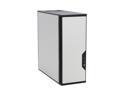
Antec Performance One P180 Silver cold rolled steel ATX Mid Tower Computer Case
Pros: Overall excellent design. Very quiet with excellent cooling. Use passive cooling on video card and the system is inaudible. (I use a Gigabyte GF6800) Also big Zalman cooler running at 1000rpm on AMD 64 3200+ with 2 gig of Mushkin 2,2,2 RAM. Excellent customer support from Antec. Lack of internal speaker not a problem with ASUS "talking motherboards" (but it really should have one)
Cons: Front door flimsy. No internal speaker (not a problem with some motherboards) Weird quality control problems (I think I got an early version of this case) ie: 1) The reset switch did not work. I traced this to the motherboard end of its cable that had a connector crimped around the insulation rather than bare wire. Easily resoldered. 2)The front panel USB ports have an internal short that causes the systemj to reboot if anything is plugged into them. This happens even if the cable is not attached to the motherboard! Since it is an integral casting that contains USB, Firewire and audio cables, something inside is shorted. If I unplug all 3 cables from the motherboard, the problem stops. 3) The front panel door has warped slighlty. The weird problems I had seem not be mentioned by anyone else (except for the front door warping). It took only 1 e-mail to Antec to get them to ship me a new door and new integrated front panel USB Firewire audio setup.
Overall Review: The following are common problems people have with this case and the solutions. 1) The video card fan duct is difficult to remove or needs removal of screws that are self tapping into plastic and hence, will break. This is not true. You should remove the fan duct by removing the 2 small screws at the bottom edge of the duct that are screwed into tapped metal receivers. These 2 screws are also used to adjust the left-right position of the duct. It takes seconds to remove them and the duct slips off to the right. 2) problems with power suppoly cables too short or PSU is too big. You must do your homework for this case. Use an Antec neopower or other suggested PSU and everything fits with the stock fans. 3)How to disassemble & clean front filters. You don't dissasemble anything. Open the front door of the case and push in on the right side of the grills over the small triangle cast into the plastic. The grills will pop open hinged o n the left.
1/9/2006See more detail
PCI bus mastering issue?
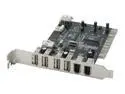
MASSCOOL PCI Card, Combo USB 2.0 & IEEE 1394 Firewire Model MT1394A+U2
Pros: Good transfer speeds, lots of ports both internal and external, extra internal power connector for firewire port support.
Cons: Power connector for firewire does not have a detent for the cable, so you have to "force" it on. Orientation of USB ports requires you to insert a cable before tightening mounting screw to get everything to line up. Worst problem is mobo won't reboot with card installed. You have to remove the card for 30 seconds and then reinsert it. It doesn't matter which slot it's in.
Overall Review: Using this with ASUS A8V deluxe mobo and Ubuntu Linux 6.10. I got this card to allow use of Epson 3200 Photo scanner which didn't work with my old USB expansion card. (All my mobo mounted USB ports are used for other things) This card does support the scanner without problems. I just can't reboot the computer without opening the case and taking out and reinserting the card. Luckily, it's Linux and gets rebooted very rarely, it's on 24/7. I suspect the VIA chipset has some PCI busmastering issues with my mobo and once it bothers me enough, I will try getting a card with the NEC chipset.
3/21/2007See more detail
Excellent Linux compatibilty

EDIMAX EW-7108PCg 802.11g/b Wireless LAN PC Card
Pros: Very affordable. Easy set up (no set up really, just plug it in) in (Ubuntu 9.10) Linux. Reliably connects to my wifi at 54 mbps. Seems to be sturdily constructed. Has lights for lan and activity.
Cons: It's not 802.11 n. b/g only. If you're only looking for b/g connectivity this is not a con.
Overall Review: I have an old Dell C510 notebook that never had wireless. I added a wifi access point in my house and picked up one of these cards for the notebook. Super easy in Ubuntu 9.10. Just plug in the card and it's immediately detected and the network manager quickly finds all the b/g access points in range. Click on the one you want and you're in. Once you enter a password for a network, it reconnects to it automatically without issues. Works reliably after suspend or hibernate in my old Dell c510.
1/18/2010See more detail
Gigabyte mobo review
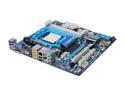
GIGABYTE GA-MA785GMT-UD2H AM3 AMD 785G HDMI Micro ATX AMD Motherboard
Pros: Good layout of parts and onboard connectors. Many standard features. BIOS allows fine tuning of memory clocking and voltages. Easy build. Great micro atx board. Flawless install with Ubuntu 9.10 the onboard ATI worked properly on first boot up and the hardware drivers Monitor correctly auto detected the video and offered the accelerated fglrx without being prompted. That installed fine and it runs perfectly with all 3D and compiz effects turned on. Supports Crucial Ballistix DDR3-1600 PC3-12800 RAM at correct timings and voltages (see Cons)
Cons: This is only a Con for the beginning system builder. It requires a trip to the BIOS to correctly set up high performance ram. It was running my DDR3-1600 at 1066 out of the box and had the voltage set too low as well. Its autodetect for the ram is very conservatively and underclocked. I normally run through the BIOS on first boot, so this is not really a bad thing, but first time or inexperienced builders should be aware of it. Not really a con, but it only has 2 PCI slots. This is expected because it's micro-atx. Make sure you don't need more then 2 pci slots.
Overall Review: I have been building systems for over 20 years. Usually I buy Asus, but when I needed this build, the ASUS got pretty bad reviews here at the egg and a lot of folks mentioned this board. Glad I got it. I will be looking at Gigabyte products more seriously from now on.
11/23/2009See more detail
Linux & Win XP dual boot
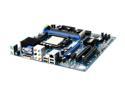
ABIT AN-M2 nView AM2 NVIDIA Geforce 7025/NF630a Micro ATX AMD Motherboard
Pros: Nice integrated solution. Easy to build, very few jumpers to set. Lots of settings in BIOS. Passive heat sink on Northbridge.
Cons: No Firewire. No serial port. (My son has a Garmin wrist GPS device he uses while jogging and it needs a serial port to update its firmware. We are trying to find out if a serial to usb converter can be used)
Overall Review: In Win XP 32 bit SP2, I had an existing installation from an older Nforce2 chipset mobo. This was almost plug and play. I fired it up, Windows asked for a few drivers from the CD once the desktop appeared and that was it. In Linux (Ubuntu 7.04) installed on a second HDD (must be on the sata 1 connector) for a dual boot, because the video chipset is so new, there is not yet support for the Nvidia 7025 graphics, so both the NV and nvidia drivers will fail to start x. You must install it in graphics compatibility mode so the vesa driver is used. The next update for nv and nvidia will contain drivers for this chip. I expect them within a month. Even in vesa mode, the desktop, internet and video viewing are nicely rendered. I am using 2 gig of gskill RAM and a 65 watt 4200+ x2 CPU. Boots very fast and runs without problems. I gave it 4 eggs instead of 5 only because there is not complete Linux video support for it yet. Within a month or so, this should change to 5 eg
6/24/2007See more detail
Almost Perfect
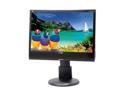
ViewSonic Graphic Series VG2230wm Black 22" 5ms DVI Widescreen LCD Monitor Height & Tilt Adjustments 280 cd/m2 700:1 Built in Speakers
Pros: Nice styling. It looks great with my P-180 black/silver case, Saitek black/silver keyboard, black Z-Bar Koncept desklamp and Microsoft black/silver mouse. Good viewing angles and no ghosting in UT2K4. Sharp text and images running with supplied DVI cable. The monitor was easily set up in Ubuntu Linux 6.10 and correct resolution and refresh rates were available without additional drivers. The color and other settings in the monitors on screen menu's are fairly easy to set up, although the buttons are on the small side. Fortunately, you don't have to interact with them after the initial setup.
Cons: Came with 2 stuck pixels. Actually, 1 stuck pixel and 1 1 sub pixel. A white one at the bottom center and a light blue one in the upper left. The white pixel responded to a brief pixel massage and has not come back. The stuck blue sub pixel did not and also did not respond to the software pixel fixers. Viewsonic will not replace this monitor with only 1 stuck sub pixel and in fact, they claim it will "work itself out over time"....Yeah, right. The monitor also suffers from moderate light bleed on the top and bottom, but is only noticeable if the screen is black. Even in dark maps in UT2K4 it is not apparent. Good brightness only if left at 100%. As stated above, the control buttons are on the small side. I didn't try the built in speakers as I have good desktop Klipsch's.
Overall Review: I own 7 LCD monitors and this is the first dead/stuck pixel issues I have ever had. Most of my desktop wallpapers feature blue skies, so the stuck blue sub pixel is not really noticeable most of the time. I hope the brightness does not become an issue later on as the backlight ages and grows dimmer. My other panels are so bright, that I had to turn the brightness down to as low as 30-40% on some of them, so as they age, I can turn it back up and they will be fine. This one will only grow dimmer with use as it is starting at 100% brightness. I think a no-speaker version would look even better with a smaller bezel. Overall, I like the monitor.
3/9/2007See more detail