
Your Browsing History


Kevin M.
Joined on 06/05/12
0
0
product reviews
- 6
Excellent Drive - Maybe Don't Purchase Here?
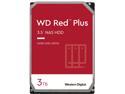
WD Red Plus 3TB NAS Hard Disk Drive - 5400 RPM Class SATA 6Gb/s, CMR, 64MB Cache, 3.5 Inch - WD30EFRX
Pros: quiet tons of storage (obviously) I use this in a synology diskstation, and I use it as a media streaming data server / backup station / coordinator for a home security system that I'm running, and it works flawlessly. I stream to my home network and over the internet simultaneously with no issues at all, streaming for friends of mine that I have given access to my server for remote streaming purposes, all the while making constant uploads from a remote home security network. With all of these applications combined, the end result is that my diskstation is making reads / writes at least 3 times every 5 seconds, 24 hours a day 7 days a week, and I have had no issues. My diskstation only gets 15 minutes of downtime once a week, and I set that up merely as a precaution because I was concerned I would be stressing the hard drive, but to date the only piece of hardware having issues handling the stress is my garbage router. For bulk file storage, media streaming and data backup, I couldn't recommend any hard drive more highly than this one.
Cons: none
Overall Review: I do my purchasing for tech equipment from several sites, Newegg included, and for some reason it seems like hard drives that get amazing reviews on other sites get extremely poor reviews here. I noticed this prior to the purchase of this item, and I made my purchase on a site known for handling their packages with a great deal of care, the end result of which is a hard drive working overtime for 6+ months with no failures. Perhaps these bad reviews have less to do with the device itself and more to do with the transit time from Newegg to the purchaser? I only currently have one drive, and I need to purchase another to run a RAID setup to backup all of my data, but all of my hard drive purchases have been made at places outside of Newegg and none of them have failed.
6/9/2014See more detail
Amazing Little Computer
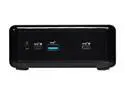
ASRock Industrial AMD Barebone 4X4 BOX-4800U SoC Faned Embedded BOX PC (Includes AMD Ryzen 7 4800U CPU, Barebone Mini/Booksize)
Pros: Small Quiet Power efficient Easy to set up
Cons: Can't change RAM timings in the BIOS
Overall Review: I bought this to serve as a game server and for some random networking tasks for my friends and I. I wanted a small computer with limited power usage that could be on all the time and this fit the bill. I have Ryzen CPUs in my computer and my wife's computer from two recent builds I've done, but I've never tried one of their mobile APUs. After getting an ASRock MOBO for my wife's build and being pleased with it overall, I decided to give this a chance. I purchased the 4800U Barebone kit, as well as 16 GB Crucial Ballistix DDR4 RAM and a WD Blue 500GB m.2 SSD and I'm extremely happy with the performance. It's fast, quiet, and capable of hosting Valheim, Minecraft, Terraria and pretty much anything else I want it to host, as well as a Mumble server, without having any real hiccups. I run it "headless" with Windows 10 Pro via Remote Desktop and It's perfect. I used to use a laptop to host my games, but when it died I needed a replacement, and this is better than I could have imagined. I have a hard time believing it's as fast and quiet as it is while using about as much power as an old light bulb. I've been considering setting up a PFSense box to replace my router, and this box would be perfect for a task like that as well; it comes with two ethernet ports, one Gigabit one 2.5 Gigabit, so there's a bit more you can do with it than other miniPCs. In a setting like mine, or in an office setting where you want a small computer to tuck away that's not going to make a lot of noise or generate a lot of heat, this thing is perfect. It even comes with a VESA mount to put it on the back of your monitor so it's completely hidden. I couldn't recommend this device enough. The only drawback is there is no option to change RAM speed and settings in the bios. This device supports ram up to 3200 MT/s, and that's the speed of the RAM I purchased, but without the ability to change RAM timings or select an XMP profile that's not possible. The RAM I settled on defaults to 2666 MHz, so I figure that's close enough for now. I don't really need the speed in this capacity or I might be more bothered by it. If you really need those high RAM speeds maybe try another brand or get one pre-built with RAM timings tuned for you.
9/21/2021See more detail
Most Used Hardware in House
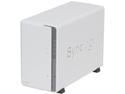
Synology DS213j Diskless System Network Storage
Pros: Quiet Reliable Full of features
Cons: None
Overall Review: Amazing piece of hardware. Bought it to create a data server without having to dedicate a full comouter PSU to it, and it works perfectly. I'm currently running a home security network through it, as well as using it to stream my home media from, both to my home network and through the internet. It has been running nonstop now for 5 months with only 15 minutes of reset time per week with no flaws. I can't even remember how I got by before this device.
5/25/2014See more detail
Sturdy, Simple, Easy

Sentry Mix 2 Fan Controller
Pros: - Fool proof - Sturdy, doesn't feel as flimsy as other external drive devices I've come across
Cons: none so far
Overall Review: I have an extended ATX motherboard, which necessitated me purchasing a full tower case. For those of you only familiar with mid sized cases or micro tower cases, it's difficult to convey exactly how large this case is, but it's enormous. It has designated space for FOUR 200mm case fans, which is my reason for purchasing this fan controller. The concept is extremely straight-forward, and even the lowest of tech levels in the modding community would be able to handle its installation. You simply reroute your fans through the fan controller, and connect the controller to your power supply. If you want your fan to speed up, you raise the lever, if you want it to slow down you lower the lever, simple as that. The device comes default with blue LED illumination on the front panel and supposedly this can be changed, but I opted to not change it simply because my case is largely covered in blue lights. Some reviewers have docked an egg for the fact that you cannot turn the fans off completely, they only drop to about 40% at the lowest fan position. I didn't remove an egg for this however, because this is most likely the manufacturer's attempt at preventing user related damage. Even under MOBO control, fans typically do not sit below 30% fan speed during idling, so having a minimum fan speed of 40% seemed appropriate to me.
12/30/2013See more detail
Excellent After-Market Cooler
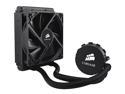
CORSAIR Hydro Series H50 120mm Quiet Edition Liquid CPU Cooler - Intel Only (CW-9060006-WW)
Pros: - Replaces two fans with one - rear exhaust and processor fan with a single rear exhaust fan, minimizing noise - Completely internal radiator system allows for water cooling temperatures without an external compressor -very cool temperatures
Cons: Device came with a pre-smeared layer of compound on the heat sink. Would have preferred to have the compound come with the device in a tube on the side. It seemed like a strange choice to deny people in the computer modding community the choice to choose their own thermal compound, but it's not worth docking an egg.
Overall Review: The best part of this device is mentioned in the pros: you replace two fans with one. There is no fan that actually sits on the CPU with this device, there is merely a pump which controls the flow of the liquid coolant. The rear exhaust fan is replaced with an intake fan to cool the radiator, so the noise is significantly reduced. I have an i5 2550k that had a stock fan, which I've come to realize was the loudest piece of hardware in my computer prior to me replacing it. The radiator system allows for cooling much the same way your car is cooled. The radiator is attached to the rear intake fan to ensure it gets fresh, cool air flowing in over it to cool the coolant inside of it, which is then pumped back to the CPU. This makes for a completely internalized system, there is no external component required. Finally, and most importantly, the processor is kept very cool. My processor used to sit at ~40-45 C, depending on the cores (for some reason core 1 in my cpu is usually 3 or 4 C higher than the others, not sure why) and would habitually approach 65-70 C under full load. Now, the cores idle at around 26-30 C, and only approach 45 C under full load. I used Arctic Silver as the compound between processor and heat sink. I bought this device so that I could begin overclocking my (unfortunately) aging processor, and it seems like it has bought me the leeway I would need to do so.
12/30/2013See more detail
great case, LEDs a bit annoying
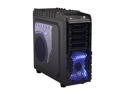
Thermaltake Overseer RX-I VN700M1W2N Black SECC ATX Full Tower Computer Case Standard PS2 PSU Power Supply
Pros: - The case works as advertised. This was part of my first build, and having an extended ATX mobo meant I needed a large case to accommodate it. This case has room and then some, with plenty of space for wire management to boot. - There are more drive bays than you could ever hope to occupy. I took some older hardware out of my previous computer and incorporated it just for the hell of it, and because I had a PSU to handle the added hardware, and most of mine are still vacant. - I read reviews saying the front side ports failed after a short period of time, but this didn't happen in my case, so perhaps it was a mobo issue, or maybe I just got lucky. Also, the HDD docking station makes integration of new drives extremely convenient; this is my first case with this feature, and it's extremely useful - Internal drive bays all have mounting holes for 2.5" drives as well as 3.5" drives. I don't know if this is standard in other cases, but it's worth mentioning. My SSD is only a 2.5", and it came with a mounting bracket, which proved to be unnecessary in this case.
Cons: - The case is COVERED with LEDs. This seems to be the trend in gaming rigs today, which is really a matter of taste so I'm not docking any eggs for it, but if you're looking for a more bland approach while still maintaining a large case, go with an Elysium or something comparable. There are two pulsating LEDs on the front, every fan (except for the rear fan) is a blue LED, and there's a power front-side LED. The side window also allows all of the LEDs on my mobo to shine through, so when I turn my computer on my room lights up like the Christmas tree in Times Square. Some sites that I've seen this case on allow you to choose the associated LED color scheme, but I don't know if it's available anymore tbh, I bought it almost a year ago. - My rig was built for gaming, but being built on a budget it's not a real powerhouse, and as such cooling hasn't really been an issue for me. This case has great airflow potential, but read the included fan elements carefully, all of the (optional) listings do not actually come with the case. Stock, it only comes with fans to fill about 1/2 of the fan slots in the case. Additional fans will need to be ordered separately. - Sheet metal place holders in the external drive bays are extremely annoying to remove
Overall Review: None of the cons were worthy of docking an egg, primarily because I knew them all coming in. If you need a big case it's hard to go wrong here, unless you would prefer having fewer LEDs.
9/22/2013See more detail