
Your Browsing History


Stephen P.
Joined on 12/27/05
0
0
product reviews
- 17
Good inexpensive machine
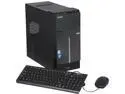
Acer Desktop PC ATC-605-UR2V Intel Core i3-4160 8GB DDR3 1TB HDD Intel HD Graphics 4400 Windows 7 Professional 64-Bit
Pros: Hard to review without talking price, just shop carefully. This is a low end machine with some very nice features. I got a great deal through newegg. Their free shipping got it here in 2 business days. Out of the box was a good experience. Booted quickly. The case is handsome. Nicely positioned front panel ports and switches (no more getting on your knees to find the memory slot). As the first reviewer mentioned, it has onboard Intel HD 4400 graphics. A quick internet search indicates the 4600 might have a higher clock-speed, but lets face it, you're not in to high end graphics if this is the machine you get. Video plays smoothly (no lags or jerks). The wifi and bluetooth work well, wifi reception was better than other machines I use, but I chose to disable this and use the 1000base ethernet connection as I already had wire running. You can disable wifi and leave bluetooth enabled. Bloatware wasn't too bad: don't make the mistake I made and remove the Acer eRecovery Management software. I thought this was some backup process and got rid of it. It doesn't ship with media, but the eRecovery software on it from the factory gives you the option of burning your own. DON"T DELETE THIS: you can't download it anywhere (Acer will sell you a copy). The windows score is a solid 5.3 and that's the graphics score (the lowest of them all. Subscores for other components (out of 7.9) are Processor 7.3, Memory 7.3, Graphics for Windows Aero 5.3, Gaming graphics 6.5, Disk transfer rate was 6 something before I messed with it (more below).
Cons: For a mini tower, it doesn't have facilities for more drives (except an SSD). Lots of room: have your duct-tape handy if you intend to install another HDD. Only 3 SATA ports (one unused). BIOS has no option for a RAID. The machine refused to POST when I had two unlike monitors attached. With different resolution monitors, the only way I could get it to boot was to disconnect one, and then reconnect after it had come up under windows. This was solved by using two identical monitors. You're probably going to want to upgrade the keyboard/mouse.
Overall Review: The 300 watt PS has 3 extra SATA connectors and a couple Molex connectors, but remember there's only one extra SATA port. The PS wires are short: I was barely able to reach the extra drive I installed. Some clever assembly person wrapped the mainboard connector wires around all the sata cables. Before managing any other connections I had to untangle this. The performance was fine with the 1TB HDD it shipped with, but to really make it sparkle I installed a Samsung 850 128GB SSD. The case frame has holes to mount an SSD using 4 screws (not included). I used Samsungs software to clone the HDD. With the SSD it boots silly fast: the windows graphic doesn't have time to display before it brings up the desktop! Maybe 4 seconds. With the SSD the windows score is 7.9 out of 7.9 for the primary hard disk. The 1TB drive is made by Western Digital: I downloaded their utility to do a low level format and get rid of the hidden partition. If you do this, be sure to use the Acer eRecovery software first to burn your own windows dvd. I used an HDMI to DVI cable to connect one monitor and a VGA (d-sub) cable to connect the other. With two identical monitors it is quite happy extending the desktop to both without any boot issues. With an SSD the thing is silent.
12/9/2014See more detail
Invalid UPC on rebate for me too...
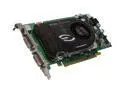
EVGA GeForce 8600 GTS 256MB GDDR3 PCI Express x16 SLI Support Graphics Card 256-P2-N761-TR
Pros: works as advertised
Cons: none
Overall Review: Like the previous reviewer, I also submitted the forms/upc from the box for the $35 rebate and got the email update "upc invalid." Seems like a trend, no?
10/27/2008See more detail
Fast, affordable
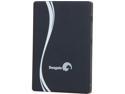
Seagate 600 Series 2.5" 120GB SATA III MLC Internal Solid State Drive (SSD) ST120HM000
Pros: Fast read and write speeds. It's about I/O per second; most applications are many small files. High transfer rates are great too, but I don't really understand the emphasis on this. This drive gives as much speed to writes as it does reads.
Cons: It's an SSD. Be sure you understand the issues writing multiple times to these before choosing any SSD. The limited writing capability limits its use to fairly unchanging operating system files. This particular drives warranty is either 3 years, or when its usage limit is reached (36.5 TB "writes), whichever occurs first.
Overall Review: I thrashed mine installing on a 6 year old Dell Vostro 200. Multiple formats and OS installs resulted in using 60% of the device's "endurance" (seems unlikely over 10 hours use, but this is what Seagate's drive info utility reports). Be sure you know what you want to install before proceeding as changing your mind will lower its life expectancy. Once installed on this moldy-old machine, the Dell WinXP SP3 Intel 6550 performed better than new. Fast access to all applications: click-bang instead of click. wait "2-elephants" then it starts to build the interface. And this is with Dell's crippled bios that doesn't have an AHCI option (just IDE). I highly recommend it, but use it with a secondary HDD for data that changes often. If used with XP be sure to read up on configuring windows so it doesn't thrash the drive. And try to limit installs to just once!
8/19/2013See more detail
Competent phone
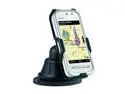
Nokia 5230 Unlocked GSM Touch Screen Phone w/ Car Kit / 3.2" Touch Screen / GPS 3.2" White
Pros: Price Very good GPS when phone is internet enabled (A-GPS) and lifetime free map updates. Good voice quality. It's not an Iphone.
Cons: it's not an Iphone. The touch interface is less sensitive. Browsing is a bit kludgey. GPS is rather limited without internet access (and the potential associated dataplan.) Limited applications available for symbian OS however I was quickly able to find and download an e-reader. (still looking for a good solitaire app for the waiting rooms...) Nokia needs to offer better documentation, especially for the GPS. It's like they expect everyone to be reading challenged.
Overall Review: Face it: at this price you're not getting a high powered mobile computing device. You're getting a phone with GPS capability. The GPS works very well when the phone has online access to find addresses, otherwise it's database of addresses/places is too limited. It's very fast to lock-on to satellites (faster than the Magellan and Garmin my wife and kids use). Voice directions and graphics are pretty sophisticated at this price point. If you want a phone with portable GPS capability and a limited array of applications this is worth considering, however for the GPS to be effective you'll need internet access. The cost of a dataplan may make this impractical. Nokia is going through transition from their PC suite software to OVI software for syncing and loading applications. I found both are necessary; the old PC-suite to load symbian apps downloaded from 3rd party websites, and OVI to get updated maps. Both are available from Nokia's site. The phone has been trouble free.
12/31/2010See more detail
Excellent Performance
SAMSUNG Spinpoint F3 HD502HJ/ST500DM005 500GB 7200 RPM 16MB Cache SATA 3.0Gb/s 3.5" Internal Hard Drive Bare Drive
Pros: Quiet, cool, fast.
Cons: none
Overall Review: Bought this to replace the WD 80GB drive that came from the factory in a Dell Vostro 200. I was going to start storing video media and needed more room. Before swapping I read reviews and downloaded HD Tune Pro to test the performance of the old drive. I was surprised the WD access times were around 20ms (don't remember what transfer rates were). Well it was a bit slow doing anything requiring file access. Installed this drive and HD Tune showed it was performing to spec, about 13.8ms access times (seek time + latency + controller throughput time). Transfer rates average 115MB/s (209MB/s bursts). Apparent speed of the Vostro doubled. Running 3 months now with nary a hiccup. Dell Vostro 200 WinXP SP3 Intel E6550
8/29/2010See more detail
Dell Vostro 200 install
SAMSUNG Spinpoint F3 HD502HJ/ST500DM005 500GB 7200 RPM 16MB Cache SATA 3.0Gb/s 3.5" Internal Hard Drive Bare Drive
Pros: Constipated Vostro 200 showed consistent average seek times on HD Tune of 19.8ms (no other system activity). Very laggy on a 2 year old XP system; running anti-virus slowed it to a crawl. This with a core 2 e6550 and 3gb RAM. After install of the Samsung, partitioning, full formatting, reload of XP and apps, the seek times HD Tune reports are 13.4ms and the Vostro runs very fast. Works as advertised.
Cons: none.
Overall Review: Software conflicts from years of installing stuff, factory 160gb WD disk being over half full all contributed to the Vostro's general malaise. Backing up, reloading the OS, apps, and data took a couple days. Definitely worth the cost of a new drive with better access times, but I bet the majority of slowness was corrected by a clean install. For the effort though, it's really worth the cost of a better drive. Also think going to 500gb even though I only use about 80gb helps access times where on the 160 drive from Dell it was slowing things down.
5/17/2010See more detail