
Your Browsing History


Brian V.
Joined on 01/30/02
0
0
product reviews
- 12
Stretching my current system / building on a budget
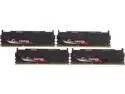
G.SKILL Sniper Series 32GB (4 x 8GB) DDR3 2400 (PC3 19200) Desktop Memory Model F3-2400C11Q-32GSR
Pros: 32GB of RAM All working upon installation
Cons: A little pricey for DD3, around 150 would have been a great deal.
Overall Review: I am still trying to squeeze as much life as I can out of my Z87 motherboard as I can. That board was purchased in 2014 and still runs everything I need, but I needed a little more "oomf." So I swapped out the 16GB Gskill Ripsaws (DDR3 2133) for these and there was a noticeable improvement. Example: playing DCS World, when I would change to other aircraft external views, the terrain would load much faster than before.
4/13/2019See more detail
Durability concerns
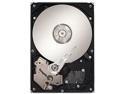
Seagate 1TB 3.5" 7200RPM SATA Barracuda ES.2 3.0Gb/s Internal Hard Drive -Bare Drive
Pros: I filled this driver with everything I could and never made it 1/2 way. Overall speed of the drive was good, not great but I didn't feel like it was unbearably slow... at first anyway.
Cons: I will admit, I use my PC a lot, in that I prefer to game / be online during my free time rather than veg in front of a TV. However after just under 2 years of use it seemed like this drive was already showing its age. Loading speeds were slower on everything from boot to just a browsing session. This compared to the WD harddives I had before (they were replaced due to capacity needs) would last a solid 3 years plus and were still ticking. I still have a WD raptor from 2006 that was still functioning very will when I replaced it.
Overall Review: For large storage this is a good drive, if you just want to save tons of files / photos/ docs. For gaming, I would look elsewhere.
8/30/2013See more detail
It cools better than a stock heat sink
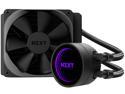
NZXT Kraken M22 120mm - All-In-One RGB CPU Liquid Cooler - CAM-Powered - Infinity Mirror Design - Reinforced Extended Tubing - Aer P120mm PWM Radiator Fan LGA 1700 Compatible
Pros: Cools better than the included air cooler for the Ryzen 7 I have. CPU temps went down 10 C for idle and load. My idle temps are around 35 and load is 55 to 65 depending on what I am running. Installation if easy, especially if you can top mount the rad (which I ended up doing).
Cons: The in-radiator pump does obstruct some of the airflow from the fan, would be interesting to see if there had been a way for the housing for the pump to be smaller and circular as opposed to square if that would yield lower temps. The stock fan can get noisy when it starts to rev up. has a noticeable groan at certain RPMs, about 900-1000 RPM. I'm probably going to replace the stock fan.
Overall Review: Early reviews of this AIO were correct as far as the price point for what you get. Initially it was $120 and for that price, you might as well had purchased a 240mm rad. In fact a Kraken X53 from NZXT is the same price currently. With the price having come down, it's more worth it as compared to other 120mm AIOs, but still on the more expensive side, and you can see why with a new design. Seems this specific model though is being replaced by the Kraken 120 which seems to be the same design. For $80 its a much more palpable purchase.
1/3/2022See more detail
Easy mode water cooling for GPU (mostly)
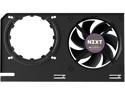
NZXT KRAKEN G12 - GPU Mounting Kit for Kraken X Series AIO - Enhanced GPU Cooling - AMD and NVIDIA GPU Compatibility - Active Cooling for VRM - Black
Pros: Allowed for mounting of an AIO water cooling unit to GPU with relative ease. With a 120mm rad AIO, I was able to bring my load temp from 80 C down to 50C (no overclocking), so now the stock boost keep the clock much closer to max even under load. Combined with the AIO, much quieter than the stock GPU cooling (EVGA RTX 2060)
Cons: It doesn't fit every CPU, especially the RTX series cards, so you will need to do some modification. A simple tin snips to remove the excess from the mounts and a drill to make some new holes bracket itself to align the mounts. A 3rd set of mounts designed for RTX cards would solve this.
Overall Review: Other reviews and online videos suggest using the AMD mounts and it will work on RTX cards, but that does not hold true for every RTX out there, mine included. Just something to keep in mind if buying this to mount on an RTX card. It's still worth it overall, when all was said and done, I spent a couple hours mounting this, a good portion of that time was running to the store to buy tin snips. In the end, I will be able to squeeze more life out of the RTX 2060 with GPU prices being what they are. In the end I spent a total of $120 for this and the AIO I mounted as well. Overall with the time and money.
1/3/2022See more detail
Good monitor

Z-EDGE 34 inch UltraWide 2K Curved Gaming Monitor, 21:9 UWQHD 1440P 165Hz, 1ms, FreeSync Compatible, HDMI x2, DP x2, PBP & PIP Mode
Pros: As with the 21:9 aspect overall, a lot of space for multiple windows all within view and no overlap if browsing or working. I play flight sims and the extended horizontal view helps with situational awareness and immersion. I replaced an LG 34um95-p from 6 years ago (it died) and this was a nice small upgrade that didn't break the bank with the very affordable $350 price.
Cons: The color seems a bit washed out compared to my old monitor which was an IPS panel. Supposedly the VA panel is supposed to be the color and pixel pitch of an IPS with the rendering speed of a TN panel. I will probably have to tweak it some more but I am struggling to find the same vibrancy of the LG I had and that monitor was almost perfect right out the box. The Z-edge seems to need a lot of effort to get the image quality to its full potential.
Overall Review: I would still recommend this monitor even knowing what I have experienced after a few days of owning. I will also add I arm mounted this to my desk and the setup on that was pretty straight forward and simple.
6/5/2021See more detail
Great replacement
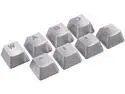
Cougar Metal Keycaps for Mechanical Keyboards
Pros: Easy install Works as advertised Great for games that need you to use WASD hacks. Metal \m/
Cons: Paired with the existing plastic keys, these have a noticeable "feel" difference that at times caused me to go 'ow' when using for normal typing since you kinda have to "relearn" how hard to hit those keys. A tad on the pricey side for 8 keys IMO.
Overall Review: Installed on a Logitech G710+ with ease. They feel much better than the standard keys. As stated above you will need to retrain your brain a bit when typing if you are a "hard typer" like me. Finger tips got a tad sore just typing this review. Overall worth it if you are tired of worn WASD keys. I'm probably going to try and fine a similar set for the remaining keys. Metal FTW.
6/25/2020See more detail