
Your Browsing History


Robert S.
Joined on 04/25/06
0
0
product reviews
- 8
GOOD STABLE BOARD !!
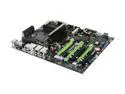
EVGA 132-CK-NF79-TR LGA 775 NVIDIA nForce 790i Ultra SLI ATX Intel Motherboard
Pros: Well laid out board. Triple SLI capable. Plethora of connections. Uses up to DDR3 1600 memory. Covenient digital display of error codes at startup, look in the manual and it tells you what the error codes mean. Overclocker's dream. Bios offers every conceivable overclock setting I can think of. Sata hard drive connections are placed throughout the board, so depending on your case layout, you should have a minimum of two hard drive connections in close proximity. Northbridge and southbridge passive heat sinks (radiator type) are easy to remove, they are held on with screws from the bottom of the board (see cons also on this one). Power, memory, and CPU LED's. The board come with every cable that you will need, dual SLI bridge, triple SLI bridge, Sata hard drive cables, IDE cable, etc. This board is very stable. I installed all of my hardware, fired it up, and have had no problems since (see other thoughts).
Cons: Due to the north and southbridge heat sinks surrounding the CPU, and they are tall, some of your larger CPU coolers will not fit, so be careful of your selection. The north and southbridge heatsink radiators are one complete unit, so you end up removing both heatsinks should you want to change them out, which can be a problem if you want to change out one, but not the other.
Overall Review: The provided fan that attaches to the northbridge heatsink does blow air onto the bottom of the top end of your graphics card, but if your case is adequately ventilated, there should not be a problem, therefore, I do not consider this a "Con". This board is a little "picky" when it comes to Vista x64. I installed Vista (DVD without service pack 1), did a search for available updates, and that is when I ran into a few problems. Of the initial 72 updates offered, 25 were "recommended", or "optional". All of the "important" updates installed with no problem, however, a few of the "recommended" ones caused the dreaded BSOD. What I eventually ended up doing was installing the "recommended" updates one by one (if I decided that I wanted them), until I ran across the offending updates....those I did not install. After all necessary updates were installed, it offered service pack 1, which installed with no problem. This is more of a problem with Nvidia drivers, than the board itself.
2/24/2009See more detail
Great Card!!

PowerColor Radeon HD 5870 1GB GDDR5 PCI Express 2.1 x16 CrossFireX Support Graphics Card LCS AX5870 1GBD5-WMDH
Pros: The card also includes a pre-mounted black metal back plate in addition to the black water block. Runs 45c under load. Drivers work well, I have not encountered the problems that some are having. EK water block already installed, so I don't have to deal with the hassle of installing one. Comparative in price to other manufacturer's 5870's with only stock cooling. Great deal!
Cons: Due to the layout of the display ports, it takes up two slots - not enough to take away an egg though, as all 5870's do so.
Overall Review: So far, the card exceeds my expectations! Came with a coupon for Dirt 2.
1/21/2010See more detail
QUALITY MEMORY
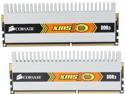
CORSAIR 2GB (2 x 1GB) DDR3 1333 (PC3 10600) Dual Channel Kit Desktop Memory Model TWIN3X2048-1333C9DHX
Pros: I have 4GB of this memory installed in an EVGA 790i Ultra motherboard with Visat X64, and it runs flawlessly at 1333 Mhz. Attractive appearance....excellent price for quality DDR3 memory.
Cons: None at this time.
Overall Review: Although the timings on the package state 9-9-9-24 at 1.60v, I have my running stable at 7-7-7-9 at 1.35v.
2/24/2009See more detail
GOOD ENCLOSURE
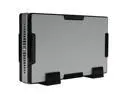
Rosewill RX81-CW-US-SLV 3.5" SATA to eSATA & USB 2.0 External Enclosure (SLIVER) w/ Screw-less Installation
Pros: Attractive appearance. Both USB 2.0 and E-Sata connectivity. Came with all of the necessary cables. Even though it is fanless, it keeps my drives (2) cool. Blue light flickers when the drive is being accessed, goes off when the drive is not. Manual on-off switch located on the back. I have Windows 7 (Beta) on one drive connected via E-Sata, and when I power down my PC (sleep of off), the external drive powers off also, and wakes up when I power up my PC, no need to manually turn it on and off. The other drive is for back-up,, and is connected via USB. I have to manually turn the drive off when I power down my PC. Enclosure power cable has standard 3 prong connection vice the brick plugging directly into the outlet, thereby covering additional outlets. Comes with 2 feet, however, you can turn them on their side and stack them if you so desire,however, I don't know how that would affect heat dissipation. Comes with 2 screws to permanently mount the drives in the drive bay.
Cons: None that I can think of. Time and durability will be the true test.
Overall Review: I have purchased Rosewill products in the past, and the company provides a quality product for a good price. As usual NewEgg was on top of their delivery game...purchased both enclosures one afternoon with standard shipping, received both the next day !
1/18/2009See more detail
GOOD ROUTER
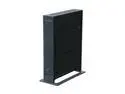
NETGEAR WNR3500-100NAS RangeMax Premium Wireless-N Gigabit Router IEEE 802.11b/g, IEEE 802.11n Draft
Pros: Draft N. Vista Ultimate X64 compatible. The ability to set up wireless security for both WPA and WPA2 simultaneously which is good for older wireless cards that don't support WPA2. SPI firewall. Easy setup (didn't use the CD), downloaded current software/drivers from the website. The lights (although bright) will inform you when there is a wireless connection. The ability to turn the lights off. The Netgear wireless software is much more informative than the Windows Wireless 0 configuration. Wireless Access List capable (I recommend using it for an added layer of wireless security). Good wireless coverage (I live in a 4,000 sq ft home and the router consistently maintains 95% signal strength at the farthest point). 1 Gbps LAN speed for fast network file transfer. Stable. Checks for firmware upgrade automatically when you access the router, which you can disable and do manually,, if you so desire. Runs warm, not hot when heavily used. Attractive exterior.
Cons: None at this time. Time will be the true test.
Overall Review: One of the other reviewers stated no firmware support through Mozilla Firefox...I have no problems with upgrades through Firefox 3.0 browser. I have 1 desktop PC(Vista Ultimate X64) hardwired connected, 1 desktop PC (Vista Ultimate X32) connected wirelessly using the Netgear WN311B PCI wireless card, 1 ASUS EEE Box (Windows XP Home Version) hardwired connected, 1 HP laptop (Windows XP Pro) wirelessly connected using the Netgear WN511B Wireless N PC card, and 1 Dell laptop (Windows XP Pro Business) connected wireless using internal 54 Mbps wireless card. All are connected simultaneously and I have had no problems.
9/14/2008See more detail
QUALITY EXTERNAL HARD DRIVE ENCLOSURE
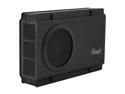
Rosewill RX-358 V2 BLK - Black, 3.5" SATA to USB & eSATA External Enclosure with Internal 80 mm Fan
Pros: Sleek, attractive, mostly metal (sides are plastic) HDD enclosure with a 80mm fan. E-SATA connectivity. I like the fact the E-SATA chip is located in the enclosure vice having to use an internal E-SATA PCI card...I just mounted it in an available slot, thereby freeing a PCI slot. It even came with an E-SATA cable and a USB cable. Easy to assemble. The directions don't really say what screws go where, however, if you have any technical skills at all, it is a piece of cake to figure out. I was up and running in 15 minutes. HDD slid easily, and snugly in place, mounted the E-SATA adaptor, plugged everything in, powered up, and the drive was instantly recognized in Vista x64. Get's warm, not blazing hot when accessed. As mentioned in other reviews, one LED is for on/off purposes, the other is for access purposes...the LED's to me are not too bright.
Cons: Doesn't put the drive in standby mode when not being accessed. Doesn't turn off when you power down/put to sleep your PC, must be manually done (I am not sure if it turns off if connected via USB).
Overall Review: It doesn't come with any "feet". I did not list this as a con because some folks may want to stand the enclosure on it's side vice laying flat. Having said that, it still could have shipped with rubber feet that the end user could attach if so desired...not a bother enough for me to rate as a con or take away an egg. I just installed some clear, rubber feet that I already had. Time will truly tell the quality of the product, but so far, so good.
8/30/2008See more detail