
Your Browsing History


Jamison T.
Joined on 06/03/02
0
0
product reviews
- 13
Small size, decent performance
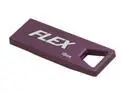
Patriot Flex 16GB USB 2.0 Flash Drive PSF16GFXUSB
Pros: Very small, convenient storage sleeve, good sequential reads and writes. Sequential reads/writes clock in at 30/12 MB/s.
Cons: Terrible random writes but that's typical of USB sticks. Narrower than a standard USB plug which makes it tricky to remove the stick from a stacked port.
Overall Review: 512k random reads are almost as fast as sequential reads while 4k random reads drop to around 4 MB/s.
12/9/2011See more detail
Hardware's great, software sucks
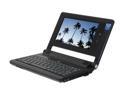
EVEREX CloudBook 7.0" 1.20GHz 512MB Memory DDR2 533 gOS V2 CE1200V
Pros: Very small, and relatively cheap. Very light. 30 gigs of storage is a nice step up from the competition at a similar price point. Windows drivers available. 3+ hour run time.
Cons: gOS was not optimized at all for 800x480 (other than setting the default resolution). Dialogue boxes don't fit on the screen, can't read the google toolbar agreement, 50% of firefox display is consumed by toolbars. Gives Linux and Everex a bad name. Additionally, no widescreen resolutions above 1000x600 are supported on the DVI port. WTH[eck]?!? The only displays that can benefit the port are flat panels and most of those are 16:10 or 16:9. So either dig up an old 4:3 panel with a DVI port or use a VGA adapter with a CRT. Totally defeats the purpose of having a DVI port.
Overall Review: This product shouldn't have been released with this gOS distribution in its current state. Everex should have taken another quarter or two to do it right and clean up the interface so it works well on the small screen even if that meant launching simultaneously with the "max" version. I'd say the early adopters got stuck as beta testers but this isn't even alpha. When the first dialogue box the user sees doesn't fit on the screen, it ain't done yet. Also the hard drive is NOT 4200 RPM. It's 3600. I'm sure that has a lot to do with the sluggish startup. I give the hardware 4 stars and the software 2 stars. Newegg, as usual rocks. Ordered Thursday, delivered Friday.
4/10/2008See more detail
Lame driver issues
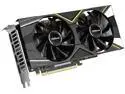
ASRock Challenger Radeon RX 5600 6GB GDDR6 PCI Express 4.0 x16 Graphics Card RX5600 CLD 6G
Pros: Good deal if it works
Cons: Didn't work after hours of troubleshooting
Overall Review: Long story short, the HDMI output on my card shut off as soon as the drivers were installed/loaded. Longer story: I went so far as to do a fresh install of Windows (twice!) on a spare drive to figure out what was going on. When I let Windows find and install drivers on its own, the HDMI output would shut off once the drivers were installed. The system didn't crash. It kept chugging along headless. I did the next install offline and used AMD's full installer on a thumb drive. The installation ran for a bit, the display blinked and came back once like a normal driver installation, then it went dark and stayed dark. The monitor said no signal detected. I don't have any DP monitors to test the other ports but, obviously, the card should send the output to a port that has a monitor connected. I don't know why the heck it's happening but I can repeat it all night long. As long as I keep it offline and don't install the drivers, it works fine (as fine as a card without drivers works). I don't think it's a hardware issue but I've spent way too much time to spend any more setting up a new fresh install, turning on remote desktop, and poking at it from another machine. All I should have to do is plug it in and install the drivers. This was a lame waste of time. Been a long time since I've bought AMD and it'll be a lot longer before I do again.
3/22/2024See more detail
Gets the job done
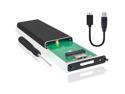
JacobsParts M.2 NGFF SATA SSD to USB 3.0 Portable External Drive Enclosure Case with UASP
Pros: Cheap Sturdy Works (as long as you don't try to sledgehammer an NVMe drive in there)
Cons: Speed is slower than the original laptop Assembly is odd No instructions
Overall Review: Assembly's a little odd and the speed isn't great but it works. To assemble it, you _don't_ screw the end mount to the board then screw the SSD to the mount. You plug the SSD into the socket, then slide the mount onto the end of the SSD so the SSD edge notch is in the groove in the mount. Then screw the mount to the board. You don't screw the SSD to the top of the mount like every other M.2 setup I've seen. And the little plate for the end isn't a great fit. The hole for the port isn't perfectly centered on the actual port so I had to wiggle it a bit to get it to pop in place. Make sure you put the plate on with the countersunk side of the holes facing out so the screws sit flush and the little hole is over the LED. As for speed, the SSD I'm using got around 550/300 MB/s reads/writes in its original laptop. In this enclosure, it gets 350/110 MB/s. That's a pretty big drop in performance. That's where it lost an egg. If it had writes anywhere near 300MB/s, I'd give it 5 stars. But it got the job done. I was able to grab the files I needed off the dead laptop's drive and now I have a moderately fast portable drive.
11/26/2021See more detail
The stink is coming from the bag. Get the bag out of your house and the smell will [mostly] go away.
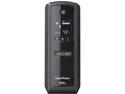
CyberPower 1325 VA 810 Watts 10 Outlets UPS, Pure Sine Wave UPS with USB Charging Ports GX1325U
Pros: Pure sine wave and compatible with active PFC power supplies. Quiet operation. Informative display. Good value.
Cons: The plastic bag reeks of petroleum byproducts. This is why it gets 4 eggs. Seriously. It's that bad. Unpack this thing outside and leave that bag outside. It will still smell a little but not nearly as bad as the bag. I should send CyberPower a bill for re-heating my house after airing out the living room in the dead of winter.
Overall Review: The electric service where I live is terrible so I have half a dozen UPSes scattered around the house protecting just about everything valuable that uses 120 volts. CyberPower makes quiet, inexpensive pure sine wave units so that's what I buy when they go on sale. So far, so good. I haven't lost anything despite two years of regular pre-outage strobes and brownouts.
1/5/2017See more detail
Very nice for the price
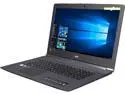
Acer Notebooks Aspire V17 Nitro VN7-792G-752J Intel Core i7 6700HQ (2.60 GHz) 16 GB Memory 1 TB HDD 256 GB SSD Intel HD Graphics 530 17.3" Windows 10 Home (Manufacturer Recertified)
Pros: Fairly small and light for a 17.3" laptop. Has Nvidia GTX 960m video with 4 gigs. Beautiful 4k display. Backlit keyboard. Thunderbolt 3.
Cons: Short SD card slot. Upgrading will be difficult. Internal battery.
Overall Review: The surface of the lid is some sort of rubber material. Provides a good grip for carrying but it's a little odd. Seems like it will scuff easily. Not really a pro or con. A definite plus is the Nvidia GTX 960m video. There's no mention of this in the listing but other sites list it as a feature so I took a chance. Unlike just about every laptop I've bought in the last 5+ years, this one doesn't have a panel on the bottom that allows easy access to components. Most laptops, you take out a few screws, slide off the panel, and you have access to memory, hard drive, wireless card, etc. for easy upgrades. With this laptop, you have to pry off a cover, take out some screws, flip it over, take out a lot more screws, flip it back upright, run a spudger along the edges, pry the keyboard up just a little, disconnect 3 ribbon cables, and NOW you can finally take the keyboard off. At this point, you can change the hard drive or wireless card. If you want to upgrade RAM or SSD, you're just getting started. Disconnect the battery, unplug some more cables and wires, remove some more screws, disconnect the monitor hinges, and NOW you can finally pull out the motherboard and upgrade the RAM or SSD. What the heck, Acer? Why? And the short SD card slot is just dumb. There's no reason to put one of those on a 17.3" laptop. There's more than enough room for a full socket that lets the card sit flush. Those two complaints cost an egg. Well, mostly the upgrade difficulty level. Other than that, it's pretty great for the money. The display looks amazing. I have it running at 4k and 200% size and it's amazing for general productivity and surfing. Text looks as crisp as a printed page. I've only tried a couple games but it does pretty well at 1920x1080 with decent quality settings. You're not going to get a better 17" 4k laptop in this price range.
11/7/2016See more detail