

Your Browsing History


Chris V.
Joined on 04/08/02
0
0
product reviews
- 33
Excellent!
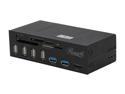
Rosewill Data Hub for 5.25" Drive Bays- 2 USB 3.0 Ports and Main Connector, Four USB 2.0 Ports, eSATA, Internal Six Slot Media Card Reader, Supports Windows ME/2000/XP/Vista/7/8/10 - RDCR-11004
Pros: -Everything works like it should -Straight up PnP w/ Win10 -MUCH better than reviews here led me to believe -NOTE: Mine shipped with SATA power connector - no need for MOLEX adapter
Cons: None really. See below for some notes
Overall Review: -From picture and reviews I bought a Molex-SATA power adapter since my PS has no Molex right now & I wasn't going to run an additional line just to get 1 ancient connector. Didn't need!!! The must have updated recently and mine uses a SATA power connector. Welcome to the 2010's. So I wasted a buck fiddy - no big deal. -From reviews of this and similar devices it made it sound like they would only work for one device at a time or not do direct transfers from 2 things plugged in. I put flash drives in 1 USB2.0 port and 1 in USB3.0 port and an SDHC card simultaneously. All three were instantly recognized and assigned drive letters. Copied a small file from desktop to one device, then from that device to another, then moved from 2nd device to third. I had no issue directly copying or moving files from/to USB flash drives & SDHC card. WIn10 64 Pro - other OS might not work the same? -Shallow depth didn't work well in my 'easy case' which just has 1 springloaded arm to hold stuff in optical drive bays w/o screws or tools. Wouldn't catch well and shallow depth let whole device wiggle around too much. I had to go old school and put a screw in each side (the horror). Screws were included though. -Not really the product's fault but the USB3.0 plug is super easy to disconnect from mobo header. Just slightly moving cables out of the way & tying off lifted one side of plug & made USB3.0 inop on first attempt. The cables going to that plug are very stiff and there is just no friction/tension on that type of connector so really easy to inadvertently pop it loose. -Only tried SD & SDHC cards in reader since that's all I use. Both worked fine. -I agree the Rosewill billboard in upper right hand corner is a little large. No worse than the 'spec sheet' printed on my HP DVD-RW drive that is plastered with feature logos across the entire bezel. I'm sure a dab of fingernail polish remover on a cotton ball would fix if I cared that much - I do not. -When device is idle - nothing plugged in - it is idle. No extra drive letters, no lights. It just sits there behaving itself. When a USB drive is plugged in, a drive letter is assigned but the unit itself does nothing. When an SD/SDHC card is in there is a small blue LED that stays on and flashes as a R/W indicator like your case HDD light does when activity on the card. Otherwise it is very well-behaved addition. Might have been a competing product, but a lot of reviews stating they had a bunch of extra drive letters all the time or always-on LEDs. -I tried getting this thing to misbehave. Installing/removing cards & flash drives over & over in different numbers and ports. It just worked. -Does not fast charge my phone on USB3.0 port. The case USB3.0 does not either. I'm thinking that's a mobo problem even though I installed and turned on MSI Super Charger utility. Or could be the cable I'm using. Or some BIOS setting. Or it could be perfectly normal that you need a proper charger for fast charging and Qualcomm 2.0 Android phones simply will not fast charge from a PC. Don't really care and not a knock on the device - just an observation that something I think is broken, this didn't fix & I thought maybe it would. MSI Z270-A Pro mobo w/ USB 3.1 if that matters. Anyway....just BUY IT if you are reading this because you are comparing different models. Unless you must have a fan controller also built in to the hub, this one is an excellent choice. In my case at least, it just worked and met 100% of my expectations.. Quickly recognizes whatever I plug in, looks good, all ports seem well-secured into device and of good quality, & everything you need is included in the box
4/11/2017See more detail
Works fine
GENERIC 10U2-02215 Gray USB 2.0 Cable
Pros: Nice length, works fine.
Cons: Nothing with the cable itself. Newegg's small parts shipping fees are silly. If something like this ships with other stuff it should be free shipping. 2x the cost of the cable for slow UPS delivery. At least drop this little stuff in a USPS priority mail flat rate mailer & get it delivered faster & cheaper. It's irritating racking up shipping fees when stocking up on little odds & ends like cables. If you buy more than one, shipping on the remainder should be free or steeply discounted - is it really going to cost more to ship 5 of these as opposed to one?
Overall Review: Would rate 5 - excellent if shipping fee was realistic
1/28/2007See more detail
Excellent so far
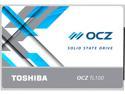
OCZ TL100 2.5" 240GB SATA III TLC Internal Solid State Drive (SSD) TL100-25SAT3-240G
Pros: Fast Not a bad price for size
Cons: None
Overall Review: Took right at 11 min to do full install of Win10 Pro from USB 2.0 flash drive. First boot until 2nd restart where you start answering the privacy questions @ 11 min. I was really impressed with how quick that was. My old 1st gen SATA SSD was quicker than a standard HDD but this one is much faster. I was on the fence between this vs NVMe & decided to save the $ and skip the [potential since I know little about it] learning curve. I think it was correct choice. Haven't timed full startup yet but it's fast. Cold start to useable state is under 30 sec & most of that is POST. Edit to add: with Fast Boot enabled I go from power off to password screen in 11sec for Win10 Pro. After entering password, it's immediately in 'usable state'. My last build with Win7 Pro & SATA II SSD still had a couple seconds of the spinning mouse pointer where background stuff was loading. This doesn't do that. Whether that's the drive or Win10 I don't know, but I like it. Everything responds incredibly fast - programs open and ready to use instantly. Only exception is Photoshop takes about 3.5 secs to load all the add-ons I have which is still much faster than before. In PassMark I get 337 MB/S sequential read, 405 MB/S sequential write so nowhere near the 530/550 in specs. Beats the pants off my 7200rpm HDD that scores 44/42 though
3/12/2017See more detail
Good cooler
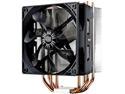
Cooler Master Hyper 212 Evo CPU Cooler, 4 CDC Heatpipes, 120mm PWM Fan, Aluminum Fins for AMD Ryzen/Intel LGA1200/1151
Pros: Quiet Performs well
Cons: Install documentation mediocre
Overall Review: This is one of those things that if you've done it once before, it's simple. If you haven't done before it's a little learning. Every one I've used up to this point had a backplate that could only install one way or only had push clips. I fumbled around for a bit trying to use the wrong standoffs and wondering why they wouldn't go in the bracket. Duh. I used AS - 5 instead of included thermal paste. I haven't pushed my system yet so with just real basic stuff like web browsing & installing drivers I get 34-35°C in a 72°F room. Dead silent, but fan stays at about min since I'm not doing enough to make CPU work. Not overly tall or bulky - had no interference or clearance issues but used an ATX board in a full tower so didn't expect any. Edit to add: After giving everything a couple days of light/basic use, I did some stress tests. 0 overclock, but my i5-7600K now idles at 31-32°C and highest peak temp I can get under stress tests is 54°. Still dead silent even under full load. Maybe the fan spools up a bit faster w/ higher temps, but I can't make it do that w/o OC.
3/12/2017See more detail
I like it
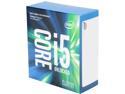
Intel Core i5 7th Gen - Core i5-7600K Kaby Lake Quad-Core 3.8 GHz LGA 1151 91W BX80677I57600K Desktop Processor
Pros: Very fast No issues with it
Cons: None really. Wish it was a little less $
Overall Review: Upgraded from an I7-950 (1st gen) 3.06GHz. This feels a lot faster but might be from other upgrades as well. After some testing I can't get this thing over 54°C at full load. Room is 22°C ambient. That's with 0 overclock, 212 EVO, & AS-5. Other things contribute, but I have a very snappy system. Was going to go with another i7 but was trying to stay under budget so 'compromised' with this i5. Now that everything is up & running, I don't feel like I compromised at all. I'm sure there are some tasks where an i5 vs i7 would be a noticeable hit, but not with anything I do. MSI M270 GB GTX 1060 3GB OCZ SATAIII SSD WIn10 Pro 8 GB DDR4 2400 From complete shutdown system boots to usable state in 12 sec, programs launch instantly, and everything just feels like it happens with faster response vs my 1st gen i7 on X58 & Win7 Pro.
3/12/2017See more detail
Happy with it
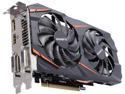
GIGABYTE GeForce GTX 1060 3GB GDDR5 PCI Express 3.0 x16 ATX Graphics Card GV-N1060WF2OC-3GD
Pros: Low cost 2x DVI Quiet Fit easily Only 1 power cable
Cons: This was most I could afford with overall build budget
Overall Review: Not an avid gamer - just a little here & there & @ 1080p. System is Z270, i5-7600k 3.8 GHZ, 8GB DDR4 2400, & OCZ TL100 SSD. Not top-end, but decent. With 0 overclock on anything in the free 3DMark I got: 3920, better than 44%, 3907 graphics score in Time Spy test 10,132, better than 69%, 12,537 graphics in Firestrike test Not bad for an $800 build (with a few recycled parts from last system) & everything at stock settings. Card never exceeded 72°C peak during tests and made no noise. If the fans came on, I couldn't tell by listening. I like that! I buy stuff that I can overclock, but end up never feeling a need to do it. Probably will be the case with this build too, but since I'm not able to get it above 72C now, there's probably some room to push this card Wanted 2 DVI connections for my 5 y/o displays. Could have done 1 HDMI & 1 DVI I guess, but that's how I had them on my GTX570 and figured it best to just stay that way since it was an option. I chose this because in general it seems to outperform ATI near same price. I felt like I was fine on my GTX570 w/ 1.25GB memory so the 3GB vs 6GB shouldn't bother me. And GeForce cards have 'just worked' for me for a very long time. Last time nVidia let me down was MX440 - very long time ago. For under $200 (plus a rebate that might show up sometime before this needs replaced with a DX15 card) I thought it was a good value. Not the strongest card out there, but quite capable, & way under half the $ of a 1080.
3/12/2017See more detail
seller reviews
- 1
Good
Fast shipment and very nice prices. Much better than going to the mall jewelry store
On-time
Delivery
Product
Accuracy
Customer Service
Satisfactory
12/4/2011See more detail