
Your Browsing History


Fred S.
Joined on 11/11/04
0
0
product reviews
- 5
Built like a brick house
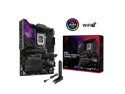
ASUS ROG STRIX Z890-E GAMING WIFI Intel® Z890 LGA 1851 ATX motherboard, Advanced AI PC-ready, 18+2+1+2 stages, DDR5, WiFi 7, 7x M.2, Thunderbolt™ 4, USB Type-C®, AI Overclocking, Cooling & Networking
Pros: I've been building PCs since the swap meet heydays of the 80s. This motherboard is built like military grade hardware, and the layout is perfect. Building a PC around it was a walk in the park. It supports a ton of standards. The ever improving ASUS BIOS is a joy to use.
Cons: I always update the BIOS prior to installing Windows. Using ASUS EZ-Flash makes that task trivial. After updating the BIOS, I got a dire warning on reboot telling me to Immediately update the 'ME' (Intel CPU Management Engine) using EZ-Flash so it matched the BIOS. Well, the download from ASUS for the ME update is a Windows program, so you can't immediately update it using EZ-Flash (I tried). You have to install Windows and run the ME update Windows program. Don't waste your time putting the program on a USB stick for EZ-Flash.
Overall Review: I see some people got boards that didn't work. Hmmm. Maybe somebody fried and returned a board and Newegg resold it. I got a 'new' SSD from Newegg that had two disks defined on it. One had an old version of Windows, and the other was a corrupt MBR disk that even diskpart couldn't 'clean'. I had to use a tool (EaseUSPartition) to clean it up. That's rare; only happened once and I've bought a ton of stuff from Newegg. I think this is probably the nicest MOBO I've ever purchased.
12/24/2025See more detail
Love this case - great air flow. Quiet.
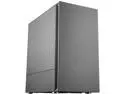
Cooler Master Silencio S400 Micro-ATX Tower with Sound-Dampening Material, Sound-Dampened Solid Steel Side Panel, Reversible Front Panel, SD Card Reader, and 2 x 120mm PWM Silencio FP Fans
Pros: The last 4 or 5 builds I've done have all been Micro-ATX with SSDs, 4 quiet PWM case fans, a good size cpu cooler. Typically the case fans that come with the case I have to toss because they either aren't PWM or they're too loud. The two fans with this case are super quiet. There's lots of intelligent engineering in this case, like a bottom air vent for the power supply fan, nifty rubber push-in mounts for SSDs, front, back, and top fan ventilation (you have to buy the top fans). It's incredibly sturdy, looks monolithically awesome, can accommodate an optic drive that you never see, has an SDRam slot on top of the case next to the USB 3.0s. It is super quiet. I put a huge Noctua NH-12S cooler in it with no clearance problem. The gaskets for routing cables are nicely placed. I feel it's worth the extra cash.
Overall Review: I'd recommend it.
11/4/2021See more detail
Very Fast, Integrates Well with Win 10 X64
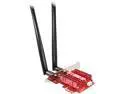
EDUP WiFi 6 Card Bluetooth 5.0 with Heat Sink, PCIe Network Card AX 3000Mbps AX200 802.11AX 2.4Ghz/5.8Ghz Wireless PCI Express Wi-Fi Adapters Dual Band Antenna for Windows 10 64-bit
Pros: I was using a 5.0 USB dongle for wireless on a desktop that wasn't near a cat 6 drop. After a year it went flakey, so I thought I'd give this a go. The bluetooth connector plugs into any usb 2.0 header on your mobo. As for drivers, it appeared to be plug and play, but I ran their driver exe files anyway (from their website). The bluetooth is rock solid, and the wireless is noticeably faster than my old 5.0 USB dongle. Well worth the investment.
Cons: When I plugged it into a pci 1x slot it didn't show up in the device manager. So I plugged it into the end of a full slot and it instantly fired right up, showed up in the device manager, and auto installed drivers. I'm guessing the 1x slot didn't have enough power for the board.
Overall Review: Because it integrates everyplace it should in Windows 10 GUI, and runs fast and stable, I recommend it over a USB dongle. Plus having bluetooth is nice. My last few Mobos didn't provide it out of the box.
11/4/2021See more detail
Fast; Great Display; Sleek
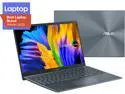
ASUS ZenBook 13 13.3" Intel Core i7-1165G7 16 GB LPDDR4X Memory 512GB PCIe SSD Windows 10 Pro 64-bit UX325EA-XS74
Pros: The OLED display is a nice step up from IPS. I decided if my 2 year old Galaxy 10 OLED display shows no sign of burn in with constant use, I'll chance OLED on a pc. I like that it's MIL-STD 810G and been drop tested. I also like that it's got two Thunderbolt 4 ports in addition to HDMI and USB 3.2 Type A. It's completely silent. It's amazingly fast, and the touch pad is extremely responsive. It's very thin. The bezel is minimal. I like the cantilevered hinge. Power consumption seems reasonable. Having 16 GB of memory guarantees my speed for anything I do. The WiFi is fast.
Cons: I wish it had Bluetooth built in. I couldn't get the Windows 10 Mail app to work properly with IMAP until I spent a day forcing updates - but that's a Microsoft thing. I had to delete McAfee (both as a program and an 'app') because I use a different product for Virus Protection. But no serious cons.
Overall Review: I think ASUS gives you a lot for your money if you're looking for above average quality. They've been making quality motherboards forever.
5/11/2021See more detail
Relaxing Build
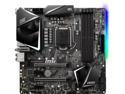
MSI MPG Z390M GAMING EDGE AC LGA 1151 (300 Series) Intel Z390 HDMI USB 3.1 Micro ATX Intel Motherboard
Pros: - Board is built like it's military spec. Very sturdy, well marked, well manufactured. - Layout on a Micro ATX is especially critical if you're going into a Mico ATX case with a sophisticated build. I managed to put a Noctua 140mm cooler, 32GB of memory, a dual slot Graphics card, two 120 PWM case fans, all around the board with no problems. The connector risers are very well marked and only reside at the edges of the board for easy access. - The bios interface is so user friendly, you feel like you're playing another video game.
Cons: - The second long PCI slot that is the same physical length as the number one 16 channel slot is actually only populated with 8 channels. -The CPU fan control logic senses between PWM and DC, but for the sys fans you have to manually configure them in the BIOS (default is DC). So if you replace stock DC case fans with PWM fans they will run at max speed until you reconfigure them in the BIOS (and save). - Not so much a con as a clarification. The board has two CPU PWR connectors in addition to the 24 pin ATX connector; one is the typical eight pin +12 V EPS and the other is a not so typical four pin +12 V EPS. So be sure to get a power supply with an 8 to 8 EPS cable and an 8 to 4+4 EPS cable (you only use half). I found a Corsair 650 that fit the bill, but both cables aren’t ‘required’ in a PSU until you get to 850 W. - Board uses an algorithm for how fast to actually clock your memory, which may result in timings slightly below what the memory is marked - you're free to set it back to the marked value. The manual is a bit weak on explanations.
Overall Review: - Definitely the most pleasant (uneventful) build I've ever done, and I did a lot of them back in the halcyon days of the 90's swap meets in So Cal. I guess the big question is whether getting the Z390 is worth the extra money. I can start the investigation by playing with my memory clocking - how fun is that? I definitely don't have any regrets buying this board.
5/23/2020See more detail