
Your Browsing History


Gerald M.
Joined on 09/22/04
0
0
product reviews
- 7
Potential drive-size issues turned out to be NON-issues
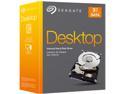
Seagate BarraCuda STBD3000100 3TB 7200 RPM 64MB Cache SATA 6.0Gb/s 3.5" Internal Hard Drive Kit Retail Packaging
Pros: Good performance and high capacity at a very good price, and my experience with multiple Seagate models has been excellent so far.
Cons: Shorter than normal warranty.
Overall Review: I built my current computer just a couple of months before the UEFI BIOS became available, so with the old style BIOS I was aware I might have issues. I did my homework and discovered that BIOS-related issues only applied to usage as a boot drive, and since my boot drive is a Vertex 4 SSD and I only use my spinning hard drive for my data collections, I was already good to go, and all I had to do was initialize the drive in Windows 7 with the GPT partitioning scheme (which also creates a special 128MB hidden partition). However, for me there was one more potential stumbling block, since I use TrueCrypt encryption on my data drive as well as my boot drive, but it turns out that TrueCrypt has been able to handle over-2TB partitions for some time now (assuming they are also recognized in Windows), even including the "System Favorite" boot-time mounting of an encrypted data partition larger than 2TB. So the upshot is that for the growing number of people who use an SSD for their system boot drive and only need a spinner for data, we don't even have to mess around with special drivers like Seagate's DiskWizard software to use these larger disks. I was especially concerned about incompatibility between DiskWizard and TrueCrypt, but Windows 7 and Vista can manage the huge partition alone without the extra help from DiskWizard. The potential drive-size issues turned out to be NON-issues, and this Seagate drive is a sweetheart of a data drive.
1/20/2013See more detail
Disappointing for me
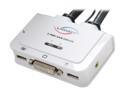
LINKSKEY LDV-302ARC 2-port DVI USB KVM w/ Audio&Mic Plus QuickSwitch Remote Button
Pros: Video quality is excellent at 1680x1050 (although this wasn't a problem with my previous D-sub analog KVM) and the DVI interface should easily accommodate the higher resolution monitors that are undoubtedly in my future. The extra-long cable for the second port is a nice feature, allowing a little more flexibility in location. Port switching can be actuated by either the wired switch, or by two quick taps on the keyboard's scroll-lock key (if you have one), or using included software, which I didn't need or try.
Cons: USB switching is slower and more problematic than with my previous KVM switch, used with the same computers. Switching this Linkskey KVM frequently crashes the driver for another USB device on one of the computers, and changing USB ports for either device doesn't eliminate the conflict. The root of the problem may be the internal hub of the KVM which combines mouse and keyboard into a single USB plug, a feature that my old KVM didn't have. If I could push the "undo" button on this purchase decision, I'd choose a KVM with separate mouse & keyboard plugs which might cure this problem. Just so we're clear, this conflict is on a 1-yr-old Asus motherboard flashed with the latest BIOS, running Windows 7 with all updated drivers. My previous KVM exhibited this problem on very rare occasions, maybe once in 4-5 weeks. After I installed the Linkskey KVM, it started happening several times a day. This only occurs at the moment I switch computers and USB devices are being reassigned.
Overall Review: The only reason I'm not sending this back for a refund is because of the return hassle and restocking fee, plus I've decided that I can live without that other USB device driver I was using. The driver that frequently crashes when I use this KVM is an extended-function Skype handset driver which enables its keypad and ringer to emulate a standard telephone, so other buyers are unlikely to have the same problem with this Linkskey KVM that I have, since that seems to be my only system conflict caused by the KVM switch. In any case, though, the USB mouse/keyboard switching with this unit is still slower and less clean than the old Rosewill KVM it replaces. That older unit only had to be replaced because it lost a color channel on one of the video ports. In conclusion, I'm really having just a two-egg experience with this Linkskey, but in fairness, most buyers will probably have a four-egg experience, so I've split the difference to be generous.
5/12/2011See more detail
Stable Even With Reduced Voltage
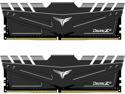
Team T-FORCE DARK Za 32GB (2 x 16GB) 288-Pin PC RAM DDR4 3600 (PC4 28800) Desktop Memory (FOR AMD) Model TDZAD432G3600HC18JDC01
Pros: Perfectly stable so far, even at reduced voltage.
Cons: Thick heat spreader could be problem in first slot, interfering with CPU cooler. Fortunately, I purchased a 2-DIMM kit (populating slots 2 & 4) and dodged that bullet without even realizing it would be an issue. I don't have a direct comparison for the thickness of the heat spreader, so it could be a problem with the layout of the ASUS motherboard or the size of the AMD Wraith cooler instead. Just get 2 DIMMS instead of 4 and enjoy the extra space.
Overall Review: After I got past that first adrenaline rush of "will my new build power up?", I got into the BIOS and set it up to use the DOCP/XMP 3600 MHz frequency and 18-22-22-42 timings, and increased the FCLK frequency to 1800 mhz for well-synchronized communications between the CPU and memory. After a reboot and some basic stability testing, the next thing I wanted was to reduce the memory voltage to 1.30v (down from the DOCP 1.35v), figuring a bit less voltage means less heat and greater longevity. So after an overnight memory stress test from a WinPE environment, I decided it was stable at the reduced voltage and ready for prime time. That's been the status for the last week or so -- the full rated frequency and timings with reduced voltage and perfect stability so far, running a fully configured virtual machine inside a Windows 10 host. That seems deserving of 5 eggs.
9/3/2021See more detail
In a word, "Delighted"
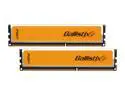
Crucial Ballistix 4GB (2 x 2GB) DDR3 1600 (PC3 12800) Desktop Memory Model BL2KIT25664BN1608
Pros: Speed, stability, price (I got them on sale, so your results may vary)
Cons: None
Overall Review: I've been running four of these modules at 800MHz(x2) at 1.60v with timings of 8-8-8-24-36-2T (the XMP settings) for nearly a month now on an Asus M4A89GTD PRO/USB3 motherboard, with an AMD Phenom II X4 955BE. I've been concentrating so much on software migration issues that I haven't taken the time to overclock anything yet, but the memory stability so far speaks for itself. However, part of the credit for that also goes to AMD for the improvements they made to the memory controller in their C3 stepping (Google "C3 stepping" and "memory controller"). Because of those improvements, I'm able to get the full rated speed and same low latency out of 4 modules as would be expected for only 2 modules, and even at slightly lowered voltage. The only glitch I've seen was when my system made it clear that a 1T command rate was unacceptable (what can I say, I got greedy).
5/4/2010See more detail
It lives up to my expectations
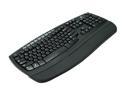
Logitech Comfort Wave 450 Black 104 Normal Keys USB Wired Ergonomic Keyboard
Pros: The basic key placements are what I’m used to, and the ergonomic aspects of this Logitech keyboard with its improved angles are a welcome improvement over what I had. I like the padding on the wrist rest, and it has as many special-function keys as I really want. The key labels and icons are crisp and legible in the relative low lighting of my typical environment. Special kudos to the designer who finally put flip-out tilt supports underneath the FRONT of the keyboard to allow setting a negative angle. There was a time when I was on the verge of developing carpal tunnel syndrome and I had to lower my chair more than I liked in order to achieve the same effect to keep my wrists as straight as possible.
Cons: If I had my druthers, I’d like to feel a tad more "click" at the bottom of a key press, but I’m still quite satisfied with the tactile response.
Overall Review: After reading many reviews of (mostly Microsoft) wireless keyboards where too many users were experiencing annoying lag times or missed keystrokes, I decided to stick with a wired keyboard with its inherently more dependable electrical signaling and no need to replace or recharge batteries. If you don't need a wireless keyboard, it seems somewhat risky as to whether you'll experience problems that arise strictly due to the wireless interface.
12/30/2009See more detail
You'll grow into it
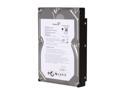
Seagate BarraCuda 7200.11 ST31500341AS 1.5TB 7200 RPM 32MB Cache SATA 3.0Gb/s 3.5" Internal Hard Drive Bare Drive
Pros: I think this Seagate is my first 4-platter drive, and I'm pleased to see that it runs as cool as any other drive in my growing collection. I bought it primarily for the space, to replace a 640GB drive that filled up faster than expected.
Cons: (this space for rent)
Overall Review: When I was a kid, my mom used to buy me clothes that were a little too large. She always said, "You'll grow into it!" I'm sure that will be the case with this extra-large hard drive as well, but at least it'll be awhile before that happens ;-)
10/30/2008See more detail
seller reviews
- 1
Good experience
Item as described, good price, and arrived sooner than promised. I wouldn't hesitate to do more business with antonline.com.
On-time
Delivery
Product
Accuracy
Customer Service
Satisfactory
6/23/2015See more detail