
Your Browsing History


Jeremy C.
Joined on 02/20/06
0
0
product reviews
- 21
The best of the pen-enabled Windows tablets.
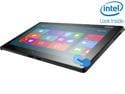
ThinkPad Tablet 2 (367927U) Intel Atom Z2760 2GB Memory 64GB Flash Memory 10.1" Touchscreen Tablet, Windows 8 Pro 32-bit
Pros: I really love the build quality. Scratch-resistant Gorilla glass on the front; easy-to-grip rubber on the back. I also think it's one of the nicest looking Windows tablets, aside from the Surface. It's even lighter than the iPad, and easy to carry around with one hand for extended periods. This is a big deal, as many of the pen-capable tablets are around 2lbs, which gets tiresome to hold.
Cons: The Atom processor and 2GB of RAM SHOULD be fine for a tablet. Many apps, however, seem to be tested primarily on desktop devices (a downside of Windows 8 running on such a diversity of hardware). Games with a lot of animations can be sluggish. On some drawing apps, the rendering lags behind the pen. Most tablets ship with a cheap pen, and the Lenovo is no exception. It works fine for taking notes, but you'll want to get a nicer pen if you're drawing or painting. My wife has a Toshiba pen and it works really well with the tablet. The (optional, Bluetooth) keyboard is really nice to type on, but difficult to transport as it doesn't attach to the tablet. As a result, I rarely use it. I prefer the Surface when it comes to keyboard support.
Overall Review: Most of the Windows 8 tablets provide the worst of two worlds: they are too heavy to use as a tablet, but too slow to use as a laptop. The Tablet 2 solves this by excelling at being a tablet, and not trying to be a "hybrid". This isn't a laptop replacement, but it's a really good tablet. The ability to run Windows Desktop is nice as the Windows Store finds its feet. That said, it's cumbersome to use on a true tablet and, thus, I rarely use it. If more (any?) RT devices supported digitizer pens, I'd have gotten an RT device instead.
5/1/2013See more detail
Hope you don't need support
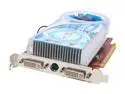
HIS Radeon X1600XT 256MB GDDR3 PCI Express x16 Graphics Card H160XTQT256GDDN
Pros: Good specs.
Cons: Windows 2003 drivers don't work properly. This isn't an typical OS so it's not too surprising that I'd have trouble. What is surprising is that I've resubmitted my support ticket three times over a three week period but haven't received even a receipt for my issue (nonetheless an actual response). Similar experience from ATI. Never received confirmation or payment on my rebate. Have not been able to get above 1600x1200 resolution using ATI drivers; the high resolution is one of the key reasons I bought this card.
Overall Review: Right now NVidia is known for providing better value products and their support appears to be superior. NVidia offered drivers for build 5308 of Windows Vista, for instance, the day of release; ATI took about a month to catch up. For my needs, the ATI chipset was better but I wish I'd gone with the comparably priced
3/25/2006See more detail
Great hardware, terrible support.
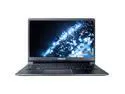
SAMSUNG Series 9 NP900X3C-A04US 13" Ultrabook
Pros: This really is a beautiful machine. The chassis build quality is solid. It's among the thinnest and lightest laptops on the market. The screen is brighter than any other laptop I evaluated - and, in its class, it has a higher screen resolution than everything but the Sony Vaio.
Cons: I had read that Samsung had bad support before I bought this, but thought: I'm technically minded, that's not the end of the world. Whoops! The laptop came with a loose Control key (the plastic connector was broken). Just trying to open a support request was an ordeal, due to multiple bugs on Samsung's website. I finally gave up on submitting a request online, and called. My only option? Send the entire laptop to Texas so they can evaluate the damage. That would take 2+ weeks, plus shipping costs - all for a $2 key that can easily be repaired by the owner. After an hour or two and multiple escalations I got to their business support, who agreed to send me a new key. I never received the key, however. Be warned.
Overall Review: I had a MacBook Air before this. There have been a lot of attempts by PC manufacturers to compete with the MacBook Air, but the Samsung Series 9 is the first one I've seen the matches the design and build quality while not blatantly attempting to copy Apple's design (ironic, since we're talking about Samsung). That said, while my MacBook Air had to go into the shop five times (it was a first generation machine), it was always a painless process. Only once did they have to send it away - and even then, it was back within a week. And that was a month after my AppleCare expired, and they didn't charge me a dime to replace the logic board and chassis (essentially, a brand new laptop at that point). It's a shame. Samsung should have a real competitor here. But on hindsight, as much as I like this machine, I wish I'd RMA'ed my Samsung and bought another MacBook Air just for the support.
3/10/2013See more detail
Effective, but a pain to install
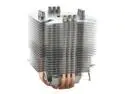
Scythe SCNJ-1000 CPU Cooling Heatsink
Pros: Very, very effective: dropped my IDLE temps on an X2 3800 from 30*C to 23*C -- and that's before the Artic Silver 5 set and without a fan (!). It's also reasonably light weight for an aftermarket large heatsink. Yes it's tall (may not fit in your case) but that also allows it to work with lower airflow (and typically quieter) fans.
Cons: This is the biggest pain to install (on a 939 chipset, at least). Removing your motherboard to install the retention bracket is annoying but easy. It required a lot of pressure for me to put this on the board. I was afraid I was going to harm the chip (a complaint I've heard a LOT). I finally got it on and it booted fine -- but it was a bit stressful. I've been building machines for a decade and I'm hardly timid around them, but this made me nervous. The fins are a bit thin; a couple bent on installation. Overall, though, it doesn't feel or look cheap. It's pricey -- but comparable to the competition. I think the only serious competitor to this is the beautifully designed and very sturdy SI-120 (although that one will definitely require a fan).
Overall Review: I put a 120mm Nexus (silent, but only mediocre airflow) facing INWARD on the back of my machine - it's about an inch from the heatsink. As such, the heatsink itself doesn't require a fan but offers good cooling. The width of this is 110mm in either direction - on my case (a Lian Li PC-V1000) this gave me 1cm clearance on one side. Make sure you have 55mm from the center of your CPU to the closest obstacle (note: it's tall enough to clear low obstacles like memory or even low northbridge heatsinks). There is concern that the motherboard components won't share in the cooling from this. In my case, facing the fan inward solved this as the fan blows air across the motherboard. The ONLY reason I'm giving this a four star instead of five is because of how difficult it is to install. I was really surprised by that; certainly not for the timid.
3/7/2006See more detail
Shoddy Craftsmanship, Good Features
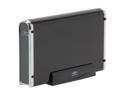
Vantec NexStar 3 3.5" SATA to USB 2.0 & eSATA External Hard Drive Enclosure (Onyx Black) - Model NST-360SU-BK
Pros: This is a true eSata interface. Almost every other chassis on the market uses a SATA converter: an internal IDE drive mapped to an INTERNAL SATA wire which is neither shielded or rated for repetitive removal. The eSata doesn't work on my machine - but I'm guessing this is not universal based on other comments. Combination with USB 2.0 is nice for machines that don't have SATA/eSATA (like my PowerBook). Not THAT much more expensive than other drive chassis (that don't support eSATA).
Cons: The back panel was falling off when I received it; I'll need to glue it down. One of the back screws won't tighten; sticks out a few millimeters from the back. The sides are thin, thin aluminum; sometimes they "pop" as they are pushed in (similar to a vaccuum sealed lid on a jar). It was a bit difficult to assemble; the SATA wire needs to be bent a tad which is challenging (and not especially great for it). Also, the wire for the LED gets in the way of the screwhole; I had to loop it behind itself to keep it out of the way. All in all I was really disappointed in the craftsmanship (per the above). It looks nice from a foot away, but it doesn't FEEL nice when you're working with it. I'm sensitive to such things, though. I'm not sure if this is my drive or motherboard or what, but Windows does not recognize the drive via eSata -- and if I boot with it on then it doesn't POST (hangs before I can even get to the BIOS). USB works fine. I've written Vantec; hopefully they ha
Overall Review: I was worried about some of the notes I saw on here. My experience with common complaints: 1) There is a very low rotational vibration; not major but enough that I'll be adding rubber feet (easy fix). 2) My drive fits perfectly in the case without any rattle or extra space (even before I screwed it in). 3) While the case is longer than necessary, it's still WAY smaller than my WD external drive chassis. 4) The exterior does get warm, although not excessively so at all. 5) The blue light on the front is really dim; not intrusive at all. I've had chassis where the LCD hurt your eyes if you looked directly into it; this is not like that at all. 6) The chassis will likely let out any noise from the drive (it's not big enough or thick enough to buffer the noise); I got a quiet drive so it's not an issue. On that note: my drive is a 250GB Samsung Spinpoint P 3.0Gpbs. I recommend this drive -- although I'll report back if I find it to be a contributor to the eSata problem (I doubt
3/7/2006See more detail
Reasonably Quiet
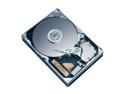
SAMSUNG SpinPoint P Series SP2504C 250GB 7200 RPM 8MB Cache SATA 3.0Gb/s 3.5" Hard Drive Bare Drive
Pros: Good price per gigabyte. Fast. Acceptable cache size. NSQ (will be nice w/ Vista).
Cons: Not as quiet as the old Samsungs I'm told, but...
Overall Review: I own the 160GB for inside my computer. I bought this for my external drive chassis. I'd been told it was notably louder than the 80GB and 160GB models. I've been very happy with my 160GB as it's very quiet; I didn't care about the noise level for this drive because I use it primarily for backup. I was surprised to find that while it is a bit louder than the 160, it's not a significant or offensive increase. The noise should be really obvious in the external chassis a foot away from my keyboard, but it's not at all. Obviously this may vary with each drive and how you tend to use it.
3/7/2006See more detail