

Your Browsing History


Brad K.
Joined on 03/30/05
0
0
product reviews
- 14
Good first SSD buy
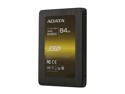
XPG SX900 2.5" 64GB SATA III MLC Internal Solid State Drive (SSD) ASX900S3-64GM-C
Pros: I had never heard of ADATA before. Reviews were tending toward positive, so I decided to make the jump and get it. I purchased this thing for Intel's SRT (Smart Response Technology). The SSD acts as a cache for a normal platter HDD, speeding up the system. While not as fast as a single SSD would be with the OS and apps installed, the speed up of my system was highly noticeable. Boot time was about 60 to 90 seconds before EVERYTHING became stable. Now it's about 20 seconds. Those times include start-up processes. The box the SSD came in was high quality. The drive doesn't feel cheap at all, despite it being extremely light. The serial number for the OS transfer software is on a sticker on the bottom of the SSD. So before you wire it in, be sure to take a picture or something. The 2.5" to 2.5" converter is plastic, looks nice, but sadly didn't fit my case (because my case's HDD bays are slightly larger).
Cons: 64GB SSD, system recognizes ~59GB. Gotta love retail to logical conversions.
Overall Review: I had a 2TB HDD already installed in my system. I also had a 320GB HDD for my Ubuntu install. My SATA controller was in AHCI. Intel's Smart Response Technology (SRT) requires your SATA controller to be in RAID, no AHCI. Many websites claim you will have to re-install the OS after you install the SSD since switching from SATA AHCI to SATA RAID will cause Windows to Blue Screen of Death (BSoD). While this is true, it will cause a BSoD, you can run this Microsoft Fix-it before switching the SATA controller and Windows will boot correctly. http://support.microsoft.com/kb/922976 If you get BSoD, put your SATA controller back into whatever it was before, restart, Windows will load, run that fix it, reboot, set the BIOS SATA controller to RAID, restart again. You should be in Windows now. You can then install Intel's Rapid Storage Technology (the software that enables SRT) and the rest is just point and click.
3/22/2013See more detail
Far better towers for slightly more price
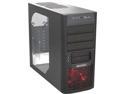
Cooler Master Elite 430 Red Edition - Mid Tower Computer Case with Windowed Side Panel and All-Black Interior
Pros: Cheap. LEDs are not super bright, which is good for me. Plenty of places to mount fans. Front panel ports are decent (1 USB 3.0, 1 USB 2.0, microphone jack, headphone jack).
Cons: Where to start? This case is awful, even for the low price. There are far better cases that are worth the extra $20. The case is constructed of steel, true, but it's very, very thin. Easily bent. The expansion ports are covered to begin with, but the metal isn't completely cut. It is still slightly attached and you have to cut it out of there yourself. This probably will bend the case because it is so flimsy. The front 5.25" bays also have this flimsy metal housing. The braces for the DVD drive and HDDs are quite tight. It feels like you're scratching the DVD drive and HDDs when inserting them. There are 6 pieces of plastic that are tool-less mounts for the 3.5" bays and HDD bays, but that's for either side of the case, so really you only have 3 plastic mounts. It comes with plenty of screws, but they're not separated, and there was also a disproportionate amount than what is listed in the owner's manual. All in all, I really dislike this case. I have built other machines with Cooler Master cases and I have loved it. And I still really like the Cooler Master brand. But stay away from this case. The HAF 912 case is much superior and has a $20 higher price point, if that.
Overall Review: This build was for my aunt who doesn't need a power house. She is actually the one that picked this out because she liked how the front was set up. As long as she likes it I'm happy, but if this were a case for my personal computer, I'd chuck it in the garbage and order a better one from Cooler Master.
8/17/2013See more detail
Haven't used yet, but looks genuine
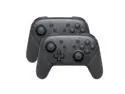
CORN Bluetooth Wireless Pro Controller Gamepad Joystick for NS Switch Console Support Somatosensory Vibration Screenshot Axis - 2Pcs
Pros: Decent shipping speed from China Looks just like a Nintendo Pro controller, without the logos and branding
Cons: Very little padding inside the box, but I have a feeling that the genuine Nintendo Pro controller is packaged the same way
Overall Review: Two huge caveats to my review: 1) I haven't used a Pro Controller. Ever. I don't have a baseline to compare these against. 2) Even if I had used a genuine Pro Controller before, I've yet to use these controllers. Haven't had the time. But they look convincingly good, and I have a high confidence that they'll work as a Pro Controller would. Hopefully now I've shared my limited experience, it'll help others pull the trigger to buy, _use_, and leave a full review.
9/16/2019See more detail
Easy and compatible with Synology DS1517+
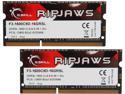
G.SKILL Ripjaws Series 16GB (2 x 8GB) 204-Pin DDR3 SO-DIMM DDR3L 1600 (PC3L 12800) Laptop Memory Model F3-1600C9D-16GRSL
Pros: Works with Synology DS1517+, just pop into the two slots on the bottom of the enclosure.
Overall Review: Recommended. Seemingly decent price, and G.SKILL has been reliable for me in the past. As for the benefit of such an upgrade, it's great. My Docker services can now sit more in RAM and not have to be swaped in and out, increasing speed and reducing wear on my disks.
8/20/2019See more detail
Disappointing shipping
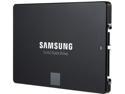
SAMSUNG 850 EVO 2.5" 500GB SATA III 32 layer 3D V-NAND Internal Solid State Drive (SSD) MZ-75E500B/AM
Pros: - High capacity and performing SSDs
Cons: Nothing significant
Overall Review: The reason for this review is mainly for this "Other thoughts" section, and unfortunately, it's directed at Newegg. I ordered parts for a brand new build all at once, expecting them to come from different places as Newegg has distribution centers across the US. Indeed, the tower case and a few other items started from the east coast, while these SSDs came from the west coast. Also from the west coast was some platter HDDs, CPU, and RAM. However, the SSDs came in a separate shipment from the HDDs, CPU and RAM. Rather than ship them all in one box, they came in two. I do not have an issue with this, nor would I have had an issue if they had arrived over the course of a few days. What does upset me is that they were delivered on the same day, on the same truck, but in two wildly different packages and packaging quality. The HDDs, CPU, and RAM came in a well handled box with plenty of air packaging to reduce bumps during shipping. The SSDs, however, were in a box absolutely mangled, looking as if the box had fallen out once every 100 miles from CA to UT. What's worse is that all of the air packing had been deflated, so it was just a bunch of plastic surrounding the boxes containing the drives. To me, it seems as if Newegg warehousing was just abusing the no-moving-part-ness of SSDs and thew them in with air wrap that has deflated over time in order to re-use plastic and cut costs. Even more so, I would be (mostly) fine with all of this but the fact that I had two boxes come in different states, the one containing properly inflated wrapping and good care, having plenty of space to fit two SSDs, and the other with poor packing, just shows some deliberate packing choices on Newegg's part. The SSDs have passed all stress tests I've thrown at them, and I still intend to run them in RAID 0, but it was disappointing to have a distributor such as Newegg, one that I love and trust, treat a package so poorly.
6/23/2015See more detail
First water cooler
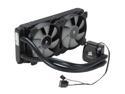
CORSAIR Hydro Series H100i Extreme Performance Water/Liquid CPU Cooler. 240mm
Pros: - Quiet when not under load - Easy enough to install, though has many cables - Great quality fans to mount to radiator - Keeps machine quite cool when not under load
Cons: - Noticeable fan/pump spin up when small computational spikes occur - Many cables to run to/from water cooling plate - fan power, pump power, Corsair LiNK USB cable
Overall Review: I didn't know what to expect from an AiO water cooler, but I planned to overclock my 5820k, so I made the jump and got this while on sale with a rebate. All the reviews tend toward the positive and there's a reason why. This is a great cooler, and is very quiet when not under load. Stress spikes sometimes cause audible noise, and it does speed up while playing a game, but that inevitable and something I personally think is for the operator to manage via headphones, tower positioning, etc.
6/23/2015See more detail