
Your Browsing History


Maarten A.
Joined on 07/07/16
0
0
product reviews
- 1
Great quality product, would buy again - but with a small caveat....
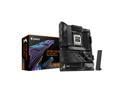
GIGABYTE X870E AORUS ELITE WIFI7 AM5 LGA 1718, ATX, DDR5, 4x M.2, PCIe 5.0, USB4, Wi-Fi 7, 2.5GbE LAN, EZ-Latch, 5-Year Warranty
Pros: - You get a ton of features for the price, often only found on more expensive boards. - Toolless installation of M.2 drives and heat sinks. - It just looks good.
Cons: - You may need to use Q-Flash to update the BIOS before it is able to boot with newer CPU's and newer sets of memory.
Overall Review: Bought this board to go with an AMD Ryzen 9800 3DX CPU. This is an extremely popular CPU, so many will likely have bought this board with that CPU. Unfortunately, the board comes shipped with an older BIOS that does not support this CPU (yet!), so in order to get it to work you have to update the BIOS to the latest version. In order to do this, you will need access to a second computer. You need a smallish USB drive, 32 GB or less so it can be formatted in FAT32. Download the latest BIOS from the Gigabyte website, unzip the files, and place ONLY the actual BIOS file (usually ending in the version number, such as F7, it will be the largest file in the ZIP) on the USB drive. Then, rename it to "gigabyte.bin" - make sure you rename the whole file including extension. Now place the USB drive in the USB port marked "BIOS" (there is only one). Power on the PC on the power supply (switch from 0 to 1), and then simply press the "QFlash" button on the back of the computer where all the USB ports are. The PC should power on, and a light should start flashing on and off. If it stops flashing immediately, something is wrong.... you might be able to resolve that by removing the video card, disconnecting any M2 and SATA drives, and just leave the CPU and Memory in place. If it is flashing however and continues to do so.... it is uploading the BIOS. If your USB drive has a light indicating activity on it, you will see it flashing too, indicating it is being read from. This process could take as much as 10 minutes, just patiently wait until the QFlash indicator light goes off, which means it is done. Now power off the PC, and power on normally. I was nervous and waited another 5 minutes just to be on the safe side. After powering on, the boot process will begin, which could take significantly longer than a normal bootup as it has to re-initialize the mainboard and memory. So don't panic, and just be patient....Don't forget to place back your video card if you don't use the internal onboard video. This is both an intimidating (I come from the era where bios flashes could brick a board much more easily than now) as well as incredibly convenient process, as the QFlash option allows you to rescue a seemingly dead board without too much trouble. So, with that out of the way I reformatted my USB stick (I only had one) with the Windows Media Creation Tool, and installed Windows 11. You will of course need to update drivers and whatnot, but I was on a Windows Desktop within 15 minutes after the BIOS was fixed. Overall, this is a REALLY good board for the price. I am comfortable with technology and doing the research, so I did not panic when at first the board refused to board..... of course things like "oh no its a DOA" went through my head but with a little research I quickly found out it was a simple case of the board not only NOT supporting the CPU I got, it also had an indicator light on that there was a RAM problem. The BIOS update solved it all. CPU recognized. RAM recognized at the right speed. Videocard working. This computer has now been online for nearly 16 hours straight and not a single issue. I will recommend this board to anyone wanting to use that awesome 9800 3DX CPU, don't be scared of the QFlash process to make it compatible. The only reason I did not award it 5 stars but went with 4 is that the 9800 3DX CPU was released over 9 months ago, and as such Gigabyte should have started shipping out boards with a BIOS that supports it. But since this was also fixable by an enduser with a USB drive.... It is only a minor inconvenience. If you were pleased with AORUS boards in the past (this is my third one), you will want to buy it. I've been a Gigabyte fan for some years, so naturally I looked at Gigabyte first, and so far I am glad I stuck with it.
8/10/2025See more detail