
Your Browsing History


Thomas S.
Joined on 09/10/05
0
0
product reviews
- 10
Does the job
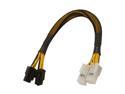
Athena Power Cable-M84M84F 8 in. Extension & Conversion Four-In-One
Pros: I have an Antec case with a bottom mounted PSU, which meant my 8-pin connector had to take an awkward route over top of my video card to reach its connector on the motherboard instead of using the case's cable organization space behind the motherboard tray. This cable is exactly what the doctor ordered and just the right amount of length. And it's versatile; it could step in as an adapter if need be. The cable is nicely sleeved and both connections are secure. The connectors didn't give me any fuss.
Cons: The margins on extensions and adapters and specialty do-dads like this must be great! Grumble grumble. Oh well, it's still just a few bucks.
Overall Review: The inside of my case looks nice and neat now. Apartment is still a mess.
6/6/2010See more detail
Excellent sound character
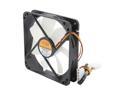
Nexus BASIC D12SL-12 Case cooler
Pros: Not quite silent at the stock 1000 RPM, but throttle it down to around 800 and it starts to disappear. But even at full speed, it's quiet, and the sound character is very smooth and pleasant.
Cons: I don't have the equipment to test it, but (using the highly scientific hand-in-front-of-the-fan test) it seems that my Scythe Gentle Typhoons actually push more air when adjusted to comparable noise levels. The sound character of the Nexus is better when they're operating at a loud enough speed, however.
Overall Review: Sleeve bearing fans are not appropriate for horizontal mounting.
6/6/2010See more detail
Nice fit-and-finish
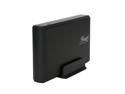
Rosewill RX35-AT-SC BLK Full Aluminum Cover, Metal Tray 3.5" Black SATA I/II USB 2.0 & eSATA External Enclosure
Pros: Attractive enclosure at a reasonable price. Excellent fit-and-finish. Assembly was very smooth. Many cheap enclosures are fussy to get together, but this one is very nice. The blue activity LED isn't overwhelmingly bright like some, which is nice.
Cons: I think I've seen other versions of this enclosure with a black anodized aluminum finish, which was a little snazzier than the the plain black finish on this one. Oh well, it's still aluminum construction and still looks very nice. Didn't come with a USB cable, but of course you want to use it with eSATA. The power switch is a pretty basic, somewhat wimpy feeling toggle switch. Would have been nice to have a more robust-feeling rocker switch.
6/6/2010See more detail
Low profile, low power, great performance
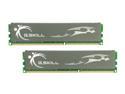
G.SKILL ECO Series 4GB (2 x 2GB) DDR3L 1600 (PC3L 12800) Desktop Memory Model F3-12800CL7D-4GBECO
Pros: This is good quality, fast RAM operating at low power (1.35 volts compared to 1.65 for most DDR3 modules). They're also from a brand with a good reputation. Admittedly, your RAM is not likely to be the biggest power hog in your system, but if you're going for cool and quiet, every little bit helps. It's also competitively priced - you're not paying a big premium for the lower operating voltage or the good brand name. At the time of purchase, this was actually one of the *least* expensive DDR3-1600 CAS 7 kits. The heat-spreaders are low-profile which means they won't interfere with large CPU coolers that overhang the DIMM slots on microATX boards. I'm very cautious about bad RAM from experiences in the past, so I've given these a good and proper stress-test out of the box, and to my delight, they are rock-solid stable.
Cons: According to some reviews, they have somewhat less overclocking overhead compared to other (generally more expensive) RAM kits. I'm not overclocking, so I can't say first-hand. Regardless, there is very minimal benefit to overclocking RAM at this point in time. There is also a small price premium over "regular" G.Skill modules (e.g. Ripjaws).
Overall Review: I have the 8 gig (4x2GB) kit, but all the above applies to either kit. My motherboard did not use the XMP profile by default, though it detected it just fine. That's the fault of my motherboard, not the RAM, and once I changed the setting, it used the correct speed/timings/voltage without any fuss. Just be sure to check your BIOS when installing the RAM to make sure it's set correctly.
5/30/2010See more detail
Good value
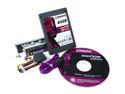
Kingston SSDNow V Series SNV425-S2BD/64GB 2.5" Desktop Bundle 64GB SATA II Internal Solid State Drive (SSD)
Pros: Kingston V series offer about the best $/gigabyte for SSD drives. Even though you can get faster SSDs, even a "value" SSD will kick the pants off a mechanical drive. It's also silent and uses less power than a mechanical drive. I had no problems getting this drive working. It does suport TRIM if your OS supports it (meaning Windows 7 and Linux 2.6.33 and later kernels).
Cons: The low price reflects the fact that it's a lower performance drive. There are faster SSDs out there if you're willing to pay a bit more. Sandforce is putting downward pressure on Intel drive prices, so if you're willing to spend a more, you can get substantially more performance.
Overall Review: Adding an SSD to your system as a boot drive is the best bang-for-your-buck way to improve performance. Throw your OS and your most frequently used applications on the SSD and keep your big files on your big mechanical drive. Even a lower-performance "value" drive like this one will radically improve boot and application loading times. Note: these drives do not suffer the horrible stuttering problem that happened with the first-generation JMicron controllers.
5/28/2010See more detail
Quiet, quality, quiet, inexpensive, quiet
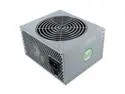
Nexus VALUE 430 430 W Active PFC Power Supply
Pros: Nexus is a brand famous for their quiet fans, and this PSU doesn't disappoint. It is very quiet. Very very quiet. I had to check to be sure the fan was even on, and that was when it was running by itself with nothing else in the case. And it's a "value" drive. What a bargain!
Cons: I put it in an Antec case (Mini P180) that mounts the PSU at the bottom, so it was a little tricky getting the 2x4 12v connectors to reach all the way to the top rear corner of the motherboard. It wouldn't reach going behind the motherboard tray in the cable-organization space, so it has to pass over top of my video card. A couple extra inches on that cable would have been nice. Unless you have a case like this with an unusual layout, or an unusually large case, this shouldn't be a problem. Of course, a modular cabling would be a nice feature.
Overall Review: Most people get WAY more power supply than they need. Unless you're doing SLI/Crossfire, or have some crazy setup, 430 watts is more than enough. Even under load, my reasonably beefy system peaks at less than half of that.
5/28/2010See more detail