
Your Browsing History


François-Pierre L.
Joined on 06/13/13
0
0
product reviews
- 1
The specs aren't hype, they're factual statements about the end-user experience.
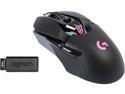
Logitech G900 Chaos Spectrum Professional Grade Wired/Wireless Gaming Mouse
Pros: - Buttons on the mouse feel awesome to click. Each and every one of them. The feedback is consistent and always even. - As advertised, the tracking accuracy of the mouse is way up there above and beyond. It beats Razer Deathadders and Mambas on their own Goliathus and Destructor mats. - Once set up, transition wired-wireless is very nice, with a much smaller "offline" transition window than other wired-wireless hybrid mice like the Razer Mamba as long as the receiver was plugged (without the adapter) before unplugging the mouse. - That button right "under" the mouse wheel? That's not a real button. However, it's something even more awesome: a switch that toggles a super-smooth low-friction free rolling of the mouse wheel, or a crisp and stiff notch-by-notch rolling. - Speaking of buttons: you can, if you want, use both the right-handed and left-handed thumb buttons, and map them each to different buttons. - Mouse surface has a very clean feel, and has enough friction with the hand to comfortably move the mouse around easily with weird hand positions in the heat of the action, and doesn't scrape the hand and stays cool easily. - Extremely reliable so far; every single movement or button-press had an immediate responsive effect in the computer. - The awesome feeling of the mouse is still present after 4 weeks, using it several hours a day. - Surprisingly lightweight, with great static-moving friction differential that's even better than advertised with a quality gaming mouse mat.
Cons: - Takes a bit of time setting up the mouse properly - Logitech Gaming Software is bloated, heavy, and can even cause Internet connectivity issues (!!) with more fragile LAN connections in Windows Vista/7 setups, which has been a known issue for years. Thankfully, not necessary for this mouse to work a full performance. - Mouse3 button (by default the "back" thumb mouse button) is a little bit too small and too close to the back of the mouse for comfort with some grip types and hand sizes, including mine. For FPS games I often end up rebinding to the "forward" thumb button instead for things I used to have on this one, and use other buttons for what I used to have on the "forward" one.
9/14/2016See more detail