
Your Browsing History


Ryan C.
Joined on 04/06/02
0
0
product reviews
- 16
Great for Low-Lag gaming
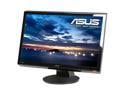
ASUS VH236H Black 23" Full HD Widescreen LCD Monitor w/ Speakers 300 cd/m2 20000 :1 (ASCR)
Pros: --After testing w/ camera, onscreen timer, side by side with a CRT to same vid card - nvidia clone mode - I got results that ranged from 3ms to 7ms INPUT LAG (NOT "RESPONSE TIME") for for 720p and 1080p - DVI and HDMI input. To see my results, and how I obtained them, google "definitive lag" and read my posts (#1149 and later). Note: how in interpreted the data resulted in somewhat _higher_ numbers than other sources. Read=my ms times would be _lower_ if interpreted the same way other sources do. :D --I found no significant difference in Input Lag between Scenery mode (my color/contrast preference) and Game mode (which has blacks that are too bright). I game in Scenery mode now. --1 HDMI/1 DVI/1DSUB/ --Speakers! (they're not good, but better than nothing) --Less desk clutter if the speakers suffice for your needs --1/8" jack audio in and HDMI audio in SPDIF RCA jack output (feedthru of hdmi audio in) --Dedicated input toggle button. --Inexpensive --Mat
Cons: I'M NIT-PICKING here considering price and gaming performance. --Glossy bezel (screen is matte though) --No height/swivel adjustment (VH236HL-P has it though) --Speakers aren't the best, but at this price, having them at all is really a bonus. --Not the best color. I haven't gotten around to calibrating it yet, but don't expect the best results. This is just fine with me though, you can't get superb color with such minimal input lag and such a low price. If you're looking for an LCD monitor that's both low lag for gaming monitor and a high color fidelity for photo/graphics editing--stop looking: you won't find it because it doesn't exist (yet, maybe OLED in 5 years?). -TN Panel means color/contrast shift based on viewing location. TN Panel = a "PRO" though, when it comes to lag time and price, though. Again, just nit picking.
Overall Review: I finally decided to buy a 1080p capable low lag monitor after finally finding one that was rated very well in lag _AND_ was actually one not yet discontinued on NewEgg. I am very happy with the results. I haven't played fighting (street fighter/mortal kombat) games on it yet, but so far I'm happy with it in FPS games (though it's still no CRT running at 85Hz, it IS capable of 1920x1080 and isn't 2+ feet deep) and old school games. MegaMan 9 on PS3 feels as responsive as it should and the same for Bionic Commando ReArmed PS3 at 720p. The challenges were more difficult on a big screen DLP because of the lag, but on this monitor, it feels tight instantaneous as it should. NOTE: this is not an LED LCD monitor, but LED LCD monitors are no better or worse gaming-wise than regular LCDs. The backlight does NOT affect input lag, and the LED portion is the backlight. Don't believe the those that say they're better for gaming. The difference is color gamut, not lag time.
10/17/2009See more detail
Such a mixed bag
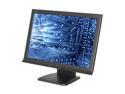
iZ3D 22" a-si TFT Active Matrix WSXGA+ 3D Gaming LCD Monitor w/ 3D glasses kit 5 ms D-Sub, DVI-D H220Z1
Pros: *3D effect very cool, but not perfect. See cons. *Very good support by the manufacturer in its forums. *VERY COOL 3D in google earth. Go to the Grand Canyon. *Allegedly the new drivers now allow zooming (weapons that change the field of view) without botching the stereoscopic effect. *2 sets of glasses plus 1 clipon set as well. *Polorized glasses, so no cords or batteries, or flicker LCD induced eye-strain. *Possibly better on the eyes, as you are literally focusing at different distances, about 1ft-20ft depending on settings. *Unlike when I tried the red/cyan nvidia setup years ago, this one allows you to have one eye see the exact default position, and the other is off center. This means you can always use 1 crosshair (you only see 2, no triple vision as crosshair is 2D) the left or the right (your choice, see setup notes) The old nVidea way was to offset each eye from center, thus making you have to aim between the two crosshairs you see=not good.) Decent size 22"
Cons: *Minimal OSD adjustments. *Poor black level, and thus contrast ratio. *Stereo Crosstalk too noticable. ie, each eye can somewhat see what it's not supposed to see, resulting in a sort of triple vision, the center item is the good looking 3D one, and you see slight duplicates to the left and right of it. Crosstalk more pronounced when an object is viewed with a monocolor/brightness background, ie a clear sky. *Polorization side effect causes each eye to see a different color tint. I had to manually adjust the colors for each of the two monitors (layers), not an easy process. Maybe they have a tweak for this in the drivers, though I doubt it. *You need more GPU power for the same framerate, as it's generating 2 (instead of 1) images for one "frame" of "frames per second" *LED light flashes when not in 3D mode. *While you don't need to be a computer expert, you should have some basic knowledge of tweaking ini file settings, and understand the stereo concept. Frustration if you
Overall Review: Sometimes this thing is incredibly cool, yet other times, it can be very disappointing. So, at some moments it's worth a 5 star rating (maybe 6) yet at other times, it's worth a 1 star rating. So I rated it 3. If you've done other stereoscopic gaming (red/blue glasses, shutter glasses, etc) this _is_ an improvement, but it's not quite mature enough a technology for the masses. BE CERTAIN YOU HAVE A COMPATIBLE GPU! Allegedly, new glasses are in development that will lessen the crosstalk. One of these days I'll get around to trying it out again in 3D, right now it's a monitor on one of my aux/gaming computers. In FPS games, falling from a high distance looking down with these things on is very cool. Much more of a sense of falling. I don't know if this would be an issue or not for people afraid of heights! :-P Read many a user and pro review. Make an educated decision. If you can, see one in action first. I cannot recommend one way or another. Such a mixed bag.
12/1/2008See more detail
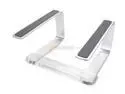
GRIFFIN Elevator Desktop Stand For Personal Computers Model 1093-CURV2
Pros: Great passive cooler. no noisy fans or cords to plugin. Sloped helps heat dissipate faster than a level stand. Keyboard tucks in nicely underneath laptop (my roommates laptop keyboard is damaged, so he uses a usb one)
Cons: I don't know how durable the plastic piece is that joins the two metal pieces. Would be awkward to type with if using the laptops keyboard.
Overall Review: My roommates old Toshiba Satellite kept restarting and having memory errors. The memory and possibly more was overheating, and even propping it up on jewel cases wasn't enough. On this it works just fine. Best used for people that don't use the laptops own keyboard much. As this isn't terribly common, I didn't give it 5 eggs.
12/1/2008See more detail
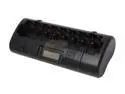
POWEREX MH-C808M Ultimate Professional Charger w/4pcs 11000mAh D Rechargeable Batteries
Pros: Great charger. AAA-D charging. Soft charge and rapid charge. Will charge each battery on it's own, so you don't need to keep batteries paired up, or worry about asymmetrical charging of 2 batteries of different charges.
Cons: NOTE: Manual says that you must slow charge AAA batteries rated below a certain capacity. By default, this thing fast charges. I don't know what exactly would happen if you didn't tap slow charge before putting a AAA battery in the unit, but I wouldn't want to risk finding out. It might have a safety backup, but I don't know for certain.
Overall Review: NOTE THE CAPACITY for any C or D rechargeables you buy. The cheap ones are basically a AA battery in a D casing. (like what you see in many stores)
12/1/2008See more detail
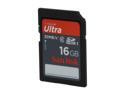
SanDisk Ultra 16GB Secure Digital High-Capacity (SDHC) Flash Card Model SDSDRH-016G-A11
Pros: No issues recording with it in my Canon HF100 at the highest quality settings.
Cons: None
12/1/2008See more detail

Unreal Anthology PC Game MIDWAY
Pros: Unreal Tournament didn't start the FPS Action Deathmatch Fragfest... But it's the closest to perfecting it. Ten bucks is easily worth the price of one of the UTs
Cons: Atypical default installation directories.
12/1/2008See more detail