
Your Browsing History


Jason S.
Joined on 01/22/06
0
0
product reviews
- 7
Awesome Value - Great Product (thus far)
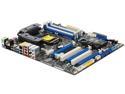
ASRock P67 EXTREME4 (B3) LGA 1155 Intel P67 USB 3.0 ATX Intel Motherboard
Pros: As of the date of this review, and considering the price, I think this is the absolute best Mobo out there for the 1155 socket. Sure, there are other Mobo's out there with a few extra ports, a few more acronyms, and/or with some legitimate additional features - but (at least for me) they're just not worth it (and are usually borderline overkill anyway). This Mobo has SATA3 6Gbps, USB 3.0 (with an included 2 port front panel), eSATA, all of the SATA2, USB 2.0, and PCI expansion slots you could need, and a UEFI interface that's simple and easy to navigate. And what's most important (in my admittedly very limited hands on time) is that it seems rock stable. My 2500K *painlessly* overclocked to a stable 45x at barely over 1.3V (with vdroop under load it's actually ~.065V less). At 45x I ran Intel Burn Test for hours with no errors. For fun I tested it at 1.51V and 51x - booted fine, but crashed under IBT within a few minutes. All of this on air using a Corsair A70 (with only 1 fan).
Cons: There's not much to complain about - especially considering the 'class' this motherboard is in. The only real gripe I did have (that I wasn't aware of before purchasing) was that I wasn't able to use the 2nd exhaust fan included with my Corsair A70 HSF (the one on the right side that would hang over the memory DIMMs). But even that is at least also partially attributable to the HSF and the height of the RAM heat spreaders, too (not just the mobo). FWIW, I think RAM w/o heat spreaders would just barely sneak underneath the A70's 2nd fan (Corsair Vengeance will not, though). Despite not being able to use the 2nd fan, my 2500K idles barely over 30C, and peaks barely over 60C (under full load for hours via IBT). Other cons would be lack of at least 1 IDE channel (I guess it's finally time to get SATA optical drives), SATA ports' 90 degree orientation is nice once you have them plugged, but a big PITA to get plugged once the Mobo is seated. Overall, though, not much to complain about.
Overall Review: My last two builds both used high end ASUS boards (939 & 775). This board does lack a few of those 'ultra' high-end features you may find on current 'ultra' high-end 1155 boards (dual LAN, dual x16 PCI-E, extra eSATA/USB3,SATA3 ports, some power phase/VRM acronyms, etc). But to tell you the truth, if you're not going to use SLI/Xfire, and you're not going to do an extreme overclock - then I wouldn't waste the money on those other boards. My last two boards have both had dual LAN, but I *never* used it. Plus the extra PCI & PCIe x1 ports provide plenty of options for expanding if you do find you need something later. Further, the clear CMOS on the back is nice, and makes for quick overclocking trials when teamed with the UEFI. But, honestly, I think you'd have to try pretty hard to get this board to fail to post - I was only able to do it once (most OCs that fail to boot into Windows will still post into UEFI w/o needing to clear CMOS). Dr. Debug codes could be useful too. GREAT BOARD!
3/30/2011See more detail
Very Good
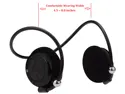
WUSA H250 Bluetooth Stereo Headphone w/ Microphone, Carrying Case (Black)
Pros: Relatively inexpensive. Good sound quality. Easy to pair/use. Pretty comfortable. Good microphone quality. AVRCP.
Cons: None for me.
Overall Review: I was looking for a low cost stereo bluetooth headset primarily to listen to music. I hate earbuds, but wanted the smallest headset possible. I'm not sure what the max battery life is, but I've gotten 4 hours of use with no problem (but have never needed to use them longer, and always recharge after using - so I don't know what the maximum run time would be). The controls on the right ear take a little getting used to (VolUp, VolDown, TrkFw, TrkRw), but work well when you press the right button. For the price, these are nice. Carrying case, USB charging cord, and extra earmuffs are included. I tried using these for a call one time (just to test it), and was told the microphone quality is also very good.
4/14/2013See more detail
Working great
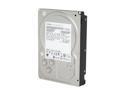
Hitachi GST Deskstar 7K2000 HDS722020ALA330 (0F10311) 2TB 7200 RPM 32MB Cache SATA 3.0Gb/s 3.5" Internal Hard Drive Bare Drive
Pros: Great price per gig. Some of the 1.5TB drives going for ~90 are actually better deals per gig ATM. But considering the extra 2TB you can squeeze out of four of these vs four of those it's worth it - at least to me and my limited chassis space.
Cons: None so far. Something to consider though... I have 4 of these in the 3.5bays within my chassis. I have a 120mm fan directly on them. They are obviously stacked in very close proximity. They run ~40C under load and drop to about 35C idle - respectable. By contrast 4x 750GB HDDs I have in a cage (albeit well cooled) never creep above 30C under load, and idle around 25C. I would definitely get some active cooling on these if you plan on using a few stacked on top of each other in the chassis. Without the direct fan cooling, I imagine they'd creep up near my personal "comfortable" temp threshold - and in turn make me nervous.
Overall Review: I saw one person complaining that they had a total of 4 of these all suffer from the same faults. While it is certainly possible that the UPS man in his area hates him, and the drives were damaged en-route to him; I suspect it's much more likely to be a BIOS and/or add-in card or onboard BIOS module issue. One of my friends experienced something similar w/ a few 1.5TB WD drives recently. So if you're having issues check your main BIOS for updates. If that doesn't work then check all of your onboard devices' BIOS settings (SATA controllers). [Basically make sure there's not an update for the SATA controllers built in to your mobo that ISN'T already incorporated in your mobo's latest BIOS release]. These scenarios would admittedly be VERY unlikely. Especially if your motherboard is less than a year or two old. But if it is it may have trouble addressing such a large drive with the default BIOS it shipped with.
3/18/2010See more detail
As Advertised
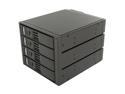
SNT SNT-SAC3141TL 4x3.5" Hard drive in 3x5.25" Bay SAS/SATA Trayless Backplane Hot Swap RAID Cage
Pros: Does exactly what it says it will. I'm not using it for RAID, but for additional drive space in my WHS. I'm very pleased that the SATA ports coming out are essentially "pass-thru." I get all of the SMART info that the drives and on-board SATA ports will allow - as if the connected disks were plugged directly into the motherboard. I'm sure it would work wonderfully for RAID as well.
Cons: None for my personal uses. See other thoughts for some that may affect you.
Overall Review: It's silly to repeat, but people are not lying about the fan noise. I knew this before purchase and was in no way deterred. The door/locks are not meant for security, but for easy access - which they achieve. I don't really see why you need locks if this is for personal/in-home use. If you plan on using this how I am (as additional and/or for hotswapable backup storage drives) it's much nicer to be able to quickly open and close the doors. Ultimately, this is a matter of preference. The doors seem to mostly be made of hardened plastic, but I think if you're not too rambunctious they will hold up for quite a while. Lastly, I have 4x750GB HDDs in here (2 Samsung 2 WD). I don't exactly remember their temps when they were in the main chassis 3.5 bays, but I know they were in the 30C range. Now the Samsungs hang out in the 23C range and the WDs in the 27C range (likely due to those fans). By contrast my 3x2TB Hitachis are all around 38C inside the main chassis w/ direct cooling via a 120mm.
3/18/2010See more detail
Works Great
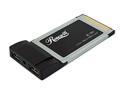
Rosewill RC-601 USB PCMCIA Card 2 x USB Type A ports, 1 x DC Jack
Pros: Plugged it in my Type II PCMCIA card slot while the computer was powered off. Booted up with XP Pro SP2 (*w/ all updates installed). Recognized it instantly. Tried out all of my flash drives and digital camera on it. They worked fine.
Cons: All I can figure from the negative reviews is that those people's power supplies on their laptops are inferior. Which leads me to the one con of this product. This does not come with an AC adapter. So if your computer power supply can't handle the power reqs then you will definitely get a BSOD or other failure when you try plugging in usb devices to it... However it does have a power adapter slot, you're just on your own to try to find one that works...
Overall Review: I've only had this a day, but it seems to suit my needs perfectly. Run both of my flash drives, and recognizes my digital camera plugged in via 1394 to USB. I'm running it on an old, old, OLD Dell Inspiron 8100 w/ a Pentium III Mobile chip @1.2ghz. Oh, yeah, and you can't be the free pricetag after rebate..
12/24/2007See more detail
Very Solid -- Must have for 939 System
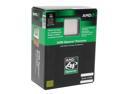
AMD Opteron 180 - Opteron Denmark Dual-Core 2.4 GHz Socket 939 110W Processor - OSA180CDBOX
Pros: LCB9E stepping. Week 07/04 TPMW. I’ve only had this CPU for a few days. Out of the box at stock volts it went to 234x12 (2808mhz) with no problems at all. I have some pretty cheap ram in the old 939 system, though. So I suspect that’s about as high as the ram will allow. Temps stayed steady right around 34c at that clock speed. I’m going to tune down my ram and see what it takes to get 250x12. If it’s easily achievable I’ll try to remember to post back.
Cons: No cons really. Possibly price. However if you have a 939 system with otherwise good components you’re wanting to keep around for another year or two it’s well worth it. This processor, especially if overclocked, for all practical purposes is about the same as my C2D e6600.
Overall Review: Like I said this processor is only a small step behind my e6600. By no means is it comparable. But if you have a 939 system you depend on, or just want to get good use out of, then this processor can keep you competitive for another year at least. It will hang tough with the first generation of Core2 Duos, and simply outpace most all other AMD (even AM2) up to about the 5600+ line. Consider what you’re upgrading from, though. I came from a 3200+. If you already have an X2 then it’s probably not worth it. But if you have a lower end 939 chip, 3700+ or below (and you plan on keeping the system). This is a no brainer. Get one before they’re gone.
12/8/2007See more detail