
Your Browsing History


Austin M.
Joined on 07/22/05
0
0
product reviews
- 9
SLI Enabled
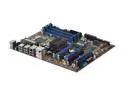
MSI X58 Pro-E LGA 1366 Intel X58 ATX Intel Motherboard
Pros: Good documentation, good price for SLI board, very easy overclocking menu, essentially everything.
Cons: None as far as I'm concerned
Overall Review: My setup did not require an SLI bridge to use SLI (which is good because the mobo does not come with one). Make sure you get the proper drivers from nvidia. The first time I downloaded them, I accidentally got the XP 64 bit package and couldn't understand why the nvidia control panel would not open. MSI X58 Pro-E Intel Core i7 920 @ 3.5 GHz 2X EVGA GTX 260 core 216 Cooler Master v8 CPU cooler Corsair 750TX psu Cooler Master Storm Scout Case G.Skill (3x2GB) DDR3 1333 Western Digital Caviar Black 500 GB Windows Vista Home Premium 64 bit
7/1/2009See more detail
Met my expectations
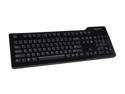
Das Keyboard Model S Wired Mechanical Keyboard, Cherry MX Blue Mechanical Switches, 2-Port USB Hub, Laser Etched Keycaps (104 Keys, Black)
Pros: Feels sturdy, clicky sound, keys respond much better than the typical membrane keyboards, and everything met my expectations.
Cons: Coming from the standard, "free with the purchase of a computer keyboard", it took about an hour to get comfortable with the tactile response of this keyboard. Not a big deal for me. I'm not a huge fan of the shiny surface just because I think it will be a pain to keep clean. I like the matte finish of the Ultimate better, but as far as I can tell there isn't an ultimate with labels on the keys. I just can't memorize every single button.
Overall Review: When contemplating ordering this keyboard, I saw a bunch of reviews on other sites (amzn was a particularly bad offender), that indicated the space bar was mushy or broken or not up to the normal standard. I have to say, not being a keyboard aficionado or having ever learned to type on an electronic type writer (being younger than 30), I have no issue with the responsiveness or feel of the space bar. It is literally a non-issue as far as I'm concerned.
3/28/2014See more detail
Every port works
SUPER TALENT INTAIN1MCR All-in-one Card Reader
Pros: Everything works at full speed. I am running 64-bit vista; it was recognized and all drivers were installed automatically. Fits in my case perfectly (Cooler Master Storm Scout).
Cons: It does assign unused drive letters, but it doesn't bother me. You will want to install windows before this device or your OS disk will be assigned a ridiculous driver letter.
Overall Review: To everyone who thought you didn't need drivers, they will be surprised to find out that ALL hardware requires drivers. Most modern operating systems automagically recognize and install the drivers. Particularly for USB devices. Sometimes software doesn't work the way it is supposed to, but that doesn't mean it is the fault of the device or the manufacturer... complain to Microsoft or use some alternative OS like Ubuntu. That said, I had no problem with Vista driver installation
7/22/2009See more detail
Excellent Cooler
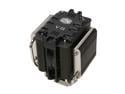
COOLER MASTER V8 RR-UV8-XBU1-GP 120mm Rifle CPU Cooler Compatible with Intel 1366/1155/775 and AMD AM3/AM2+/AM2
Pros: It keeps my Core i7 920 overclocked to 3.5 GHz idling under 30C with ambient temperature between 20-22 C. As suggested I applied the paste in a thin horizontal strip across cpu.
Cons: Bolt on could have been a pain with a difference case. The picture on the directions for the correct mounting orientation is wrong and will cause a counter current airflow. You should mount it in a tower with the words right-side-up rather than up-side-down as it shows in the directions.
Overall Review: My Storm Scout had a cut out that was perfect for installing the V8 as the last thing since it takes up a lot of space. Mount the screws to the brackets before putting the brackets on the cooler as they are long and threaded in REVERSE. Here is my build, if all fits with no modifications or fan removals: MSI X58 Pro-E Intel Core i7 920 @ 3.5 GHz 2X EVGA GTX 260 core 216 Cooler Master v8 CPU cooler Corsair 750TX psu Cooler Master Storm Scout Case G.Skill (3x2GB) DDR3 1333 Western Digital Caviar Black 500 GB Windows Vista Home Premium 64 bit
7/2/2009See more detail
Everything Fits
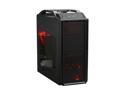
Cooler Master Storm Scout SGC-2000-KKN1-GP Black Steel / Plastic ATX Mid Tower Computer Case
Pros: I was extremely happy to see all of my stuff fit into this case without having to remove any fans or do anything modifications. There is a cut out in the motherboard tray right behind the cpu mount which is a godsend. I was able to install the motherboard into the case first, then near the end of the build add the cpu and cooler master v8 which is a bolt on cooler requiring access to the back of the board.
Cons: Definitely need to plan the order in which you plug stuff in. As previously mentioned, cable management is challenging, but I only have two HDD's and the remainder of the HDD rack is an excellent place to hide all the wires. The tool-less expansion slots do not work with the large videos cards, but fortunately the case comes with enough thumb screws to replace all of those horrible tool-less clips.
Overall Review: All of the below will fit: MSI X58 Pro-E Mobo Intel Core i7 920 @ 3.5 GHz Cooler Master V8 2x EVGA GTX 260's Corsair 750TX psu G.Skill (3x2GB) DDR3 1333 WD Caviar Black 500 GB WD Caviar Black 1 TB
7/1/2009See more detail
Agree with DonTomazzo
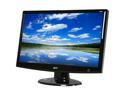
Acer H233Hbmid Black 23" 5ms HDMI Full HD 1080P Widescreen LCD Monitor 300 cd/m2 40000:1 (ACM) Built in Speakers
Pros: I got it for $176. Bright, big, seemingly good contrast ratio, has a built in speaker that is good enough for me. The speaker was a nice bonus, it adds no bulk.
Cons: These are relatively insignificant, but the base does seem a little flimsy even for the price. The oval base is wobbly. The screen does take a moment to start up so if you aren't pushing the delete key before the screen starts you will miss bios. This could be a problem for dual boot situations where the timeout on the bootloader is short. For instance, loading ubuntu from wubi one can easily miss the boot loader.
Overall Review: Also, this may be user error, but I have the monitor mounted with a standard wall mount. Everything is fine, but I can't figure out how to easily take of the post of the stand. The base of the stand is easily removable; thus, I have it mounted on the wall with the neck of the stand still attached. Otherwise, it is a great monitor.
6/25/2009See more detail