
Your Browsing History


Joel G.
Joined on 08/09/04
0
0
product reviews
- 12
SP1 is the way to go
Microsoft Windows Vista Ultimate SP1 64-bit for System Builders
Pros: Super easy install. SP1 version is the way to go. Up and running on an X48 based mobo with 4x 2GB of RAM. Ultimate has the oh so nice DreamScene motion backgrounds which even the wife loves. Larger and clearer icons are much appreciated when using high res monitors.
Cons: Not sure how to turn off (if possible) shadow copy, which appears to consume a good amount of HDD space -- though it gives it back if needed.
Overall Review: I've had no problems finding 64-bit drivers for any and all of my hardware, including some stuff that is quite old (i.e. 2004 is 'old' to me).
5/6/2008See more detail
SataII 3.0GB not working?
Seagate BarraCuda 7200.10 ST3320620AS 320GB 7200 RPM 16MB Cache SATA 3.0Gb/s 3.5" Hard Drive (Perpendicular Recording Technology) Bare Drive
Pros: Fast... just not so sure about the 3G performance.
Cons: See below. After removing jumper to enable 3G performance, I got a ton of read errors. (Using this on a new ASUS P5W DH mobo).
Overall Review: I took a 700MB file that was on my seagate and copied it to my raptor, being careful not to do anything else during the copy. (I am in 3G mode for these tests). I then used the CMD prompt's FC (file compare) command. I found the following: (1) if there is no other disk activity (or minimal activity), with no real programs running in the background, the FC will match the files about 50% of the time, otherwise it has mismatches from bad reads (2) if I do ANYTHING of remote significance in the background that generates disk activity, like navigate around in IE 6, the FC (file compare) generates a LOT more errors. (3) to be sure the problem was related to the Seagate drive, I copied the file to two different directories on the Raptor and compared it on that drive alone -- no matter what I did, I could not get the FC to find any errors on the Raptor comparing versus itself (4) I did the same as #3 but on the seagate and got a constant stream of errors
8/3/2006See more detail
Great Programmable Keyboard
Microsoft Sidewinder X6 AGB-00019S Black 104 Normal Keys 15 Function Keys USB Wired Ergonomic Keyboard
Pros: Easily programmable keyboard either through direct recording of keystrokes OR through simple creation of macro codes in notepad. To the person who said you can't edit delays -- sure you can -- you can do this directly in the GUI driver that comes with the keyboard. You can download the full driver/editor from Microsoft if it's not included OEM. I even was able to create a simple Excel worksheet that generates macros with easily changeable delays. No other programmable keyboard lets you so easily review & edit DIRECTLY the macro files that are created.
Cons: CAPS lock and ESCape key are poorly placed & sized. Like others, I would have preferred a more traditional placement. Numberpad won't stay on great if you like to keep the keyboard in your lap. I added some plastic velcro to the bottom of mine to keep it attached when on my lap.
Overall Review: If you keep your macros on your NON-C drive as I do, then the first time you hit a macro key, it may take 5-10 seconds for it to activate if the drive they are stored on is in sleep mode. After that, it is seemingly instantaneous.
7/17/2009See more detail
FAT32 is for Compatibility
WD My Book Essential 1TB USB 2.0 3.5" External Hard Drive WDH1U10000N
Pros: FAT32 is for compatibility. You really should leave it formatted as FAT32 unless you never intend to use the drive with anything other than a Windows PC. Setup as FAT32, you can use this as easily as you would a thumbdrive with other devices like an XBOX360 or PS3 AND it guarantees maximum compatibility over a network.
Cons: If you re-format as NTFS, forget about getting it to work with anything other than a PC. Also, good luck in finding software that will put it 'back' to FAT32 as current versions of Windows refuse to format any partion over 32GB as FAT32, even though it's within the FAT32 specifications.
Overall Review: Think before you format!
8/4/2008See more detail
Decent card; love the HDMI connector
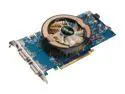
ASUS GeForce 9600 GT 512MB GDDR3 PCI Express 2.0 x16 SLI Support Graphics Card EN9600GT TOP/HTDI/512M
Pros: Has the special HDMI connector that lets you connect to an SPDIF connector on your mobo (or some audio cards) for multichannel (5.1+) audo out. Some other brands omit this feature though I thought it was a staple of the 9x00 series. Would make an EXCELLENT card for a PC used in a home theater setup.
Cons: Hard to say if this is faster or slower than my 8800 GT in another PC, but it's certainly no 8800 GTX. If you are planning to play at 1680x1050 and up, this may be okay for now, but will not likely run the newest stuff as well as the big dogs.
Overall Review: For the price, it's a great card. Just don't expect 8800GTX performance. If you are only running a 1280x1024 screen, however, this is perfection.
5/6/2008See more detail
Best PSU ever
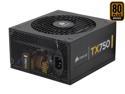
CORSAIR TX Series CMPSU-750TX 750 W ATX12V v2.3 SLI Ready CrossFire Ready 80 PLUS BRONZE Certified Active PFC Compatible with New 4th Gen CPU Certified Haswell Ready
Pros: Love this PSU. Has every connection a modern setup could want. 4x 6+2 PCI-e connectors! Who else has even 1 or 2 of these? 4x2 CPU power, 20+4 mobo power, plenty of SATA and MOLEX connectors. Loving it.
Cons: Well, it's not modular, but then again, I use almost every lead it has anyway, so that wouldn't have helped and may have made me worry that the plug would pop out on the PSU side. In fact, modular for something like this may be a negative unless you have a LOT of space around your PSU.
Overall Review: Have this in an Antec P182 running a Q9450 that is overclocked to 3.6 GHz on a Gigabyte GA-X48-DQ6 with 8 GB of ram. Zip zoom!
5/6/2008See more detail