
Your Browsing History


Christopher R.
Joined on 07/22/01
0
0
product reviews
- 6
Hidden Overclocking Options
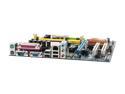
GIGABYTE GA-M61SME-S2 AM2 NVIDIA GeForce 6100 Micro ATX AMD Motherboard
Pros: You get a lot for the money here. Very stable and very fast with good matching hardware.
Cons: Why did they hide the overclocking?
Overall Review: You -can- overclock this board. Go into the BIOS by pressing DELETE during POST, and at the BIOS menu, press CTRL+F1. This will unlock a new menu option "Advanced Chipset Settings." You can change your FSB, multiplier, and RAM speed here. You cannot change your voltages.
1/23/2008See more detail
Overclocking master, eSATA, onboard temp gauge
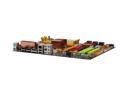
BIOSTAR TPower I45 LGA 775 Intel P45 ATX Intel Motherboard
Pros: I am extremely impressed with this motherboard and would recommend it to anyone looking for a Crossfire compatible board with excellent OC ability. I am running an e8400 on a Tuniq Tower with Zalman thermal compound at 4.2GHz stable. I was able to get it to 4.4GHz and successfully complete a 3DMark06 run, but it would not stay stable in TF2. I have 8GB (4x2GB) GSkill 1066MHz in there running at 975MHz. If I were running the CPU at stock speeds, I could get the RAM up to 1100MHz easy. This board also has 2 eSATA ports and, my favorite feature so far, a post-code/temperature gauge LED readout right on the board. Easy to see during testing what your CPU temp is running at. Also has power and reset buttons onboard so if you are running your computer on a tech bench like me, there is no front panel connections to deal with.
Cons: Setting up Crossfire isn't the easiest thing in the world due to the 9 jumpers you must use to enable it. 8 of the 12-pin jumpers and 1 3-pin jumper. eSATA ports are not hot-pluggable.
Overall Review: Great value for a board that would normally be around $250 for an ASUS with the same functionality and stability.
8/18/2008See more detail
Thanks for the free hat!

Newegg Black Baseball Cap with "Canon" Logo
Pros: An unexpected gift. Thank you to everyone at Newegg. I am going to marry this company.
Cons: .
4/2/2008See more detail
Great cooler
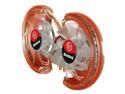
Thermaltake CL-G0102 VGA Cooler
Pros: Smaller than it looks in the picture, but big cooling capability. All-copper design and large surface area really gets the video card cool. Comes with ramsinks for all video RAM chips and power regulators on the far end of the card. Total size of unit still keeps within the two-slot boundary of the stock HSF.
Cons: Heatsink does not cover the entire die of the 8800GTX GPU. Even though this is the case, it still cools great, but I wonder what the capability would be if it covered the entire GPU. Ramsinks are kind of small but cover them completely, and manage to keep them pretty cool, as the two fans will run air across them.
Overall Review: Running 2 of these on PNY GeForce 8800 GTXs SLI'd. Brought from 85 degrees C to 60 degrees C on both cards. Have not tested overclockability yet.
11/1/2007See more detail
Excellent cooler, worth the money
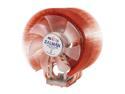
ZALMAN CNPS9700 LED 110mm 2 Ball CPU Cooler
Pros: Large, full copper. Fit perfectly on my ECS KN3 SLI2 with an Athlon X2 5200+ inside a Cooler Master Centurion 5 case. Dropped temps from stock AMD heatsink/fan from 55 degrees idle to 30. Bottle of silver thermal compound w/brush included. Incredibly useful. I don't have to use my razor blade to apply thermal paste anymore :D Install was pretty quick and easy. Hard to mess up or damage the CPU. Was able to install without removing the mobo from the case.
Cons: Size. Nothing you can really do about it, but it will not fit some smaller cases or badly configured motherboards. Also, it seems that the fan controller will not allow the maximum amount of voltage to the fan, but in a way this helps keep the noise down, because it doesn't need to run full-on to dissipate the heat.
Overall Review: I personally did not use the fan controller, and connected it directly to my motherboard. It is kind of loud at max voltage, but I don't mind the loudness.
10/16/2007See more detail
Not bad
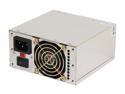
Athena Power AP-MP4ATX40 400W ATX12V / MicroATX / SFX12V v 2.2 SLI Ready CrossFire Ready eMachines, HP Upgrades/Replacement Power Supply
Pros: Heavy. When it comes to PSU's, heavy = good. Nice chrome finish. Powers a Socket AM2 microATX board, Athlon 64 3800+, ATI X1650 Pro PCI-E, a hard drive and two case fans no problem. Also has plenty of connectors including 24-pin mobo, 6-pin PCI-E, and 2 SATA. Also has a proprietary, tiny 4-pin HP video plug.
Cons: Wires are tangled and seem very weak. Bend easy. Possibly lower gauge than most PSUs normally use.
Overall Review: Replaced a 350w PSU included in a cráp case that I got because the size was right for my project. That one died in a week. It also weighed about half as much as this.
9/13/2007See more detail