
Your Browsing History


Brian S.
Joined on 11/22/08
0
0

product reviews
- 7
Beautiful case!
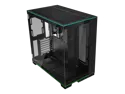
LIAN LI O11 Dynamic EVO RGB Black Aluminum / Steel / Tempered Glass ATX Mid Tower Computer Case----O11DERGBX
Pros: Plenty of space...(considering your GPU size). Beautiful glass for displaying components. Plenty of airflow. Tons of space for fans, with multiple fan installation options. Options to reverse the entire build, if that's your thing. A true work of art. I find myself staring at it in awe.
Cons: I would have liked to have a bit more space for cable management, though.....there is a ton of space if you remove the drive bays if you're not using them. I ran into a small issue installing my Gigabyte Geforce RTX 4090 Gaming OC. It rubs against the back of the case when lined up with the PCIe slot. It seats properly, but I'm not sure it is a motherboard problem. (ATX size). I couldn't push the GPU straight in, I had to install it at an angle. Either way, my included pic speaks volumes of this case. IT IS BEAUTIFUL!!!
Overall Review: Absolutely would recommend!! Lian Li has several cases that showcase the beauty of your build. I love this thing!
2/6/2024See more detail
Ok
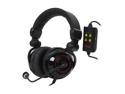
Rosewill 5.1-Channel Vibrating Gaming Headset- USB Connector - RHTS-8206
Pros: Vibration is a pretty cool option. Seem to be pretty good quality make. USB connection is nice, if you prefer that. Sound quality is good.
Cons: I found this headset to be quite heavy on my head. Also the ear cups did not perfectly seal around my ears. Very bulky. I didn't like the volume/vibration control box. Large and very inconveniently placed along the cord. When I sat back in my chair to game, I had to lay the box on my chest...kinda lame.
Overall Review: I was looking for a great sounding headset around this price point. This headset did sound good but just didn't feel that great on my head. I spent a little extra and bought the Logitech G35.
12/30/2013See more detail
So far, flawless!!!
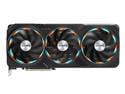
GIGABYTE Gaming GeForce RTX 4090 24GB GDDR6X PCI Express 4.0 x16 ATX Video Card GV-N4090GAMING OC-24GD
Pros: Well, it's an RTX 4090.....what else can I say?!?!? I got this for a recent PC build; my very first attempt at building my own PC. Upgraded from an RTX 3070 of the same brand, which I also never had any issues with. Gigabyte has treated me well over the years. So far, I haven't had any issues. Gigabyte offers an extended 4 yr. warranty on this beast! That provides peace of mind right there.
Cons: It's a large GPU! It barely fit in my Lian Li Dynamic EVO RGB case! It rubs a bit on the back of the case but seats properly. Cost....but you gotta know that when deciding to go with an RTX 4090. Though RGB lighting isn't ever a deal breaker for me, the lighting on this GPU isn't the greatest. I've definitely seen more attractive looking 4090's. (Please don't let the look of this card steer you away from it. It is a GREAT piece of computer equipment.)
Overall Review: I would definitely recommend this GPU! If you have the $ to spend on it.
2/6/2024See more detail
Great little card
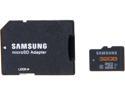
SAMSUNG 32GB microSDHC Flash Card w/ Adapter Model MB-MPBGCA/AM
Pros: It still blows my mind that so much memory can be contained in such a tiny card. I got 2 of these for my wife and I. We use them in our Samsung Galaxy S4. They are precisely what we were looking for. Plenty of memory to hold photos, apps and videos. I haven't uploaded any music yet but I'm quite sure they will do fine.
Cons: Only had them for a couple of weeks, none yet.
7/30/2014See more detail
Nice keyboard
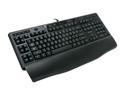
Logitech G110 LED Backlighting Gaming Keyboard
Pros: This keyboard had everything I was looking for. The key action is fantastic! Quiet keys and they feel great for typing or gaming - whatever you plan to use it for. The options to plug in headphones or a usb mouse right into the keyboard are a definite plus (even though I myself don't use them). I was looking for a nice backlit keyboard but didn't want to spend $100 for one with the LCD that I didn't need. If you are looking for the same things, this keyboard will be just fine for you too. (See below about the backlighting).
Cons: All the good stuff aside, the keyboards backlighting is WAY TOO dim!! I find the red the brightest color (easiest to be seen). Too bad, because I got it for the blue to match my computer case. Many of the keys are only partially lit. The top quarter or so of the letter/number are not lit. These are the only cons that I have. If the backlighting was much brighter, this keyboard would be absolutely fantastic!
Overall Review: The wrist guard is just simple plastic and snaps on. Nothing as high quality as my last MX3200 which had a solid rubberized wrist guard and felt great. Logitech needs to improve on this model and make a fantastic - high quality mid-priced keyboard. That being said, you can't go wrong with a Logitech!
3/1/2010See more detail
Power issue - interesting
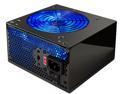
Rosewill RP500-2 500W ATX12V v2.01 Power Supply
Pros: Product came DOA, no pros other than it looks good!
Cons: My product came DOA. However, I found this to be interesting. Once everything was put together and plugged in, I powered up the PSU and got the green light on my mobo indicating there was power. When I pushed the power sw on the case front, nothing happened. I checked connections, and inputs, and cables to trouble shoot for hours and still got nothing but the green light on the mobo.
Overall Review: What I found to be interesting is even though you get that mobo light, the PSU could still be bad. It powers that light connection on a different voltage than the rest of the computer. I had a friend who is a computer tech tell me the same thing. I took the rig to a Geek Squad professional and he again told me the very same thing. I hope this helps troubleshoot issues that some of you may be having. I simply thought, I have a green light on the mobo, the PSU must be working... not necessarily.
12/8/2008See more detail
seller reviews
- 1
BEAUTIFUL case!!!!
I absolutely love this case!!! This was my first true PC build. After watching hours of 'how to' videos on youtube, I thought I'd give it a try. While not as easy as I foresaw it being, it wasn't too difficult. I did run into an issue fitting my Gigabyte Geforce RTX 4090 Gaming OC into the PCIe slot.....but I think it was more of a motherboard issue than a case issue, though I cannot be 100% sure. The PCIe slot is positioned a bit too far left not allowing me to push the GPU straight in without the left side rubbing the back of the case. I was able to get it in with a bit of force but it does contact the back of the case. Other than that...I love this case! With the addition of some Lian Li TL and LCD fans this is truly a work of art as much as it is a gaming PC!
On-time
Delivery
Product
Accuracy
Customer Service
Satisfactory
2/6/2024See more detail