




 here!
here!
I’m your shopping assistant for PC builds, upgrades, and everything tech.
Got questions? Ask away!
Start a conversation
here!
I’m your shopping assistant for PC builds, upgrades, and everything tech.
Got questions? Ask away!
Start a conversation

Joined on 12/15/01
Not the Same?
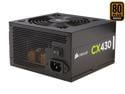
Pros: Name brand. Nice wire covering that looks like snake skin. 2 conduits with 2 SATA power plugs each. 1 conduit with 3 4 pin Molex plugs and 1 4 pin floppy disk type plug. Main MB connection is 20 + 4 and the extra 4 pin segment looks to stick better to the main plug better than some PS connections I have seen. There is a separate conduit with a 6 pin PCLe plug and a 2 pin auxiliary. The extra MB connection is 8 pins.
Cons: A little bit of confusion. I bought a CX430 2 years ago. The plug selection then was different. Specifically the extra MB connection was 4 pins. It appears the 8 pin on this newer version is intended to be used like the 20 + 4 MB would be used on an older MB. That is the extra pins hang out beyond the socket. This 8 pin plug has 2 latching tabs so it does connect firmly with a 4 pin socket on the MB if that is what you have.
Overall Review: Almost all computer connectors are designed to fit only 1 way. Closely examine the plugs and the sockets, don't use excessive force, and you will won't make a mistake. However if you are like my brother, you will manage to insert a 4 pin Molex plug upside down into a hard drive.
Dimensions
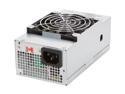
Pros: I was needing an upgraded power supply for an Enlight 7180 case. This was the closest in dimensions that I had found. The measurements I made when I received it are: H 55.5mm/2.2" (not including the fan protrusion which adds 8mm/0.3") W 83.6mm/3.25" and L 145.5mm/5.75" This agrees with the dimensions given in the sales description. See below for further thoughts about this. It has an 80mm fan.
Cons: I had expected the unit to be longer which would require cutting off a tab but it is also not as high and not as wide. That is why actual dimensions were important to me. A number of the power supplies listed as TFX and SFX have non standard shapes and sizes and some of the dimensions given don't agree with the picture of the unit.
Overall Review: Still, it is 300W and has a 24pin motherboard connection where the Enlight had only 150 watts and a 20 pin motherboard connection. If I don't find anything that comes closer to the dimensions I need, I may just modify the case to make it fit.
Yes, It Works
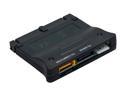
Pros: Good tool to have if you are mixing old & new components. If you have an old MB without SATA sockets and you need to use a SATA Drive OR you have a newer MB and you want to use a PATA drive as a semi-permanent install, 1 device handles both situations. No drivers required may make it easier to install XP on a SATA drive on an older MB. The device has a power/activity LED.
Cons: This is powered by a 4 pin floppy power plug. The power plug does fit snug in the device. The fit into the PATA socket on the MB is not as tight and could work loose. The device will stick aprox. 3 1/2 inches above the MB so that could interfere. This is going through the PATA circuit so don't expect a SATA drive to run as fast as it is capable. The PATA plug on the device is a for a 3.5 in socket only. **Yes, it tends to work loose from the PATA and I often have to wiggle it to get the HD to boot.
Overall Review: I had an old AMD MB with an add on SATA controller card. The computer got where it would give 1 set of diagnostic beeps when turned on and not do anything more. After swapping out all components the cause seemed to be the controller card. Switching it out for 2 identical cards gave the same beeping result. I plugged this device in and got the computer back up running. The HD activity LED on the front panel could not work when I was using the add-in card but now it does.
What You Need to Know
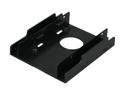
Pros: It is a double decker IF you are mounting 2 x 2.5 HD or 1 SSD and 1 2.5 HD. The upper drive has to have mounting holes on the side so that means the upper drive can't be a SSD. The drives are centered in the middle of the adapter unlike some which offset the drives completely to one side. Unlike some similar products, it looks like both drives can be mounted "face up."
Cons: This fits tightly in one brand of case I tried and loosely in another, but that seems to be normal variance. However, it is 122mm long which makes it (surprise!) too long to fit in a Rosewill FBM-01 case. However it is plastic and it looks like you could easily saw off 20mm. I can not comment on how well the mounting screws work on the plastic.
Overall Review: This was a bonus when I bought a SSD. At the time, I didn't think about details of length of the tray or the ability to mount a 2nd drive (but not a 2nd SSD). If you have a case that is deep enough the length probably would not be a problem. Well the text description does say it is 122mm long but it would have been more useful to show that dimension on one of the images. One the other hand, it does claim that 2 SSDs can be mounted which doesn't seem likely. Also, it is plastic so it doesn't dissipate heat and there could be screw thread problems. If you are mounting 1 SSD, there are metal alternatives that may be cheaper. While it may work for you, it doesn't work for my current application and regardless, I would probably buy something else in the future, so I give it 3 Eggs.
What You Need to Know

Pros: It is relatively cheap. It has 2 MB2 slots if that is what you are using for a hard drive. The UEFI setup is not as confusing as other MBs. It has 4 memory slots - but it turns out you are not going to be able to use more than 2. It can handle Rizen whopper size screw on CPU coolers and water cooling (3 cpu cooler fans plugs) or the repackaged FM2 CPUs with clip on coolers. At least it has a combo (purple/green) PS2 plug. If you like glitter there is a plug for LED lights.
Cons: 1) My customer wanted Win 7 installed. At a certain point in installation, all the USB ports were turned off - even the USB 2.0 on the back. That means a SATA DVD drive had to be added to read the installation media and a StarTech KYC1MF PS2 Y cable (yes it does work on this MB - there is an entry in the UEFI for a PS2 Y cable) added for a keyboard and mouse to complete installation. 2) MB manufacturers test memory modules before they release the product and they don't bother to do any further testing once the product is dumped on the public. That means that you won't find any tested memory for sale by the time you buy the MB so you have to guess if what you buy will work. Basically the slower stuff has a better possibility of working. The instructions are specific about what modules work in which slot Buy a single stick or 2 paired sticks. I bought a WD 512 SSD and Oloy 2666 2x8mb ram combo and it seems to work OK.
Overall Review: I give this 3 Eggs. This isn't because this MB is lacking in features compared to similar products. However, it seems to me this isn't as easy to set up as it should be (other MBs may have all these problems and worse). This is because the buyer has to do much more research on components that will work with this item and OS installation may not be so straightforward..
Will It Work?
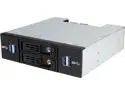
Pros: Nice heavy metal. The drawers have latches that double as tab to pull out the drawer and the drawer need not be locked to work. I thought at first the USB cables were too short but most of the length was tucked up in the sides of the case.
Cons: No diagrams or instructions with the product or online. This is confusing because there are 4 SATA sockets in back but only 2 SATA drives can be put in the drawers. Also each of the typical 20 pin USB female plugs have 2 attached flat plugs like USB 2 MB connectors, but don't have the all the correct color wires or arrangement for either USB 2 or 3. The The sockets on the front of the panel recognized only USB 3 thumb drives and NOT USB 2.
Overall Review: The original price was $80, but New Egg may be closing out this item. I think it is 2X over priced.
There are better vendors
Slow getting the product to shipping; slow shipping. The flash drive held 180G and then Windows began insisting on scanning it for errors. It is not 2T and not even 256G
Simple Product
Several other sellers offer essentially the same thing. Delivery was 10 working days


