
Your Browsing History


Ben R.
Joined on 04/13/09
0
0
product reviews
- 6
Very nice!
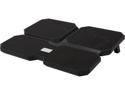
DEEPCOOL Multi Core X6 Laptop Cooling Pad 15.6" Metal Mesh Panel 2*100MM and 2*140mm Fans
Pros: First cooling unit for a laptop I have ever owned (my fifth one) that has had an appreciable effect on the temperature. My Asus ULVT50 spins its fan at maximum, and overheats at, approximately 190 degrees Fahrenheit. Every cooling unit I've owned before managed to drop a degree here and there and the laptop would hover around 185, which still caused an overheat after it remained there for a while. The X6 has dropped the unit temperature by 20 to 40 degrees Fahrenheit (!) while performing demanding tasks like the Flash plugin or gaming, keeping it around the 140-160 degree range in high demand situations. During low demand work (word processing, web browsing), the X6 has pulled down the idle temperature by about 10 degrees Fahrenheit, idling at 118 degrees right now.<br><br>The largest temperature problem I have with my laptop is streaming services that still use flash player. HTML5 services like Netflix (at least, they use HTML5 when you view on a Linux OS) do not bother my laptop much, but services like YouTube and Hulu that are still living in the past push my laptop to its maximum fan speed/overheat temperature very quickly. What I ended up doing was playing the video for 5-8 minutes, pausing it, then minimizing Chrome or switching to another tab without a flash plugin for 2-3 minutes while the temperature went back down. No more of that for me.<br><br>This unit also fits a 17" laptop very well despite not stating as such on the product page. The specifications listed the unit as 14.96 x 11.61 inches (actually ended up being about 14.4375 wide) and my laptop is 15.125 x 9, which is very nearly a perfect fit.
Cons: Two very small ones. The little adhesive rubber feet included with the unit (that you affix to the mesh to prevent a laptop from slipping) were all cracked up and broken. My laptop has its own little rubber feet so this was no problem in my case, but it may be an issue for others. I also find using the provided stand puts the unit too steep for my taste, but I also do not use a separate USB keyboard so I may be in a minority by not simply using this laptop as a monitor.
Overall Review: After combing through dozens of items and ignoring each one without a listed CFM, I ended up with an array of 7 cooling pads. This one was listed with an absurd CFM of 121 and it was one of only two units from my short list with a fan dedicated to the upper left quadrant (where the bulk of the heat accumulates in my laptop), the other being a 5-fan model with a smaller auxilliary fan in the same position. I was sold on this X6 between the large primary fan in the upper left and its CFM rating.<br><br>What I have learned since I started using the X6 is that the CFM rating is the sum of all the fans on the unit. This 4-fan unit with a ~120 CFM is putting out ~30 CFM per fan. I was initially impressed with that statistic when I purchased it, but what you would expect in terms of dramatic air movement is certainly not the reality. This is only a minor gripe about the advertising literature though, since the X6 still works very well for me.<br><br>I also learned very quickly that this unit does almost nothing if you don't use the stands to incline it. I'm perfectly happy with my laptop remaining flat on the unit and the unit flat on the desk, but this gives it zero airflow and renders the X6 completely ineffective despite the little feet it has on the underside to keep it from sitting directly against a surface.<br><br>Personally I had no care for a great number of features and properties of the cooling unit I purchased because all I needed was a chillpad, not an LED-packed, 80's VHS future spaceship part. It's an effective cooling unit and that's all there is to the X6, unless the "butterfly" design would be pleasing to some arty guy or something. I don't really care because it sits beneath my laptop and I never see it.<br><br>Update after 6 months of ownership: the X6 is still performing admirably. I'm one of those people who finds it too inconvenient to power down a computer at night and power it back up in the morning, so all four fans on my X6 have been running continuously since I purchased it back in July 2014. The only time it's been off is when I lost power for a couple of hours and the 5-ish minutes I spent dusting it off. I've yet to see a temperature exceeding 160 F, which is toasty but well short of an overheat for my laptop. The best $30 I've spent in a long time.
1/5/2016See more detail
It's Bose, it's always great
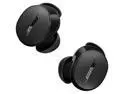
Bose QuietComfort Earbuds - True Wireless Bluetooth In-Ear Headphones, with Active Noise Cancellation and Mic, USB-C Charging, IPX4 Rating, Up to 8.5 Hours of Playtime, Black
Overall Review: I've had a pair of Bose SoundSport Free for 7 or 8 years. They've been excellent earbuds for the most part, but the batteries have just had it and they only last 60-ish minutes on a charge. It was finally time to upgrade. QuietComfort drew me in because it basically looks like "modern" SoundSport with the concha fit. What I notice right away about QuietComfort is that the entire charging case feels extremely flimsy. It reminds me a lot of those cheap plastic balls the toys come in from coin-operated candy machines. The plastic is very thin and easily deforms with only a little pressure. The SoundSport case is remarkably tougher, and I've still replaced it thrice because I broke the hinge -- mostly by dropping it -- and I fear for the longevity of the QuietComfort case. I'm not terribly impressed with the provided USB-A to USB-C cable. Minor annoyance given my powerbank of choice only has USB C ports on it. I've already amassed a collection of USB C to C cables to use with it, but it probably would have been better to provide a USB C to C cable with one of those little USB A-type adapters connected to it. As far as fit, these are great in my ears and feel exactly like my SoundSport with the provided medium size eartips. They're secure and do not move around or jiggle free, but I'm also pretty consistent about wiping the rubberized bits with alcohol lens wipes and the inside of my ears with a tissue before each use. Hairnets don't cause a problem either, less so now because of how small they are. Having to get a hairnet over the earbuds is one of the biggest reasons I didn't go with the "stick style" of products like Airpods or Galaxy Buds. The Android app is a bit of a mixed bag. Setup was extremely fast, perhaps 45 seconds. The Equalizer portion of the app gives me three presets and says I can customize EQ, but I can't find it. The only notification I'd like from the app is a persistent one during use that indicates how long much listening time I have left, but this does not appear to be an option. Disabling all the touch controls was annoying because there was no broad "turn this feature off," I had to individually set single tap, double tap, triple tap, and hold to "off" on both earbuds separately. There's also an option for "low latency audio" which does not indicate that it affects battery life... so why is it not on by default? With ANC off, simply the fit of the earbud is reducing a ton of environment noise. I can't hear myself typing this review while listening to YouTube Music. ANC seems to be very good at eliminating any kind of repetitive noise, such as the 40-ish decibel window fan right next to me. Any other random noise with no pattern, like human speech, just sounds like you have cotton balls in your ears. It is still significant enough ANC to completely drown out anyone speaking to you while listening to music or what-not. With my PC soundbar set to maximum volume on a MoistCr1TiKaL video, the music in my earbuds completely drowned him out despite my literally feeling the desk vibrating from his voice. The app's indication of remaining battery time does not change based on the ANC option, despite indications this feature should reduce battery life. What I've become accustomed to because of my time with my old SoundSport is the earbuds' tendency to glitch 1 to 3 times per hour. For no discernable reason, the audio will stop for a small fraction of a second and then resume as if nothing happened. I've been through at least 4 phones during my time with those SoundSport, and it also happens with the QuietComfort. Clearly a Bose quirk. Nowhere near a dealbreaker as far as I'm concerned, but as mentioned, I've been desensitized to it over the last 8 years. My very unprofessional opinion on sound quality is that it's great. It doesn't feel like anything is lost during playback. The bass is punchy, and the high ends are discernable. I don't hear any clipping or distortion. Overall, I'm happy. These will probably be my go-tos for the next 8 years. My only real complaint is that they dropped $50 in price the day after I purchased them.
10/7/2025See more detail
Upgrades to a secondhand business unit
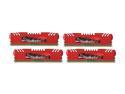
G.SKILL Ripjaws Z Series 32GB (4 x 8GB) DDR3 1600 (PC3 12800) Desktop Memory Model F3-12800CL10Q-32GBZL
Overall Review: Got these as a replacement for mismatched 4x2GB sticks in a refurb HP Prodesk that I bought for my mother. These are the fastest RAM that the board could support as well as the largest quantity, so it worked out well. Runs Windows 10 like a champ when paired with a Samsung SSD.
8/10/2024See more detail
Overall, awesome
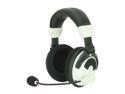
Turtle Beach XBOX 360 Wireless Gaming Headset Ear Force X31
Pros: I own an old 27" CRT from 2002 and my previous source of sound was only the pair of three-inch speakers on the front of the unit. Obviously, this was a terrible way to game and cost me a lot of respawns when the most subtle sound cue mattered. I previously did terrible on Team Fortress 2 because I missed these subtle sound events, and my last few days of 2Fort and Well plays netted me 7:1 kill/death ratios, simply due to the sound quality and clarity of the X31 headset. It's amazing what the tiny RF transmitter (about the size of a pack of cards) can deliver to the headset unit. It's also extremely lightweight (I've forgotten I've been wearing it already), doesn't crush my skull between the ear cups, and took me approximately three minutes to set up. XBox voice chat remained clear and discernible over gunshots and explosions.
Cons: Even though it's cited as an advantage, the "battery extender circuit" that delivers consistent sound quality until the batteries are entirely useless is a mixed blessing. The generic batteries that came in the box with the X31 lasted ten hours (with a nap and removal of the batteries between sessions) and died when I was in the midst of a Rainbow Six Vegas 2 gunfight. I ended up having to hide somewhere so I could swap out the batteries. In short, keep at least one extra pair of triple-As handy. Also, the microphone is a little oversensitive. I frequently saw the voice chat bubble in Team Fortress 2 appear when people were making any noise throughout the first floor (the front door, a coffee cup being set down on the desk, people walking through the room, any cough or sneeze throughout the entire floor, and normal-volume speech from 35 feet were all picked up by the microphone).
Overall Review: After an eight-hour Team Fortress 2 session, the cloth used for the ear cups left a wide purple ring around my ears, and my friends were convinced I was bruised somehow. It came off after a shower and a bit of scrubbing, but it was still pretty strange. There's also a volume control dial on the transmitter unit and on the headset itself for game audio -- I'm not entirely sure why it was designed this way, but I simply cranked the transmitter all the way up, and adjust the headset dial for volume control.
11/6/2009See more detail
Pleasantly surpised
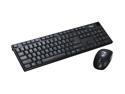
Rosewill RKM-800RF 2.4 GHz Cordless Slim Keyboard and Mouse Combo
Pros: I was in search of a USB keyboard to use for instant messaging while on XBox Live, and I couldn't be happier with this product. When I initially connected the receiver dongle into the back of my XBox (which is almost against a wall to boot) I was in the opposite corner of a 25x20 foot room and it had no trouble receiving a signal or noticeable delay producing glyphs when I typed. It's also amazing how slim the entire design is -- the receiver unit is about the size of my thumb from knuckle to tip, and the keyboard is the perfect size to fit nicely into your lap (it was even perfect for an Indian-style seating position).
Cons: The power button for the keyboard is about the size of the nail on my pinky finger on the back of the unit,and is flush with the case around it so it takes a nimble fingernail to switch it on and off. I didn't want to leave the keyboard on while I was playing a game, so I had to flip it over and turn it on/off about a dozen times. This is hardly a design problem as such considering the above is not its' labeled purpose, but it's certainly an excusable issue when one considers the immense value here.
Overall Review: I have yet to try out the mouse since the keyboard was the reason I purchased this product. In addition, I had never heard of Rosewill until I browsed NewEgg for a wireless USB keyboard, but the brand name is certainly one I will trust and look for in the future.
4/18/2009See more detail
Works as expected
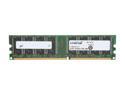
Crucial 1GB DDR 400 (PC 3200) Desktop Memory Model CT12864Z40B
Pros: Pop it in and you're off... what else is there to say?
Cons: None
Overall Review: I'll likely get another in the near future to replace the factory 512 in this ThinkCentre A series. Crucial is one of the few names I trust for RAM, and they've yet to disappoint me.
4/18/2009See more detail