

Your Browsing History


TOBY K.
Joined on 11/02/10
0
0
product reviews
- 20
Great board
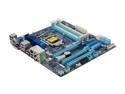
GIGABYTE GA-Z77MX-D3H LGA 1155 Intel Z77 HDMI USB 3.0 Micro ATX Intel Motherboard
Pros: Feature packed Small form factor Decent overclocking ability
Cons: No coax spdif out on the back panel just a header on the board
Overall Review: I managed to wire a wire a female RCA plug to the spdif out header on the board to get a working coax spdif output. I have this board paired with an i5 3570K and 2x4GB of Gskill sniper low voltage DDR3. I followed the advice of several ivy bridge overclocking guides but I was seeing temps over 70deg at 4.5GHz. I had better results disregarding the guides and going with core LLC set to normal, C3/C6 enabled, C1E disabled, EIST disabled, and setting a core voltage offset rather than setting a fixed voltage. The voltage reading in CPU-Z was higher (1.3v peak) but I was seeing significantly lower temperatures than when I had LLC set to turbo and a fixed voltage. End result is a 4.5GHz ivy bridge system that runs at 65deg under full load with a $20 Hyper TX3 cooler all packed into a little Micro ATX case. Great motherboard.
6/6/2012See more detail
Avoid
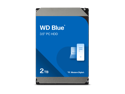
WD Blue 2TB Desktop Hard Disk Drive - 5400 RPM SATA 6Gb/s 256MB Cache 3.5 Inch - WD20EZAZ
Pros: - It's still working
Cons: - Dog slow - Less than three years and it's already showing signs that it's about to fail
Overall Review: I bought this thinking it was like other drives I've had from WD over the years... it's not. This drive is trash. I just ran a surface scan and several regions of the drive are now reading at less than 30MB/sec and I suspect that the drive will fail soon. After WD passed this "SMR" drives off as a regular drive on me this will be the last mechanical drive I ever buy from WD. I'm hoping to have better luck with a Toshiba X300 series drive as a replacement.
2/13/2022See more detail
Stupid fast
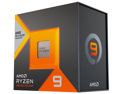
AMD Ryzen 9 7950X3D - Ryzen 9 7000 Series Zen 4 16-Core 4.2 GHz - Socket AM5 120W - AMD Radeon Graphics Desktop Processor - 100-100000908WOF
Pros: Never crashes Runs everything like butter
Cons: It was expensive but with things as they are I don't expect the value to drop much within the foreseeable future.
Overall Review: I've owned this CPU for almost a year now. I have mine limited to 120 watts via PPT and used curve optimizer because I like fast and quiet. It maintains over 5GHz all core while encoding x265. Rendering, transcoding, compiling, gaming, low latency audio work (somehow I get no clicks or pops with a Scarlett 2i2 even at the lowest buffer size, 3ms round trip latency) ... it's strong everywhere. I hung on to my old four core 4.2GHz Ivy Bridge system for over a decade. Hopefully this holds up as well but there's also a decent chance that a worthwhile drop in AM5 CPU upgrade will come alone before then.
4/23/2024See more detail
Nice machine
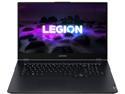
Lenovo Legion 5 17ACH6H - 17.3" FHD 144 Hz - AMD Ryzen 7 5800H - GeForce RTX 3060 Laptop GPU - 16GB Memory DDR4 3200 - 512GB PCIe SSD - Windows 11 Home 64-bit ()
Pros: - Fast CPU - Fast GPU - Decent amount of RAM and it's in dual channel - Empty spot for another NVME SSD - High refresh rate screen with support for both freesync and gsync - Display port output to drive external variable refresh monitors - Num pad
Cons: - Heavy (unless you're particularly small or weak it really shouldn't matter) - Default settings make for short battery life and too much fan noise
Overall Review: Buyers should understand that while on battery the dGPU is limited to 20 and 30 watts for quiet and balanced modes respectively and performance mode is not available. Pressing Fn-Q cycles between three power profiles (power button LED turns blue, white, or red to show the active profile). If you care about battery life you'll need to switch "hybrid mode" on using either the BIOS or Lenovo Vantage software and then install drivers for the AMD integrated graphics. Then apps can be set to use either the integrated or discreet GPU via the list of apps in settings > system > display > graphics. If you care about fan noise while gaming (they can get pretty loud) be sure to set a frame rate limit either in game or in the display driver control panel for whichever GPU is running the game. Using power or clock speed limits to control fan noise will cause noticeable lag and stuttering in most games. Also be sure to change a few settings in the control panel that can be found by searching for "edit power plan" and then the link "change advanced power settings". To prevent the fans from constantly spinning up during normal desktop usage edit the "Legion Quiet Mode" profile's "processor power management" max processor state to 99% or less to prevent boosting or unlock the hidden "processor performance boost mode" control and set it to disabled. Nice machine overall.
12/12/2021See more detail
Works
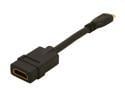
StarTech.com HDACFM5IN 5 in. Black Connector A: 1 - HDMI (19 pin) Female
Connector B: 1 - Mini HDMI (19 pin) Male 5in High Speed HDMI Cable - HDMI to HDMI Mini- F/M
Pros: It both fits and works.
Cons: none
Overall Review: I doubt any of the one piece type adapters would have fit because there is very little clearance around the mini HDMI output on my video card.
12/29/2014See more detail
Nice unit
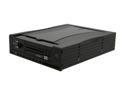
AMS DK-1220SEBK Comet Value Series (Black) - 5.25" Removable Rack (SATA-to-SATA)
Pros: Works exactly as advertised. Quiet fan.
Cons: Lock can be opened easily with just a finger.
Overall Review: Hot swap works with windows 7 x64 Ultimate and "Hotswap!" utility by Kazuyuki Nakayama. Hits 37 degrees C max with a TOSHIBA PH3200U-1I72 2TB 7200 RPM drive.
10/24/2013See more detail