
Your Browsing History


Anthony S.
Joined on 01/31/01
0
0
product reviews
- 38
WOW!!
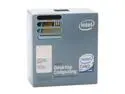
Intel Core 2 Duo E6420 - Core 2 Duo Conroe Dual-Core 2.13 GHz LGA 775 65W Processor - BX80557E6420
Pros: Incredible. I was going to buy the 6600 when the price droped, but then I read reviews on 6420. 8x multiplier makes them an easy Overclock to 3.2, which apparently nearly all will do (including mine)I just set the memory speed to 533MHz in BIOS on the Biostar 965PT, then changed memory voltage to 2.0 and FSB to 400. Stock voltage on the CPU. Most of the reviews I have read on the 6420 show similiar overclocks to the 6600 for forty dollars less. Is sailing through Prime 95 torture test now. It may well run faster than 3.2, maybe I'll push it more or maybe I won't. I have always been the "low hanging fruit" type of overclocker. Whatever the CPU and memory will do without a big voltage (and thus temperature)boost. How fast? My Pentium D 805 overclocked to 3.32GHz did Super PI 1MB in 39 seconds. 2MB in 1m 27 seconds. 4MB in 3m 11sec. The C2D 6420 at stock 2.13GHz 1MB 23 sec, 2MB 56 sec, 4MB 2m 9sec. At 3.2Ghz, 1MB 16sec, 2MB 41 seconds, 4MB 1m 26sec. 2x faster!
Cons: What cons? It isn't free? It won't self install?
Overall Review: Why buy the 6600 for forty bucks more? Or the 6700 for over one hundred bucks. 3.2Ghz seems to be the sweet and easy overclock on these processors. This processor's 8x multiplier makes that easy. Does anyone now purchase the 2MB cache 6300 and 6400 processors? When the 4MB versions cost the same and are faster? BTW, I'm using inexpensive Super Talent PC 5300 memory (667MHz) that easily does 800 MHz at 2.0v. This much performace for soooo little cash!!
5/11/2007See more detail
Not what it used to be
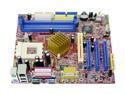
BIOSTAR M7NCG 400 462(A) NVIDIA nForce2 IGP Micro ATX AMD Motherboard
Pros: Best available integrated video. A GeForce 4MX videocard is still around $xx - half the price of the board.Board is well laid out, makes a good OEM replacement board, and recognizes the mobile Athlons
Cons: Quality has slipped over the years. This used to be an editor's choice of Anandtech and Tomshardware. No backplate,and the manual would be of little help to beginners.
Overall Review: Over a two or three year (I forget) period I have built perhaps half a dozen pc's with this board. This is the first version 7.2 I have recieved, and I am not impressed. Appears board shipped with an incorrect driver CD. Driver CD will only install sound and usb 2.0 drivers. Downloaded drivers off of Biostar's website, and Nvidia's website. Neither set of drivers would get the LAN to work. And the drivers cause some sort of instability in Windows XP, takes forever for Control Panel or System properties to come up after driver install. And I reinstalled Windows XP twice, thinking I just had driver conficts. There was a time when you might put up with some of these issues, to have a Socket A micro ATX board with a full set of overclocking features. Now, most people, as I was, were just looking to replace/repair a socket A system. I've had better luck with cheaper (Foxconn, PC Chips) Socket A boards. This one is going back. It's a shame, original version 1.0 board got rave reviews.
4/15/2006See more detail
Fast, good price point
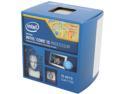
Intel Core i5-4570 - Core i5 4th Gen Haswell Quad-Core 3.2 GHz LGA 1150 84W Intel HD Graphics Desktop Processor - BX80646I54570
Pros: This is a great "bang for the buck" processor near the high end. The i5's are IMO the best value processors to begin with. Hyper Threading has always been sketchy as to real practical value and that's all the more expensive i7's offer. This i5 runs just 200 MHz slower than the more expensive 4670 and it's twenty to forty bucks cheaper depending on if you want the unlocked version. Amazingly cool and quiet in operation. Using the stock cooler in a well ventilated Micro ATX case, temps run under 20 degree Celsius just doing everyday things. Ran Prime 95 stress test for six hours and temps ran 38-42 Celsius.
Cons: None really. I could always wish it was cheaper.
Overall Review: I used to overclock. I used to love to overclock. There is really no reason to now. It's blazing fast, it already has a turbo mode when needed. So why spend more money on an unlocked CPU, an enthusiast board, higher electric bills and loud fans just to do what - run maybe 400 MHz faster all the time than what this runs in turbo mode as needed?
2/28/2014See more detail
Nice board
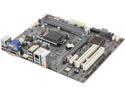
ECS B85H3-M3 (V1.0) LGA 1150 Intel B85 HDMI USB 3.0 Micro ATX Intel Motherboard
Pros: Inexpensive - though now I see it on sale for $14 less than I paid! Boo. It seems sturdy and well made and has a lot of features for a "value" board. Three video outputs - VGA, DVI and HDMI. USB 3.0, lots of connectors and even has a standard PCI slot. Has four memory slots, not common on Micro ATX boards. It looks like it might support overclocking but I'm not interested.
Cons: I'm not sure how big a con this is. But on my board I cannot enable "IGD Multi-Monitor" in BIOS. My BIOS screen looks just like what it shows in the book. But I don't have the choices it says I will have under "Initiate Graphic Adapter" AND "IDG Multi-Monitor" is stuck on Disabled. I cannot change it to Enabled as shown in the owners manual. I'm not sure how big a deal this is - Windows still detects both monitors (I have one hooked up VGA and the other DVI) and I can still expand my desktop across both monitors. But I think it might still be something detrimental because if Aero is enabled the second monitor will not fill the screen. If I use a basic windows theme (which fortunately I prefer. Aero is a gimmick and nothing useful) then it works just fine. I'm actually dropping one egg as much for all the garbage loaded on the driver CD as I am over the video issue that I'm not sure is a video issue. I don't think I've ever encountered a motherboard driver CD that tried to install a bunch of games, trial ware and just junk. When I realized what was going on I terminated the program and installed manually.
Overall Review: I've tried looking for an updated BIOS but ECS's website is slow and I can't find downloads. So instead I submitted a support ticket, which took forever on ECS's slow, hard to fill out support screen.
2/28/2014See more detail
Attractive, inexpensive case
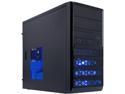
Rosewill RANGER-M Dual-Fan Micro ATX Mini Tower Gaming Computer Case with Blue LED Lighting
Pros: As the title says. Attractive, Inexpensive. Two nice case fans installed. Caught mine with a $15 instant off offer. A recommended case on Tom's Hardware.
Cons: None really. It is lightweight. But sturdy enough. I don't know about everyone else, but my desktop computers stay in the same place for years.
Overall Review: Newegg shipped quickly and it arrived faster than I expected. Always a bit of concern with shipping computer cases, but mine arrived in perfect shape.
2/21/2014See more detail
Good for the price
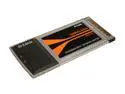
D-Link WNA-2330 RangeBooster G Notebook Adapter
Pros: Good price, under twenty bucks and shipped free. Card itself works fine - as well as more expensive cards. Newegg got it here fast.
Cons: Do not ignore what others are saying. The software shipped with the card sucks and the card loses an egg because of that. DLink is shipping drivers from 2005 and the website has updated drivers from June 2007. Throw the CD that comes with it in the trash. Download the latest drivers off of DLink's website. Do not run set up. Unzip the drivers, then insert the card. Steer the installation to the appropriated folder for your operatiing system. A minute later you will be up and running.
Overall Review: I initially ignored other's advice and installed off the CD. It would drop the wireless connection and reconnect every few minutes. After installing the way described above my six year old eMachine laptop connects to the wireless router & internet great.
12/23/2010See more detail