

Your Browsing History


Cameron C.
Joined on 07/27/16
0
0

product reviews
- 8
Fantastic little chip
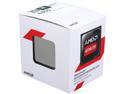
AMD Athlon 5350 - Athlon Kabini Quad-Core 2.05 GHz Socket AM1 25W AMD Radeon R3 Desktop Processor - AD5350JAHMBOX
Pros: -Very Cheap -Very cool -Cooler is very quiet -Extremely low power draw -Easy overclocking even on the stock cooler -Performs well enough on its own to handle most stuff 720p
Cons: -The cooler is bad with long term temps, over about 9 hours i watched the idle 20c temps change to idle 30c when everything else was still cool, while all coolers do this, usually the chance is only a few degrees -The cooler is extremely difficult to install -The AM1 platform is mainly two hole cooler mounts on motherboards, making other coolers hard to install, boards like ECS's Kam1-I have 4 holes however, and support other coolers -Woefully underperforming in 1080p -Has issues sometimes with higher resolution video, 1080p50fps is ok, but 60fps can be choppy
Overall Review: This is a great little processor for the budget oriented or simple task build. I bought this for my sisters computer, the build was this Athlon, a 750ti, on an ecs kam1-i board. Also included was a 450w apvexia psu, 16gb of ddr (just spare sticks i had) in a cooler master elite 110. Its not much, the total build was less than 200$. But its more than enough to handle what she wanted to play, namely Minecraft, Runescape 3, Fallout 4 and a bunch of older games like OSRS, Empire Earth and Halo 2. The APU alone can handle all of those. At 720, not fantastic settings, and definitely not 60fps. But still very playable. With the 750ti in there it smashed through these games at maxed out 720, and even some low 1080p. It lived up to my expectations and then surpassed them by a mile. Not once would i think that a budget apu, and budget gpu would get me great performance like this. She currently has minecraft maxed out with shaders an ten million something mods and its still going great at 50-60fps in 720p, or 30-35fps in 1080p. I couldnt be happier, she couldnt be happier. Granted, thats with a 750ti. The testing i did with the apu on its own was about what i expected too, but not much more. Youre looking at low medium graphics in 720p for most light games like LoL or Dota 2 in order to get above 60fps. Games like CSGO can do low 60fps, medium around 40, high to very high is going to be sub 30fps and not playable. On its own the APU did what you could consider medium settings in minecraft in 720p. Medium levels of things like smooth lighting and particle effects, a render distance of 10 chunks, easily getting 50-60fps. Due note, that with any APU, you will greatly benefit from higher memory speed ram. This is one of the few instances where the difference between DDR3 ram speeds actually makes a difference, and i even tested that just to make sure what others said online is correct. With 8gb of HyperX Blue at 1333mhz, i got 30fps in maxed out 720p minecraft. With 8gb of Corsair Vengance LP 1866mhz ram, i got 38fps at the same settings. Because its an APU, its using your ram as video memeory, and faster video memory improves framerates drastically. So if youre getting this and new ram, shell out the few dollars extra to get the highest speed your motherboard supports, you will notice a performance increase. For the tl;dr version: Its a great APU for the price, on its own it handles plenty of common games at playable settings, and paired with an equally cheap budget GPU, you can get a great little quadcore system that handles 720p and some 1080p on the cheap. I will be using this APU again in the future.
12/9/2016See more detail
Rattles.
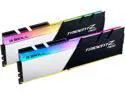
G.SKILL Trident Z Neo (For AMD Ryzen) Series 32GB (2 x 16GB) 288-Pin RGB DDR4 SDRAM DDR4 3200 (PC4 25600) Desktop Memory Model F4-3200C16D-32GTZN
Pros: -its ram -it works -it looks nice -functional maracas
Cons: -it rattles -are you actually kidding me -these feel like they were put together with scotch tape -"the rgb ram we have at home" -cant get over the fact that it rattles
Overall Review: Ive been wanting a kit of this for a long time and ive never been more disappointed in my life. I have a secondary system running and figured hey why not, lets get that kit of neat looking ram ive wanted for a bit, ill throw the extra $30 at it just for fun. Instant regret as soon as i pulled them out of the package. The cheapest aliexpress no name RGB dimms feel better than this.
1/11/2025See more detail
A good replacement for my aging PSU
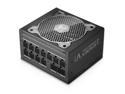
Super Flower Leadex V Platinum PRO 850W ATX 80 PLUS PLATINUM Certified Power Supply, Smallest 130mm 850W ATX PSU, 10 Years Warranty, Patent Super Connectors, Full Modular, SF-850F14TP
Pros: -Very compact for its size -universal connectors are a great idea for cable positioning -reasonable stock cables -very premium feel -physical eco mode switch is nice to have -extremely quiet
Cons: -while universal connectors are cool, theres very few sleeved cable options out there for this standard -stock cables are almost excessively long for a compact build, where i presume most of these compact PSU's are going
Overall Review: I got this to replace my decade old Corsair HX850i which started to give me trouble with higher wattage video cards. I briefly had a 4070ti super in this system and sometimes it would hard shut off at boot. I switch GPU's in this system frequently and i need something more reliable than that. I opted to not go with another HX850i as while it was a good PSU, i expect more than a decade out of a good power supply. So im trying superflower. We'll see how it holds up long term, maybe in 10 years itll suffer the same age related fate, or maybe itll go for 10 more. I have 20 year old units in my collection which still work exactly as if they were new, which is why im displeased with the corsair. This as well i wanted a compact one as im using an asus AP201 for a case with a 360mm aio, hoses oriented towards the front of the chassis. This requires the PSU mounting bracket to be in its lowest position and with a longer PSU this puts some strain on the connectors on the PSU side of things. Having this shorter unit completely mitigates that issue and makes cable management easier as a side benefit. Im torn on the universal cable connector thing, its a good idea if everyone used it, but not everyone uses that standard. If you havent seen that part of these superflower units, all of the cables except the 24 pin use the same connector on the PSU. You can plug any of the cables in anywhere on it the unit. I can see this making some cable management aspects easier for certain builds by being able to use whatever position on the back of the unit for whatever cables. But it seems kind of moot otherwise if nobody else is using this standard. Ultra back in the mid 2000's was using male to male cables, ie a 24 pin was the same pinout in both ends, EPS was the same pinout on both ends, etc. That made a lot of sense and proprietary cables kinda ruined that for us. Superflower i think has found a reasonable middle ground that resolves the issue of proprietary cables by using one connector type, but it doesnt mean anything if nobody else is using it.
1/6/2025See more detail
It works
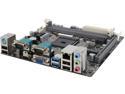
ECS KAM1-I (V1.0) AM1 USB 3.0 HDMI Mini ITX AMD Motherboard
Pros: -Cheap -Loads of ports -bios is very nice and friendly, easy overclocking oddly enough
Cons: -for most people, youre not going to need half the stuff on here -no 4 pin cpu power connector
Overall Review: it works, not much else to say, ive used these so far for two vastly different builds one was my sisters minecraft machine, it does that very well, the athlon 5350 in it doesnt require a 4 pin cpu power connector, i dont think any of the am1 cpu's need them, but to be honest it wouldnt hurt to have, overclocking can draw more power than the atx connector can supply if you have a graphics card of 75w installed aswell. This also depends on your power supply, but like it said, most people wont need that anyway the other was a quality control machine my boss wanted where i work, dual serial ports was a must, this fit the bill and saved around 1300$ compared to buying a hub that could support more gages, instead we just used two of the smaller hubs we already had because this motherboard has dual serial ports.
12/9/2016See more detail
Great for some specific builds
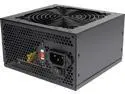
APEVIA ATX-VS450W 450 W ATX12V Power Supply
Pros: -Cheap -Cool and quiet -looks nice -can output advertised power draw
Cons: -limited amounts of cables -not very efficient
Overall Review: So the reason i bought this, there were three distinct reasons: 1) Its cheap as cheap gets for 450w 2) Its black, which was needed in an "open" mini itx case which was also black and needed to look nice 3) Limited amounts of cables. I know, that last one was my con. Because its normally a con for everyone else. But in my case it was perfect. Im using it in a little AM1 build with a 750ti. So in this build, im using a grand total of 3 of the connectors. The 24pin atx of course, a single sata power, and a single molex power. Everything else was neatly tucked away. If i had used another power supply that had say, 6 molex, 6 sata, two pci 6+8, an 8 pin cpu power, 20+4 pin atx, fdd, etc etc etc, i would have a tiny case thats 99% tied up cables. It was just not needed, and thats why i wanted this psu. Anyone whos buying a budget 450w power supply like this is likely going to be using it in a small build, light hardware, budget oriented stuff. Like my athlon that doesnt even need a cpu power connector, and a pci only 750ti. So you have the mobo power, cpu power if you need it, enough sata power connectors for your average build of say, one boot ssd and one storage hdd, and the molex for fans, or molex to pci if you have a card that draws less than 150w but needs a 6 pin. Its nice, its clean, i would highly recommend it just for that factor. Its a PSU that fits the needs of someone who doesnt want loads of cables.
12/9/2016See more detail
Fantasic card, even at high power consumption
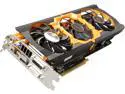
SAPPHIRE TRI-X Radeon R9 280X 3GB GDDR5 PCI Express 3.0 CrossFireX Support Graphics Card 11221-08-CPO
Pros: Its plain and simple a powerful card, nothing too crazy, but the 280x will definitely get the job done for almost anything in 1080p. That mere 3gb of GDDR5 goes pretty far. Im getting stable 50-60fps in 1080p High/Very High settings in GTA V with Soft shadows, 16x Anisotropic Filtering, 4x reflections MSAA, 16x AA, etc, etc, etc High settings, beautiful looking game. On a pentium G3260. Which bottlenecks the hell out of this card, but this tiny little dual core can be propped up by this amazing graphics card, to still give a wonderful playing experience. The game looks like an angel came down and polished it a little bit. It makes the console version look like Super Mario 64. But onto some other things with this card as far as pros go. It has an outright sexy looking cooler, the Toxic 3 fan design is one of the more aesthetically pleasing coolers that sapphire ever made. And the little green Sapphire logo that lights up makes it even better. Its also fairly quiet, i cant hear it in my extremely thin walled Zalman ZM-T1. And finally, its actually kind of cool. Reaches maybe 60c under full load, granted, i have alot of fans and i keep my room in the 60 degrees Fahrenheit sort of range, but thats still pretty good for a 300w card.
Cons: On the other side, some negatives. This cooler is straight up huge, and while it looks great, it just barely fits in my Zalman ZM-T1, it took some serious wedging to get it in there and even then its touching both sides of the case. I cant actually use two of my hard drive slots because of how long the card is, covering the vertical mounts. If you have a smaller case, do not use a card with a cooler thats a foot long, that should be well known but this is an extremely large card, that doeskin really look like it would be that big. Plenty of 3 fan designs are still below 300mm, but this card is a bit over 305mm in total length. Secondly, the power consumption. This card can draw 300 watts of power. If your PSU doesn't have dual 8 pins and is 600w or higher, do not use this card, or upgrade your PSU. Im using a Thermaltake TR-2 600w power supply. It has a single 8 pin, and one 6 pin. So i have to use a dual molex to 8 pin adapter. Which is fairly ok in my instance, thats still 240w with my particular molex cables, and im rarely maxing out this card anyway, and 75w is taken by the PCI slot as is. So im at that 300w needed, but just barely. The rest of my system still gives me around 100w to spare, even with a planned upgrade to an i5 4460s. I definitely recommend you not only buy a high wattage power supply, but a high quality power supply. When a single component is eating this much power, you want something that can handle that much wattage on just the GPU cables alone.
Overall Review: All in all, fantastic card. Did i forget to mention the price? Refurbed they are cheap as can be, i got mine while it was on sale, plus a promo code and got it for around 127$. It came with molex to 8 pin cables, the drivers disk, and a case badge. It was nicely packaged in foam and even had the original plastic cling still on the cooler. Not sure what was wrong with it, but it hasnt given me any problems, maybe the previous owner just got bored?
10/22/2016See more detail