

Your Browsing History


Kenyon L.
Joined on 12/10/08
0
0
product reviews
- 37
Excellent Chip

Intel Core i7-5820K - Core i7 4th Gen 6-Core 3.3 GHz LGA 2011-v3 140W Desktop Processor - BX80648I75820K
Pros: Great CPU. Was able to overclock it with complete stability at around 4.4GHz and 1.3V using the Asus X99 Deluxe board. Fantastic price for a 4.4GHz chip with 6 cores. 28 lanes are plenty for the average user. Just enough lanes for most gamers. A little less heat with 6 cores vs. the 8 cores of the 5960X. A whole heck of a lot cheaper per core than the other two options. The 5820K rings in at $63/per core vs $131/core for the 5960X and $97/core for the 5930K. Ignore the GHz rating. You will be able to very easily get another 800MHz or more out of this thing.
Cons: The money you save on the chip will be spent on the move to DDR4. DDR4 prices make this a questionable purchase at this time. If you have a bunch of DDR3 sitting around when you upgrade then I would strongly consider a 4000 series chip. In my case I was not replacing my existing rig so I was going to need new RAM. It made more since to me to go ahead and start the buildup of DDR4 rather than buy RAM that I would need to replace in a few years (even at these prices). The enthusiast will still be a slave to the silicon lottery.
Overall Review: Some clarity on lanes for the average buyer: Lanes refer to communication lanes to the card that is inserted in a slot. The average user will have a video card in a slot and that card will use 16 lanes. If you decide to add a second video card for SLI or crossfire, your second card will utilize 8 lanes. This is fine. You will see little to no speed degradation with this setup compared to using 2 cards at 16 lanes each (with a 5930K or 5960X). There are plenty of benchmarks available on the web that prove this statement. The same goes for 3 cards all running at 8 lanes. Where things get tricky is for the enthusiast who wants four video cards or for someone who wants to add other cards to their three or four GPU setup. I plan to run two GTX980s (SLI) and I plan to add M.2 storage. The GTX980s will take 16 and 8 lanes for a total of 24 lanes. The M.2 will take four lanes. I’m now at the CPU max of 28 lanes. That’s all I can add. So in my case I needed to make sure to get a board with the other options that I wanted such as high quality sound since I wouldn't be able to add a sound board. No problem. I went with the Asus x99 Deluxe. You cannot have four video cards with this chip. If you’re sinking that kind of bank into GPU’s then you shouldn’t be looking here anyway. Intel’s unwillingness to tighten their standards and/or to test their chip lots to a higher degree has left a lot to chance in the silicon lottery. They have chosen a very conservative frequency that they know all of their production runs can achieve. Therefore, overclocking is now a must if you want to get to the real value of your chip. Don’t run these at stock. Intel has made these chips affordable by leaving the testing to us. Easy OC 4.2GHz at 1.2V. Even a rookie can do this. Likely OC 4.3 at 1.2V-1.3V Good OCs 4.4-4.5 at 1.2-1.3V Very good: 4.6 at 1.3 to 1.35V I don’t like to go over 1.3V (unless I’m trying to show off). Never get the temp above 80C unless you really know what you’re doing.
12/10/2014See more detail
Old school
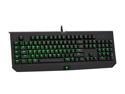
Razer BlackWidow Ultimate Mechanical MAC Gaming Keyboard– Cherry MX Blue (RZ03-00383100-R3M1)
Pros: Solid! Heavy.
Cons: Not a standard layout from today's keyboard standards (windows key, alt key and the like). This is an old school keyboard with old school tactile click. If you are looking for a more standard (today) tactile click this is not your keyboard. I found it to be terrible for gaming. Any side pressure on a key (such as when using ASDW for movement) will simply stick. It expects direct pressure.
Overall Review: This is a well built keyboard. Why aren't the Lycosa keyboards built this way?? Reminds me of the old IBM terminal keyboards. Cool but not right for me. My own fault.
7/17/2013See more detail
Died after a year
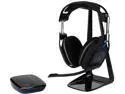
Astro Gaming A50 Circumaural Wireless Gaming Headset
Pros: Very comfortable. I even bought a second one after this one died.
Cons: This one died after a year. The second one also died after a year. I have given up on Astro. Sorry.
Overall Review: I would not purchase.
6/17/2018See more detail
Good
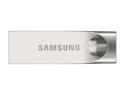
Samsung 128GB BAR (Metal) USB 3.0 Flash Drive, Speed Up to 150MB/s (MUF-128BA/AM)
Pros: .
Cons: .
Overall Review: Had to reformat to NTFS for my LG television to read it. Other than that, good to go.
4/20/2017See more detail
Not as pictured

Backlit Light 7 Color Bluetooth Keyboard Case for Apple iPad Air /Air 2th Gen Rechargeable Keyboard Portable Laptop Clamshell Clamcase Cover F8S(Gold)
Pros: Looks nice. Priced appropriately.
Cons: The Keyboard is just a loose item. It does not connect in any way to the case like an actual Clamcase branded case. A couple of the images in the pictures are not this item at all. I will be returning this item. I have already ordered a Clamcase branded case.
12/28/2016See more detail
Excellent

Mpow@ Swift Bluetooth 4.0 Wireless Stereo Sweatproof Sport Headphones Earbuds Earphone with AptX,Mic Hands-free Calling for iphone 6 6 Plus 5 5c 5s 4s ipad Samsung Galaxy and Other Android Cell Phones
Pros: Great product. Works very well with most Blue Tooth devices.
Cons: Does not work well with iPhone when iPhone is in pocket. It will lose signal regularly. And yet, it works great with my TV at great distance.
1/21/2016See more detail
seller reviews
- 1
PC Slug
They use UPS Mail Innovations instead of regular UPS. That's the slowest service in the world (all so they can pocket 16%). Don't plan on receiving anything this decade. I placed my order 10 days ago. 8 days ago the part was on a truck in Tennessee. 8 days later it is in central Florida and it still has to get to South Florida to reach me. This is going to take 2 weeks by the time I get to install this part (if it shows at all). C'mon guys. Change your name or forgo the 16% and use UPS. Just charge an additional 16%. We will pay a little more for reasonably fast service. Just ask AMZN. They are now charging sales tax because they wanted to deliver faster by putting distribution points all over the place. People still buy from them and they love the fast delivery. Did you not get the memo? Two weeks is simply not acceptable.
On-time
Delivery
Product
Accuracy
Customer Service
Satisfactory
12/11/2014See more detail