
Your Browsing History


Daniel K.
Joined on 08/20/06
0
0
product reviews
- 15
Great Design, Very Well Constructed, Solid PSU, Very Good Value (with Discounting)
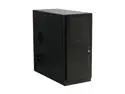
Antec NSK6580B Black 0.8mm cold-rolled steel ATX Mid Tower Computer Case 430 Watts 80 PLUS Power Supply
Pros: DESIGN. Well thought-out design (with a couple of minor exceptions), well constructed. Lots of features like on other Antec cases: mount points for 3 additional fans (2 in front, 1 on the side), vibration-dampening silicone grommets for the internal HDDs, removable internal 3-1/2" drive cage design which seems sturdy enough - remove two thumb screws, slide it out. POWER SUPPLY. 80-Plus Certified with Active PFC and a solid performer - may not be 'best of breed' but, I've used this same model before without a single problem or failure. MANUAL, PINOUTS, IMAGES, ETC. Newegg's description doesn't do justice to this case - visit the 'Manufacturer Product Page' link to see better descriptions. User's Manual (also available online) is very well written and, for those who may need it, clearly describes wiring pinouts for the front panel connectors.
Cons: *ONLY IF* you plan on filling up every drive bay and adding power hungry graphics cards, then the 430W PSU may not be enough. Otherwise, it's more than adequate for typical SOHO and (light?) gaming use - and you'll probably still have plenty of power to spare. FRONT FAN MOUNTS. A minor issue - these are designed for 92mm fans which, although not uncommon, are relatively limited in selection. (Still, they beat 80mm fans!) SIDE PANEL LATCHES. Another minor annoyance and not an issue if you'll rarely open up this case. Even fully loaded, the case is light enough that it moves around when you try to disengage the latches and swing open the side panel - you almost need a third hand to open it up.
Overall Review: UPPER-HALF 'BUDGET BUILD' CASE. I'd put this case in the upper-half of the 'budget build' category. One trait that concerns me is the entire plastic front panel - it seems soft enough to scratch easily. I would like to have seen an eSATA port on the front panel but, USB and FireWire are clearly the dominant (and better?) interfaces. HARD DRIVE CAGE TRAYS. Initially, I thought the removable HDD trays would be susceptible to noisy vibrations but this turned out to not to be the case - it's nice and quiet. FOUR EGGS. PRICE IS THE ONLY REASON I DON'T GIVE IT FIVE EGGS. With good discounting, this case and PSU package would be a Five Egg value!
11/21/2008See more detail
Good keyboard, okay mouse, horrible speakers
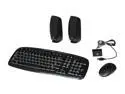
Logitech EX100 Black Cordless Desktop Keyboard, Optical Mouse & Speaker Kit
Pros: Keyboard is fine for light to moderate general purpose work [word processing, email, server terminal, etc.]. I wouldn't rely too much on it for heavy duty work [it doesn't seem like it was designed for heavy work anyway]. I haven't really tested the range--it works fine within a few feet of the XP Pro-based workstation that I use for testing and development. I'm satisfied with the keyboard.
Cons: *Mouse is only so-so for slightly intensive work [buttons and wheel feel cheap and mouse overall is too light for my preferences--I stashed it away as a backup]. *Speakers are *HORRIBLE*--right out of the box, the right-speaker kept cutting off and eventually died within a few hours. I gutted them for a few parts for other electronics projects.
Overall Review: *I got this at a substantial discount during a Newegg promo. If I had paid the regular price for this recertified package, I would have sent it back. *You may want to consider getting something else--very disappointed in this product regardless of price. For my purposes, the wireless keyboard is the only component that made it worth the promotional pricing.
10/18/2009See more detail
High Failure Rate--NOT WORTH THE RISK
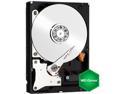
Western Digital WD Green WD20EZRX 2TB IntelliPower 64MB Cache SATA 6.0Gb/s 3.5" Internal Hard Drive Bare Drive
Pros: With such high failure rates, there is not a single pro. Even when used as intended, these drives are NOT WORTH THE HIGH RISK OF FAILURE.
Cons: High failure rate. NOT WORTH THE RISK. Only 2 year warranty and cost per GB.
Overall Review: NOT INTENDED FOR RAID SOLUTIONS! If RAID application is your goal, you should be looking at other WD lines such as RED, not GREEN. Straight from the data product sheet for these HDDs: "WD Green hard drives are tested and recommended for primary use in desktop and All-in-One PCs, as secondary storage for archiving, in external cases or as reliable backup storage. Desktop drives are not recommended for use in RAID environments. Please use WD Red™ storage for NAS or RAID applications."
9/29/2014See more detail
Good Performer; Better than smartphone-based GPS services
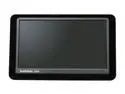
GARMIN 5.0" GPS Navigation with Life Traffic and Bluetooth
Pros: Large screen. Accurate to within 12 feet in Northeastern US (depending on satellite reception, etc.). Good device--never had a significant problem with it. Response times are much better than Android-based smartphone GPS services; accuracy is about the same. Very satisfied with this dedicated, stand-alone GPS device.
Cons: Resolution is not great despite large screen. Touchscreen sometimes responds in unexpected and undesirable ways which can get frustrating on the road. Cord is bulky (due to integrated traffic antenna); I rarely use the traffic data. Battery life is not that good when using this as a portable device (walking, biking, etc.).
Overall Review: This 1400-series device uses NAVTEQ traffic data as explained on the manufacturer's product web page; it does NOT (and never did) use the now-defunct MSN Direct traffic service.
8/2/2011See more detail
L2 cache . . .
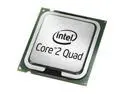
Intel Core 2 Quad Q9505 - Core 2 Quad Yorkfield Quad-Core 2.83 GHz LGA 775 95W Desktop Processor - BX80580Q9505
Pros: As of today's date (October 17, 2009), the specs listed on Newegg's site are the same as those listed on the Intel site. See "Other Thoughts" below.
Cons: A bit pricey when compared to other processors such as the Q9550 (which has 12MB of L2 cache). Other than the L2 cache, I can't see the differences between this CPU (6MB) and the Q9550 (12MB). Unless it's an application-specific issue (for example, a BIOS limitation, etc.), I don't see any reason to get this processor rather than another one such as the Q9550.
Overall Review: Perhaps there was a glitch when the previous review was made a week ago. This is NOT a 65W processor, it is NOT a Q9505s, and it does NOT have a bus/core "multiplier" of 11. This is a Q9505, 95W processor, and it has a bus/core ratio of 8.5 . . . Using the "Processor Finder" on Intel's web site and entering the model number "BX80580Q9505" gives only one result (as of today) with an "sSpec# of "SLGYY". That page gives exactly the same specs as what Newegg has listed for this processor. As best as I can tell, Intel does not currently offer a retail version of the Q9505s processor - only an OEM version (it's sSpec is "SLGYZ").
10/17/2009See more detail
Great PSU - Check your power requirements
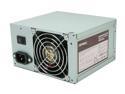
Antec earthwatts EA500 500W Continuous Power ATX12V v2.2 80 PLUS Certified Active PFC "Compatible with Core i7/Core i5" Power Supply
Pros: Dependable, stable, and a 3-year warranty (parts & labor). Been using Antec PSUs for several years without a problem. Installed in several systems: Various Intel motherboards with various Intel Core2 Duo and Core2 Quad processors.
Cons: Never had any complaints about this or any other Antec PSU.
Overall Review: Luke9583: The Supermicro C7X58 motherboard manual is clear about what it needs for power requirements. The Antec EA500 PSU meets those requirements and more. However, the requirements for your particular systems logically depend on your particular build (CPU, etc.). You may need to attach BOTH the 4-pin (to JPW3) and 8-pin (to JPW2) connectors. Also double check the power requirements for your peripherals to ensure you aren't overloading either of the +12V rails, or ANY of the rails for that matter. While it's certainly possible you received a bad batch of 6 PSUs, I can't imagine NOT doing a 1-system test setup before investing such time, money, and effort in 6 systems and then not holding Antec's feet to the fire - if the PSUs are indeed faulty. Antec has always been timely and responsive to customers. Or, maybe your motherboards are at fault - Supermicro is also very responsive.
9/18/2009See more detail